When a location deserves its own page
A location page is a website URL whose primary job is to help a customer understand one real place the business occupies or one coverage area it truly serves. It is not a generic service article with a city name swapped in.
Typical examples: a clinic branch page with that clinic’s address and parking notes; a restaurant location with that dining room’s hours; a coverage page that explains which suburbs a plumber will actually attend. The page answers “can this business help me here?” with facts, not with a keyword template.
A location deserves its own page when two conditions are both true. The presence is real. The page can add information that is not already on another URL. Real presence means a staffed premises, a genuine branch, or a service area the business will honour. Unique information means local services, hours, access, team, photos, policies, or coverage boundaries that differ from other pages. If a second branch has different parking, a different phone, or a different practitioner list, those facts need a home. A shared template is fine. Identical paragraphs are not.
Multi-location brands should treat this as information architecture, not content production. See also Local SEO for multi-location businesses.
If yes
Can the page add unique, true information? Address or coverage, hours, local services, photos, team, access, or policies that differ from other pages.If unique information exists
Create a location page One URL, one job, facts that match the real location.If the page would only swap a city name
Do not create the page Identical templates with a different place name are doorway pages, not local content.If there is no real presence
Do not invent a location Virtual offices and fake addresses should not become indexed city pages.If it is a service area, not a branch
Explain coverage on a useful page A service page or one honest coverage page can be enough. A suburb URL is optional, not automatic.When not to create another city page
You should not create a location page when the URL would pretend a presence that does not exist, or when it cannot say anything useful that another page does not already say. Most businesses should not create a page for every suburb, barangay, ZIP Code or postcode district they drive through.
- No actual presence: the business does not work there and will not travel there.
- No meaningful service difference: the copy would only change the place name.
- Identical city-swapped content: a template with “Melbourne” replaced by “Geelong” and nothing else true.
- Fake addresses: a pin created to rank in another city.
- Virtual offices presented deceptively as a shopfront the customer can visit.
- Property inventory: a house for sale or rent is not a business location page. See sales and leasing office eligibility.
Weak Google Maps visibility in a suburb is not, by itself, a reason to publish a page. Measurement belongs in service-area rank tracking; the page decision stays here and in how to rank in multiple suburbs without spammy location pages. Suburb queries often share intent with a parent city or with a service query that already has local results. Creating dozens of near-identical URLs splits internal links, duplicates content, and invites doorway classification. Create a suburb page only when that suburb has a distinct operating story: a real depot, a different team, different access issues, or a coverage promise you will keep that other pages do not already explain.
Doorway pages are URLs created to funnel searchers for similar queries to the same destination, usually with interchangeable copy. In Local SEO they typically look like “Service in [city]” repeated across a country. Common mistakes include generating a location sitemap from a spreadsheet of nearby towns; using the same three paragraphs and a stock skyline photo; pointing every city URL at one phone number while claiming a local office; hiding the thinness behind FAQ blocks that repeat the city name; and publishing the pages, then asking an SEO tool why they do not rank.
Google’s spam policies address scaled content that is unhelpful. Local doorway pages are a common form of that problem. They also waste crawl budget and compete with your real URLs. City pages for places you never visit are diagnosed separately: what happens when local pages target unserved areas. If a previous vendor already published a thin city set, use whether you should delete thin or duplicate city pages rather than this creation guide. If those pages were generated at scale with AI, see whether AI-generated location pages can hurt Local SEO. Keyword mapping belongs on the local keyword mapping guide. Do not build suburb URLs merely because a tool listed “plumber + suburb” variants.
Place-name conventions change by country. The decision rule does not. Australia often searches by suburb. The United Kingdom uses towns, boroughs and postcode districts. The United States uses city, neighbourhood and ZIP Code. The Philippines uses cities, barangays and sometimes building names. A page is still justified only when the business has a real presence or a coverage story unique to that place. Do not copy a US ZIP-Code template onto a Philippine city, or a UK “high street” paragraph onto an Australian suburb, just to look local.
Does each branch need its own URL?
For several genuine branches with different addresses, hours, services or booking paths, a stable page for each
branch usually gives customers a clearer destination than one general homepage. A path such as
/locations/branch-name/ can provide that identity on the existing domain. It does not require a
separate website.
A single-location business may be represented well by its homepage. A service-area business should explain where it genuinely works without implying that every suburb has a staffed office. Create additional coverage pages only when they answer a distinct customer need with useful, accurate information.
Once a branch page is complete, connect it from the store locator and relevant services, and check that the Business Profile points to a representative destination. A particular URL pattern is an architecture choice, not a guaranteed ranking advantage.
Uniqueness is identity: each genuine location has a stable https address whose job is that place, so hours, parking and booking are not mixed with another shop. Google asks for a website that represents the individual business location. It does not publish a ranking bonus for a particular path pattern. Action links for multi-location businesses must lead to a specific location, not a general landing page. Sources: Guidelines for representing your business on Google and Business links policies and guidelines. Several shops can physically share the homepage. It is a poor representative URL when shops differ in address, hours or services. One homepage is still reasonable for a single-location business.
Place
Is this a staffed shop or true coverage base? No premises and no honest coverage job means no extra URL.Path
Is there a stable https URL for it? A path on the main domain is enough. A new hostname is optional and often costly.Profile
Can Business Profile use that URL? Google asks for a site that represents the individual location.Yes
Publish one representative URL Point Maps, the locator and internal links at it.Next
Do not mint a URL per suburb Unserved-area and doorway patterns are a different cleanup.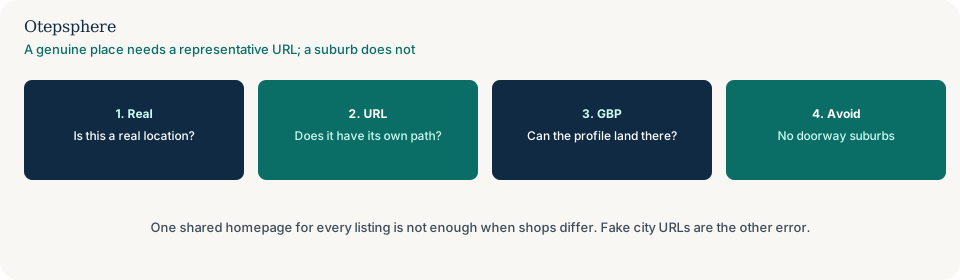
A path on the main domain or a separate website?
A path on the main domain is usually enough and is easier to govern. Extra hostnames that cover the same brand and town can split Search Console impressions: why local microsites compete with the main company website. Franchisee-owned sites are a different ownership problem: what to do when franchisees create their own local websites.
Prefer /locations/branch-name/ on the existing domain unless there is a real operational reason for
a separate host. Do not treat more hosts as more rankings. Do not mint a URL for every postcode you drive
through, and do not leave Maps pointing at a homepage once a true location URL exists.
What a useful location page contains
A genuine location page should contain the facts that help a customer choose and arrive — and only those facts that actually exist. There is no useful word-count target. A branch with a full address, distinct hours, parking, three original photos and a short service list can be a strong page at a few hundred words. A coverage page that honestly lists travel limits and response expectations can be enough without a 2,000-word history of the suburb. Padding with Wikipedia geography does not make the presence more real.
- Location-specific services, including what this branch does not offer
- Address, for premises customers visit
- Hours, including variations that differ from other branches
- Parking, transport and access notes where they are real
- Local staff or practitioners, named only if they work there and consent to being listed
- Service boundaries for mobile work attached to this base
- Photos of this premises, team or work — not stock interiors labelled as “our clinic”
- Nearby landmarks only when they help wayfinding
- Local FAQs that this location actually receives
- Testimonials only when they are genuine and, where required, permitted
- Driving or directions information that matches the real entrance
- Unique policies: after-hours, wheelchair access, languages, payment methods
If a field is empty in real life, leave it off the page. Empty heading-and-lorem sections are a signal that the URL was created for a city keyword, not for a customer. If you cannot assemble unique facts, do not publish the URL. Put the coverage note on a service page instead. A published URL that still could be any city is why a location page lacks local proof. If the page lists services this shop cannot honour, use why customers enquire about services that are not available at their location.
Physical branches and service-area coverage
A physical location page describes a premises. It should include the address customers use, how to get there, and what happens on site. Google Business Profile for that location should point at this page when it is the best landing page.
A service-area page describes coverage. It should say where the team travels, what is excluded, and how booking works. It should not invent a shopfront. Many service-area businesses need strong service pages plus one honest coverage explanation more than they need a URL per suburb. Connect this to service-area business SEO and Google Business Profile for service-area businesses.
Hybrid businesses exist: a garage that also offers roadside assistance. Those organisations can have a storefront page and a clearly described mobile service, without cloning a page for every motorway they drive.
Connect the page to the locator and Business Profile
Once a branch page is complete, connect it from the store locator and relevant services, and check that the Business Profile points to a representative destination. Real branches still need crawlable HTML links from a locator or locations hub: why Google cannot crawl a store locator or location finder. Where the Business Profile should point, once the URL exists, is a separate destination check: whether every location should link its Google profile to the corporate homepage. Creating the URL does not automatically update Maps.
Location pages should link to the services that location actually offers, to a locations hub if one exists, and to the organisation’s contact or booking path. They should not mesh-link every city to every service when the relationship is untrue. A Manchester branch that does not offer 24-hour callouts should not link to an emergency service page as if it did. A coverage page should link to the services customers in that area can book. Supporting articles can link in when they answer a local operational question. Details are in internal linking for Local SEO and local on-page SEO. If several real branches appear to occupy each other’s queries, use why business locations can compete with each other in Google Search. If Search Console says Google chose a different canonical, use why Google chose a different canonical for a location page. If a location URL is indexed but still has no local visibility, use why a location page can be indexed but not ranking before publishing more city templates.
Supporting local questions can live in local content strategy rather than as fake city homes. If templates show the wrong hours, fix data binding before you add more paths.
Location-page decision checklist
- Confirm a real staffed premises, a genuine branch, or coverage the business will honour.
- Confirm the page can add facts that are not already on another URL.
- Give each genuine branch one representative https URL. Prefer a path on the main domain.
- A single-location business may keep the homepage as that representative URL.
- Do not publish a suburb page for places you only drive through.
- Do not launch a new hostname per shop as a default, or treat a slug pattern as a ranking factor.
- Include address, hours, access, services this branch actually offers, and original local proof.
- Leave empty fields off the page. Do not pad with geography copy.
- Link the page from the locator and relevant services. Point the Business Profile at it when accurate.
- Do not keep a closed location as a live marketing page — redirect, explain, or remove.
- Do not mint extra URLs for synonyms or nearby towns you do not occupy.
| Scenario | Create a page / own URL? | Reason |
|---|---|---|
| Genuine branch with its own address and hours | Yes — one path per shop | Customers need branch-specific facts; the profile needs a landing page |
| Two real shops, one homepage for both listings | Split to one path each | A shared homepage is a poor representative URL; Google does not require a new domain |
| Service area the business actually covers, with unique access or response notes | Sometimes | One honest coverage page can be enough; extra suburb URLs need extra facts |
| No premises; you only drive through the suburb | No | Explain coverage on a service URL. A unique URL will not create Maps visibility there |
| Identical city-targeted page with only the place name changed | No | Doorway content; no unique value |
| Virtual office or mailbox presented as a storefront | No | Misrepresents presence; conflicts with Google’s profile guidelines |
| Unique regional service offered only in that market | Yes, if the offer is real | The page has a distinct job beyond geography |
| Different branch team, hours or facilities | Yes | Those differences are the unique content |
| Location URL exists; Maps still uses the homepage | Keep the page; update the destination | Creating the URL does not automatically update Maps |
| Plan to launch city1.brand.com for every town | Prefer main-domain paths | Hostname sprawl splits impressions unless there is a real operational reason |
| Closed location | Not as a live marketing page | Redirect, useful closure message, or removal — do not keep selling a closed branch |
Sources and further reading
- Google Business Profile Help: Guidelines for representing your business on Google
- Google Business Profile Help: Business links policies and guidelines
- Google Search Central: Spam policies
- Google Search Central: Creating helpful, reliable, people-first content
Need a location-page policy that forbids doorway URLs?
Otepsphere can map which places deserve pages and a representative URL, which should stay as coverage notes, and how those URLs should connect to services — without doorway suburb pages or a ranking promise.
View Local SEO servicesPublished by Otepsphere
Published by Otepsphere, founded by Joseph Enmanuel. Learn about Otepsphere and its approach to local SEO.