What does this problem actually mean?
It means Google may load the locator page without being able to discover the individual location URLs customers need, because those URLs are not present as crawlable links in the HTML Google can parse.
A store locator can still be useful for people. Crawlability is a separate job: can Googlebot find and fetch a URL for each real branch? A locator Google can crawl can still list a shop that shut last month; that is stale location data: why a store locator shows closed, missing or outdated locations. Decision rules for when those pages should exist are in when to create location pages.
Test 1
Are locations HTML links? Google can generally extract links from anchor elements with an href, not from click-only map pins.Test 2
Does each location have a URL? A finder that never opens a unique location page gives crawlers nothing to store per branch.Fail
Hash routes or JS-only pins Fragment URLs and onclick-only markers are poor discovery paths.Test 3
Rendered HTML still has the links? If the map API or script is blocked, the locator can look empty to Googlebot.Outcome
List + linked location pages A crawlable list of locations plus a page per real branch is the reliable pattern.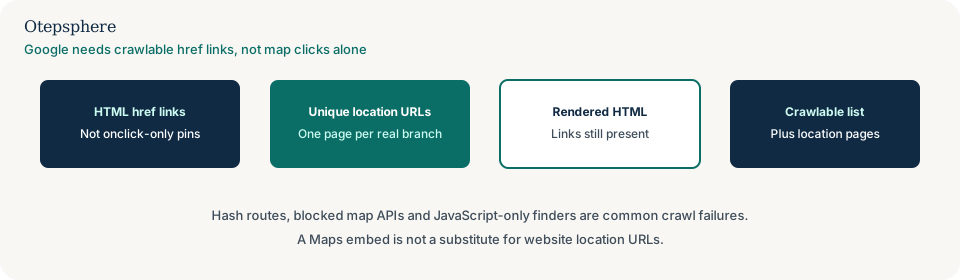
Why can a locator be uncrawlable?
Most locators fail crawl tests when pins are drawn by JavaScript, when clicking a pin never changes the URL, or
when the only “pages” are fragment identifiers such as #/store/12.
Google processes JavaScript in crawl, render and index phases, but it still relies on crawlable href links to discover other URLs. Server-side or pre-rendered HTML remains the more reliable pattern. Source: Understand JavaScript SEO basics.
How do I confirm the cause?
Confirm it with rendered HTML and URL Inspection, not only with a working map in your own browser.
Inspect the locator URL. Open the rendered HTML. Search for location path patterns. If the live browser shows pins but the rendered HTML has no hrefs to location pages, Google is not being given a discovery path. Check server logs or Crawl Stats if you need evidence Googlebot requested the locator or its API.
Are locations exposed as HTML links?
Google can generally crawl a link if it is an anchor element with an href attribute. Click handlers, routerLink
attributes without href, and javascript: URLs are poor discovery methods.
A locator that lists “Open this branch” as a button with no href fails the test even if the map looks complete. Source: Link best practices for Google.
Is the finder JavaScript-only?
If the initial HTML is an empty shell and locations only appear after an API call, Google must render the page before it can see them — and it still needs links in that rendered HTML.
If the location API is slow, fails, or is blocked, the rendered result can be empty. Empty or error-like rendered pages can also be classified as soft 404s: why Google treats a local page as a soft 404.
Are locations hidden behind hash URLs?
Fragment identifiers are a weak way to represent location pages. Google cannot reliably treat hash routes as separate documents.
JavaScript SEO guidance recommends the History API and real paths such as /locations/cebu/ rather
than #/locations/cebu. Give each real branch a stable URL and link it from the locator and a text
list.
Is a map API or script blocked?
Blocking decorative images in robots.txt can be reasonable. Blocking the script or JSON that injects location names and links can leave Googlebot with a blank finder.
If you disallow a resource that is required to understand the page, Google may not analyse it well. Allow the location data endpoint if that is how links are built, or — better — print a crawlable HTML list without needing that endpoint. Source: Introduction to robots.txt.
Locator crawl diagnostic table
| What you observe | Likely cause | What to change | What not to change first |
|---|---|---|---|
| Pins work; no location hrefs in HTML | Click-only map UI | Add an HTML list of location URLs | Business Profile categories |
URLs look like #/store/… | Hash routing | Real paths plus History API or server routes | Adding more map markers |
| Rendered HTML empty; browser full | JS render or blocked API | Allow resources or pre-render the list | Rewriting location page copy |
| Only a Google Maps embed | No website location documents | Publish crawlable pages for real branches | Expecting the embed to create indexable URLs on your domain |
| Filter URLs for every pin coordinate | Parameter explosion | Canonicalise to location pages; see parameter duplicates | Indexing every lat/lng combination |
Parameter copies of a locator are a related but different problem: why filter and parameter URLs create duplicate local pages.
What should I not do?
Action checklist
- List every real location that should have a public website URL.
- Confirm each URL is linked with an href from the locator or a locations index.
- Inspect rendered HTML for those hrefs.
- Replace hash routes with stable paths where you control the application.
- Stop disallowing scripts or APIs required to render those links, or pre-render the list.
- Include canonical location URLs in the sitemap Google fetches.
When professional help makes sense
Help is useful when a franchise locator is a third-party widget, when hundreds of branches have no HTML URL, or when robots rules and JavaScript rendering disagree. Crawlability work does not guarantee Maps or organic rankings.
Sources and further reading
- Google Search Central: Link best practices
- Google Search Central: JavaScript SEO basics
- Google Search Central: Introduction to robots.txt
Store locator working for people but not exposing location URLs to Google?
Otepsphere can review whether each real branch has a crawlable URL, how the locator renders for Googlebot, and how those pages should connect to the rest of the site — without treating a map widget as a ranking system.
Contact OtepspherePublished by Otepsphere
Published by Otepsphere, founded by Joseph Enmanuel. Learn about Otepsphere and its approach to local SEO.