What does a missing location URL actually mean?
It means the sitemap Google is processing does not list that location URL as a suggested canonical page. The location page can still be indexed if Google finds it through links.
A sitemap is a hint. Google does not guarantee that it will download the sitemap, crawl the URLs, or index them. If the page is not indexed at all, start with why a local service page is not indexed. Source: Build and submit a sitemap.
Fetch
Which sitemap does Google use? robots.txt, Search Console and the CMS often disagree about the file that matters.Include
Are location URLs in that file? Custom post types, store-locator plugins and paginated hubs are commonly omitted.Mismatch
Listed URL ≠ live canonical HTTP, www, trailing slash or parameter copies waste the hint.Noise
noindex or non-canonical URLs listed Asking Google to crawl URLs you do not want in Search wastes crawl attention.Limit
A sitemap is a hint Inclusion does not guarantee crawl, index or ranking. Discovery still needs crawlable links.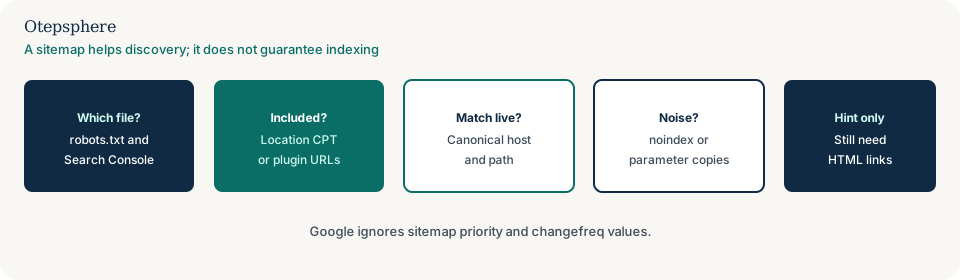
Why are location pages omitted?
CMS plugins often sitemap posts and products but skip a custom “Locations” type. Store-locator apps generate URLs the XML job never sees. Large sites split sitemaps and forget to include the locations file in the index.
Pagination, noindex leftovers and “exclude from sitemap” checkboxes on location templates are also common after a redesign. The migration checklist covers whether the sitemap was updated at launch: Local SEO after a website redesign.
How do I confirm which file Google uses?
Check robots.txt Sitemap lines, the Search Console Sitemaps report, and the CMS output. They frequently disagree.
A sitemap affects descendant URLs of its directory unless you submit it in Search Console. Host it at the site root when you can. Use absolute https URLs. Source: the same sitemap documentation.
Did the CMS skip the location type?
If locations are a custom post type, the sitemap plugin must be told to include them. If they only exist inside a JavaScript locator, there may be no URL for the sitemap to list — that is a crawl architecture issue: why Google cannot crawl a store locator.
Each real branch that deserves a page needs a stable URL before it can appear in XML.
Are listed URLs the live canonicals?
Listing HTTP, www, or parameter copies of a location page weakens the hint. Google generally shows canonical URLs in results; sitemaps should name the URLs you prefer.
Google uses lastmod if it is consistently and verifiably accurate. Google ignores priority and changefreq. Lastmod that is faked on every location page is not a ranking lever.
Is the sitemap asking Google to crawl the wrong URLs?
Including noindex pages, thank-you URLs, or faceted locator junk wastes crawl attention on URLs you do not want in Search.
Parameter copies belong out of the sitemap: why filter and parameter URLs create duplicate local pages. Canonical documentation treats sitemap inclusion as a weak signal compared with redirects and rel=canonical.
Sitemap gap diagnostic table
| Observation | Likely cause | Fix | Still not a promise of |
|---|---|---|---|
| Search Console never fetched your file | Wrong URL, robots block, or not submitted | Declare the live sitemap in robots.txt and Search Console | Immediate crawl of every location |
| File fetched; location slugs absent | CPT or plugin not included | Include the location type; regenerate | Rankings for those URLs |
| Listed URL 301s | Sitemap uses an old path | List the final canonical URL | Google ignoring your other signals |
| Locations in a child sitemap not in the index | Sitemap index incomplete | Add the locations sitemap to the index file | Indexing of thin templates |
| noindex locations listed | Sitemap job ignores robots meta | Exclude them; fix leftover noindex if they should be public | That Google will drop them today |
What should I not do?
Action checklist
- Identify the sitemap URL Search Console last fetched.
- Confirm each live location canonical appears as an absolute https URL.
- Include the location post type or generated location URLs in the generator.
- Remove noindex, parameter and redirecting URLs from the file.
- Keep a crawlable HTML locations hub; do not rely on XML alone.
- Resubmit once after a real change. Monitor processing errors, not rankings.
When professional help makes sense
Help is useful when several sitemap plugins conflict, when a franchise CMS omits hundreds of location URLs, or when Search Console reports sitemap errors that the team cannot map to a file. Fixing the sitemap cannot guarantee Google will index every location.
Sources and further reading
Live location pages still absent from the sitemap Google fetches?
Otepsphere can compare the CMS output with Search Console’s processed sitemap, match listed URLs to live canonical location pages, and keep XML in its proper place as a discovery hint — not a ranking control.
Contact OtepspherePublished by Otepsphere
Published by Otepsphere, founded by Joseph Enmanuel. Learn about Otepsphere and its approach to local SEO.