Should I create a new Google Business Profile after moving?
No. If the same business relocates, do not create a new Business Profile for the new location. Update the existing profile with the new address.
Google states that rule on the duplicate-help page. A second listing for the same business can be marked as a duplicate and stop showing. The Maps place, photos and reviews stay with the profile you already have. Source: Resolve duplicate profiles and ownership issues. A public-facing practitioner changing clinics follows the same “update, do not duplicate” idea, with extra contactability and review-transfer caveats: what happens to a practitioner profile when they leave a clinic.
A genuinely new branch is different: a second staffed location that continues alongside the first can have its own profile. Closing one shop and opening another for the same company is still a move of that location, not a chain rollout. If the change is a renovation or a short-term customer arrangement you expect to reverse, do not treat it as this permanent-move checklist. Use Local SEO during a temporary relocation or renovation instead. If Google still shows the old shop as closed after you have opened at the new address, use why Google may say the business is closed only for a mistaken closed label on a listing that should still represent the operating business.
How should the GBP address be changed?
Change the address in the existing profile’s Location settings, include suite or floor details, and adjust the map pin so it points at the new customer entrance.
Google’s address help says to edit Business location, enter the address, and use Adjust if the system cannot find it or if you need to set the pin. Include building, suite and floor numbers. Use landmarks only where the official street address does not accurately pinpoint the place. Source: Manage your business address.
If customers will not visit the new base, hide the address and set a true service area instead of pinning a shopfront that does not exist. Pin accuracy is covered in more detail in what to do if Google Maps shows the wrong location.
Profile
Edit the address and adjust the pin to the new entrance Google says a verified business that moves must verify again.Website
Update contact, location, footer, structured data and directions Customers and search systems should see the same new address.Listings
Correct high-impact sources, not junk directories Old location pages should be replaced, redirected or kept only if they still help.After the move
Monitor Maps visibility from the new catchment Rankings can change with distance. That is expected, not proof the move failed.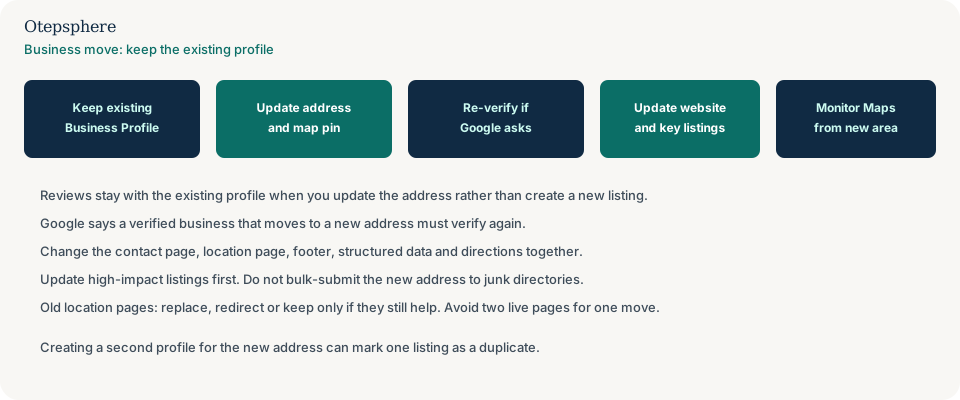
Will Google require verification again?
Google says that if you move your business to a new address after it is verified, you must verify the business again. That can happen. It is not something a consultant can waive.
Prepare the same location, operation and management evidence you would use for a first verification, this time at the new place. Use the method Google shows after the address edit. Verification failure diagnosis is in why Google Business Profile verification failed. Source: Edit your Business Profile.
What happens to existing reviews?
Existing reviews stay on the Business Profile you update. Moving the address is not the same as creating a new profile that starts at zero.
Google does not publish a guarantee that every review will remain visible through every address edit. If reviews later vanish, treat that as a missing-review diagnosis, especially after verification or a merge, not as proof that a move automatically wipes ratings. See why Google reviews disappear or stop showing. Customer sentences that still mention the old street are historic text you cannot edit: what to do when reviews mention an old business name or address.
How should the website be updated?
Update every public page that still publishes the old address so customers and search systems see the same new location as the Business Profile.
- Contact page: address, map embed, phone and hours.
- Location page: the page the Business Profile website button should open.
- Footer or header NAP, if the site shows an address there.
- Structured data: LocalBusiness or Organization postalAddress must match the visible address.
- Directions copy, parking notes and embedded maps.
- Local landing pages that still describe the old street as the place to visit.
If you are shutting this site and sending customers to another remaining branch, that is a closure, not a move: how to close one business location without creating Local SEO problems.
Google sources Business Profile information from the website as well as from owner edits. Leaving the old street on the contact page is a common reason the public listing appears “stuck.” Source: How Google sources and uses info in Business Profiles.
Which citations and listings should be updated?
Update high-impact listings that customers and major platforms actually use. Do not bulk-submit the new address to low-quality directories.
Practical order: the website and Google Business Profile, then Apple Business Connect if you use it, then social profiles, then the industry or government registers that already list you, then well-known local directories in your market. Ignore junk sites that create new duplicates. That is the same priority used in inconsistent business information online and in local citation management. If the old address returns on listings you already edited, that is why old business information keeps coming back after citation cleanup.
What happens to old location pages?
Old location pages should be replaced, redirected or kept only when they still help a customer. Do not leave two live pages that both claim to be the current shop.
- Replace: one location URL, updated copy, same purpose.
- Redirect: the old URL pointed at a street you have left and should send people to the new location page.
- Retain: a history page can mention the former address if it is clearly historical.
- Avoid: a new city URL that repeats the same template with only the suburb changed.
Doorway-style city pages are a separate problem and are covered in when to create location pages.
Should a business update everything on the same day?
Update the source-of-truth record, the website and the Business Profile in the same operational window so public facts do not disagree for weeks. That is an operations checklist, not a Google-published same-day rule.
Google says some profile edits show in about 10 minutes and others can take up to 30 days. You cannot force every directory to match on the hour. What you can do is stop publishing the old address on pages you control once the doors have moved. Source: Manage your business address.
A practical sequence:
- Confirm access to the existing Business Profile.
- Publish the new address on the website pages listed above.
- Edit the profile address and pin. Complete re-verification if Google asks.
- Update important third-party listings.
- Redirect or retire old location URLs.
- Watch the public listing and Search Console for the location page.
How should rankings be monitored after a move?
Monitor Maps visibility from points around the new address, not only from the old shop. Distance is a local ranking factor, so some queries can change because the business is now somewhere else.
A drop near the old street can be expected. A blank listing everywhere is a different problem: verification, duplicate or a pin that never updated. Use a consistent geo-grid method as described in how to track Google Maps rankings across your service area. Do not treat one phone screenshot on moving day as the new ranking.
Business Relocation Local SEO Checklist
- Keep the existing Business Profile. Do not create a second listing for the same business.
- Recover owner access before the move if a former staff member still controls the profile.
- Write one internal record for the new address, suite, phone and hours.
- Edit Location details and adjust the pin to the new entrance.
- Complete verification again if Google requires it after the address change.
- Update contact, location, footer, schema, maps and directions on the website.
- Point the Business Profile website button at the page that now states the new address.
- Update high-impact listings. Skip junk directory blasts.
- Replace, redirect or clearly archive old location pages. Avoid two current-address URLs.
- Monitor Maps from the new catchment and record the move date in your rank log.
When professional Local SEO assistance makes sense
Help is useful for multi-page websites, several directories that still show the old street, or a move that coincides with a rebrand or a lost-access problem. It cannot keep the old neighbourhood ranking after the business has left that neighbourhood.
Official Google sources
- Resolve duplicate profiles and ownership issues
- Manage your business address
- Edit your Business Profile
- Guidelines for representing your business on Google
- How Google sources and uses info in Business Profiles
Moving your business and worried about local visibility?
Otepsphere can review the move across your website, Google Business Profile, local listings and tracking so important business information remains aligned. Distance and Google’s review of the new address still affect what customers see.
Contact OtepspherePublished by Otepsphere
Published by Otepsphere, founded by Joseph Enmanuel. Learn about Otepsphere and its approach to local SEO.