Who owns the practitioner's profile?
The practitioner identity and the clinic identity are different entities. Access to the Google account is a separate fact from whose name the profile should display.
Google describes an individual practitioner as a public-facing professional, typically with their own customer base — doctors, dentists, lawyers, financial planners, and insurance or real estate agents. A practitioner profile should use the practitioner’s name, not the organisation name, when that person is one of several public-facing practitioners at a location. Source: Guidelines for representing your business on Google.
That is the setup question answered in whether several professionals at one location should have separate profiles. This page is the departure question: the person is leaving.
In practice, the clinic’s marketing manager, the practitioner’s personal Google account, or an agency may hold owner access. Whoever can be contacted at the stated location during stated hours is who the listing should still describe. If the practitioner can no longer be contacted there, the listing is already inaccurate.
Should the clinic mark the practitioner permanently closed?
Not as a default. First check whether the practitioner still sees patients somewhere else.
Permanently closed is for a business that has stopped. If the practitioner is moving, the accurate action is usually to update the existing profile rather than close it and start again. Google’s review-transfer help says not to create a new Business Profile because of a change in physical location or ownership. Source: Move your reviews across Business Profiles.
If the practitioner has retired, left clinical work, or can no longer be contacted as that professional, a closed status may be the honest representation. Do not close a still-practising doctor’s listing to keep the reviews at the old clinic.
What if the practitioner moves to a new clinic?
Update the existing practitioner profile with the new location information, then verify again if Google requires it.
Duplicate-profile help says that if a business relocates, you should not create a new Business Profile for the new location. Update the existing profile with the new address. Source: Resolve duplicate profiles and ownership issues.
After a verified address change, Google may require verification again. Treat hours, phone, website and appointment links as part of the same update. The wider move sequence for an ordinary business is in how to handle Local SEO when a business moves. A practitioner still has the extra contactability test: they must be contactable at the verified location during stated hours.
Should a completely new practitioner profile be created?
Usually no. Creating a second listing for the same person is how duplicates and split review histories start.
Create a new profile only when there is no existing practitioner listing to update, or when the old listing represented a different person or a clinic-only entity. If someone already created a new listing by mistake, stop creating more and work with the two that exist.
What happens to practitioner reviews?
Reviews may stay, move, or be removed depending on the change. Movement is not guaranteed.
Google currently says that if you move to a new address and keep the same business name, reviews transfer automatically, except for certain categories such as hotels, golf courses or scenic attractions. If you unintentionally created and verified a new profile after a location or ownership change, you can contact Google to request a transfer. Not all business changes qualify to move or remove reviews. Source: Move your reviews across Business Profiles.
Reviews that mention the old clinic or address can remain visible even after a correct move. That is a customer-history issue, not proof that the move failed. See what to do when reviews mention an old brand or address.
What if the clinic and practitioner dispute ownership?
Treat it as an access and authorisation dispute, not as a reason to publish a competing listing.
Only owners or authorised representatives may verify and manage a profile. If the clinic holds the only owner login and will not transfer it, follow how to recover lost Google Business Profile access rather than creating a second practitioner pin. Creating a rival listing usually produces a duplicate, not a clean handover.
What should happen to the old practitioner page on the clinic website?
Choose update, redirect, or a short explanatory page based on usefulness to patients.
- If the practitioner now works elsewhere and patients still search the old URL, a redirect or a clear “now practising at” note prevents dead booking paths.
- If the page is the clinic’s only record that the person used to work there, a short historical note can be more honest than a 404.
- If the page still offers appointments at the old clinic, it is inaccurate and should change immediately.
Do not keep ranking copy that implies the practitioner is still bookable at a location they have left.
Should appointment links be removed?
Yes, if they are no longer valid.
A Business Profile, website button or third-party widget that books the old clinic sends patients to the wrong place. Remove or replace those links on the same day as the address and hours update. Leaving a working “Book” button for a departed practitioner is a customer-information failure, not a Local SEO tactic.
Practitioner departure checklist
Moving to a new location
Update the existing profile Change address, hours, phone and website. Do not create a second practitioner listing.No new public location yet
Review status carefully Do not mark the profile permanently closed without checking whether the practitioner still sees patients.Website and booking
Remove invalid appointment links Update or redirect old clinic pages based on usefulness.Reviews
Not guaranteed to move Google documents when reviews may transfer. Do not promise movement.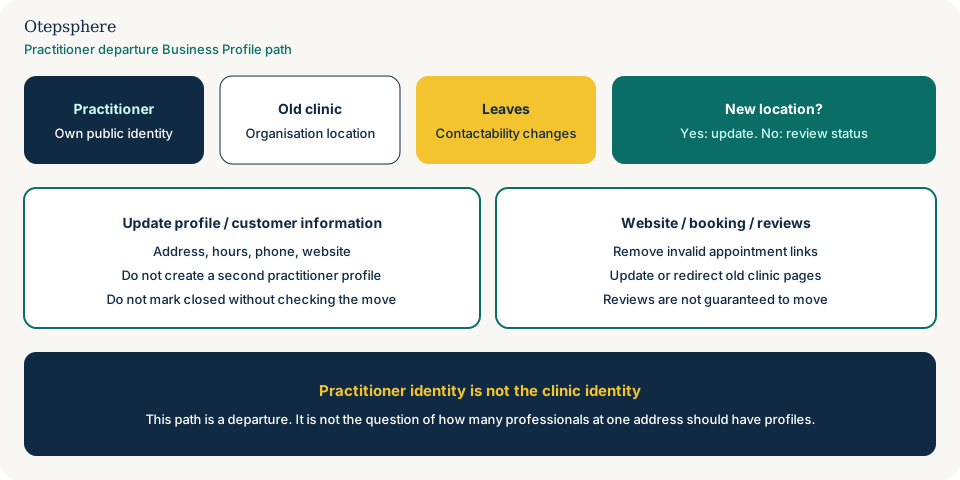
- Practitioner profile and clinic profile are identified separately.
- Owner access is documented before anyone is removed from the Google account.
- New location, if any, is written onto the existing practitioner profile.
- Invalid appointment links are removed from the profile and the website.
- Old clinic bio pages are updated, redirected or given an explanatory note.
- No second practitioner profile was created to “keep the reviews” at either site.
What not to assume
- That the clinic automatically owns the practitioner’s public identity on Google.
- That reviews will follow the practitioner in every category and every move.
- That permanently closed is the correct status for every departure.
- That a new clinic’s marketing team should create a fresh listing by default.
- That leftover reviews mentioning the old rooms prove the profile is still at the old clinic.
What not to do
- Do not create a second practitioner profile at the new address.
- Do not keep hours and a book button for a person who cannot be contacted there.
- Do not close a still-practising professional’s listing to hoard the review count.
- Do not rename the practitioner listing as the clinic, or the clinic listing as the practitioner.
- Do not treat this as the same job as deciding how many people at one site should have profiles.
Practical action plan
- List the profiles that exist today: clinic, practitioner, and any department pages.
- Record who has owner access and whether the practitioner is still seeing patients.
- If they are moving, update the existing practitioner profile rather than creating one.
- Align website, booking and phone on the same day.
- Search Maps afterwards for a leftover listing at the old rooms.
When professional help makes sense
Help is useful when the clinic and practitioner both claim the listing, when a second profile has already been created, or when reviews and booking links are split across two addresses. It is not useful if the brief is to copy the review count onto a brand-new pin.
No consultant can guarantee a review transfer, an ownership change, or verification at the new location.
Sources and further reading
- Google Business Profile Help: Guidelines for representing your business on Google
- Google Business Profile Help: Move your reviews across Business Profiles
- Google Business Profile Help: Resolve duplicate profiles and ownership issues
- Google Business Profile Help: Edit your Business Profile
Practitioner moving between clinics?
Otepsphere can review the practitioner profile, clinic pages and location information before changes create duplicates or outdated customer information.
Contact OtepspherePublished by Otepsphere
Published by Otepsphere, founded by Joseph Enmanuel. Learn about Otepsphere and its approach to local SEO.