How can I tell who owns my Google Business Profile?
You can tell who owns the profile only from the People and access list on a Google Account that already has owner or manager rights. The public Maps listing does not show the owner’s email.
Google’s ownership help says that if you cannot find a Claim this business or Own this business button, you might already be the owner. Sign in at business.google.com with every account the business has used: the founder’s Gmail, a company domain mailbox linked to a Google Account, and any agency login you were given. If none of those open the dashboard, someone else manages the verified listing. Source: Request ownership of a Business Profile.
Forgotten usernames or passwords for the Google Account that verified the profile are recovered through Google’s Accounts troubleshooter, not by creating a new Business Profile. Duplicate and ownership overlap is also covered in Resolve duplicate profiles and ownership issues. If a clinic and a departing practitioner both claim the same listing, start from access rather than a second pin: what happens when a practitioner leaves a clinic.
What is the difference between owner, primary owner and manager?
An owner can add or remove users, edit the profile and delete it. A Business Profile can have several owners but only one primary owner. A manager can edit most profile content but cannot add or remove users or remove the profile.
Google currently uses those three labels. Managers were formerly called site managers. Only owners can change access roles. Only the primary owner can transfer primary ownership. A primary owner cannot leave until primary ownership is transferred. New owners and managers must wait 7 days before they can delete the profile, remove other users, or make someone the primary owner. If you already have access and those buttons error, that wait is the new-owner seven-day restriction, not lost access. Sources: Manage your Business Profile owners and managers and Transfer primary ownership of a Business Profile.
If you only have manager access, you can still update hours and photos, but you cannot take the listing away from a former employee who remains an owner. Ask an existing owner to raise your role, or use the ownership request process if you have no access at all.
What if a former employee owns the profile?
If a former employee still owns the profile, ask them to add you as an owner and transfer primary ownership. If they will not, or you cannot reach them, request ownership through Google.
Google’s transfer help says that when ownership of the business changes, the previous owner should add the new owner and transfer primary ownership so reviews and other business information stay on the same profile. That is the cleanest path when the person still answers email. If they ignore you, use Request Access rather than cloning the listing. After you become primary owner, remove people who should no longer edit the business.
What if my old SEO agency owns the profile?
If a former agency owns the profile, treat it the same way: request a transfer from the current owner, then request ownership through Google if they do not complete it.
Agencies often hold primary ownership because they created the listing. That is a contract and access problem, not a reason to publish a second pin. After you regain owner access, add a company-controlled Google Account as primary owner and keep the agency as a manager only while they still work for you. Google’s third-party help is written for this arrangement: verify first, then add people. Source: Verify your business on Google.
How do I request ownership?
For a storefront or hybrid business, request ownership from business.google.com/add by selecting the existing listing and submitting Request Access. For a service-area business without a shopfront, contact Google support and ask to transfer ownership of the listing.
Google’s current storefront steps are:
- Go to business.google.com/add.
- Enter the business name and address.
- Choose the business from the list.
- When you see “Someone else may manage this Business Profile,” select Request Access.
- Complete the form and submit it.
You will receive an email confirmation. Check status from that email or by signing in to the Business Profile. Source: Request ownership of a Business Profile.
Business
Start with the business that already exists Search the name and address before creating anything new.Existing profile
Use the listing that already represents the location An unclaimed listing can be claimed. A claimed listing needs an ownership request.Request
Ask the current owner for access Storefront and hybrid businesses use Request Access. Service-area businesses without a shopfront contact Google support.Response
The current owner has 3 days Approval, denial or silence each has a different official next step.Access
Verify if offered, then manage the same profile A Claim or Verify option after 3 days is not always available.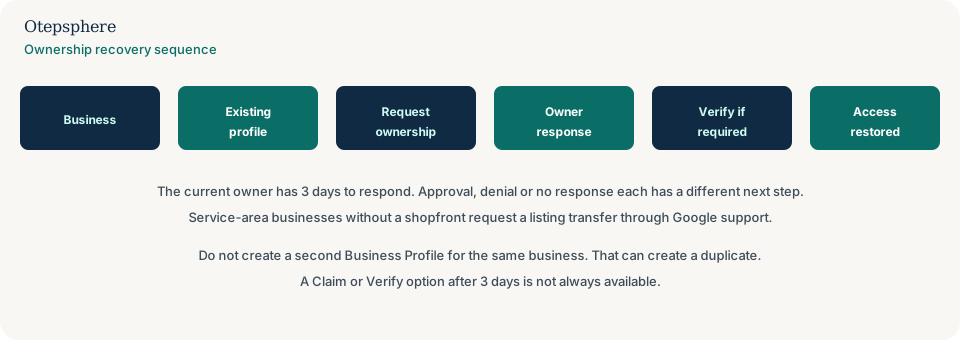
How long does the existing owner have to respond?
The current profile owner has 3 days to respond after Google notifies them by email.
That three-day window is stated on both the ownership request page and the duplicate-and-ownership page. If the request is approved, you receive an approval email and can manage the profile. If it is denied, you receive a rejection email, can suggest an edit on Maps, and can try to appeal the decision. Source: Request ownership of a Business Profile.
What if the request is ignored?
If you do not get a response after 3 days, you may be offered the option to claim or verify the profile. That option is not always available.
Google’s current claim steps are: open the confirmation email, select View request, then Verify, and follow the on-screen instructions. You can also sign in and look for a Claim or Verify button. If neither appears, wait and use Google support rather than creating a new listing. Source: Request ownership of a Business Profile.
If verification is offered at this stage, treat it as verification of the existing profile. Follow why verification can fail rather than starting a second URL.
What about service-area businesses?
Service-area businesses that serve customers at the customer’s location and do not have a physical shop or office should contact Google support to request a listing transfer, not the storefront Request Access form.
Google’s ownership page says to contact support, enter “Transfer ownership of listing” in the help field, and select that issue description when you submit. Bulk-verified accounts can also request ownership of existing profiles with the bulk upload spreadsheet. Source: Request ownership of a Business Profile.
That difference exists because many SABs hide their address. The add-a-business flow that depends on a street address does not fit them. Hide-address setup is explained in Google Business Profile for service-area businesses.
Should I create another Business Profile?
No. Do not create another Business Profile for the same business while you are trying to recover access.
Google allows only one Business Profile for each business. A second listing can be marked as a duplicate and stop showing on Search and Maps. Reviews, photos and the Maps URL stay on the original. Creating a clean new profile does not move them across. If you already created a spare listing by mistake, remove the extra one from your account after you confirm which profile is the original.
What not to do:
- Do not pay someone to “reset” the listing outside Google’s tools.
- Do not share verification codes, including with a new manager.
- Do not mark the real listing permanently closed so a new one can take its place.
- Do not use a personal Gmail as the only owner once you regain access. Add a company-controlled account.
Business Profile Ownership Recovery Checklist
- Search Maps for the existing listing before creating anything.
- Try every Google Account the business has used, including old Gmail and company email.
- If you already have manager access, ask an owner to raise your role or transfer primary ownership.
- If a former employee or agency still answers, ask them to add you and transfer primary ownership.
- For a storefront or hybrid business, submit Request Access from business.google.com/add.
- For a hidden-address SAB, contact Google support and request a listing transfer.
- Wait the current 3-day owner response window.
- If there is no response, look for Claim or Verify in the confirmation email. It may not appear.
- If the request is denied, use the appeal path in the email and suggest an edit if needed.
- After access is restored, set a company-controlled primary owner and remove people who should not edit.
- Do not create a second profile for the same business.
When professional Local SEO assistance makes sense
Help is useful when you cannot tell which listing is the original, when a duplicate already exists, or when the website and the public profile no longer describe the same business. It is not a substitute for Google’s ownership request, and it cannot force a former owner to approve access.
Official Google sources
- Request ownership of a Business Profile
- Manage your Business Profile owners and managers
- Transfer primary ownership of a Business Profile
- Resolve duplicate profiles and ownership issues
Lost access to a Business Profile you should control?
Otepsphere can help you identify the current profile situation, review ownership and duplicate risks, and determine the appropriate next step before another listing is created. Google controls ownership requests and verification, so access cannot be guaranteed.
Contact OtepspherePublished by Otepsphere
Published by Otepsphere, founded by Joseph Enmanuel. Learn about Otepsphere and its approach to local SEO.