This page is about operating many Business Profiles with roles. It is not the checklist of which company should own Analytics, Search Console and the domain — that is who should own your Local SEO accounts.
Why should teams avoid sharing Google passwords?
Shared passwords make it impossible to grant the right locations, revoke one person, or see who changed a listing. Google currently tells owners to give each user their own Google Account so they can manage profiles without sharing a password.
When five managers use one Gmail, you cannot remove the person who left without locking everyone else out. You also cannot use manager-only access. Edits, review replies and ownership transfers all attach to accounts, not to a hallway password. Source: Manage your Business Profile owners & managers.
Owner vs manager
Owners have full control, including adding and removing users and removing the profile. Managers can run daily operations but cannot add or remove users or remove the profile. A listing can have multiple owners and only one primary owner.
Google currently publishes a capability table: both roles can edit main info, attributes, photos, posts, reviews and insights downloads. Only owners can add and remove users and remove Business Profiles. You cannot add Google Groups as owners or managers. New owners and managers wait 7 days before they can delete or undelete a profile, remove other users, or transfer primary ownership. Source: Manage your Business Profile owners & managers.
What is a Business Profile business group?
A business group is a set of Business Profiles managed together so you can share access and apply changes across those locations.
Google’s agency documentation currently describes a business group as a select group of profiles collectively managed by an organisation or user group. Sorting locations into groups makes it easier to manage multiple locations and keep them organised. Bulk verification can apply when the main owner of a group is verified and profiles are not owned by someone else. Older materials may still say “location groups.” Sources: Manage agency business groups and Verify Business Profiles in bulk.
When should a business group be used?
Use a business group when several locations should share the same management set — a chain, a franchise brand, or a region — without inviting every user onto every profile one by one.
Google currently also says that if a verified bulk account already exists, organisations should create a business group account to share management rather than stacking another verified copy. A single cafe does not need a group. Ten clinics under one brand usually do.
Should every franchise manager have access to every location?
No. There is no universal rule that every franchise manager should see every location. Grant the least access needed to do the job.
A store manager typically needs one location as manager. A regional operator needs that region. Corporate needs owners where they must add users or protect primary ownership. Opening every branch to every manager increases accidental hours edits and messy review replies.
How should agencies receive access?
Invite the agency as managers — or, for registered agencies, use an organisation and business-group invitation — without transferring primary ownership of the business’s profiles.
Google currently documents agency organisation accounts that cannot directly own an individual profile. Clients invite the organisation or business group. Daily editing does not require the agency to become primary owner. Transferring primary ownership to a vendor is how businesses lose listings at handover. See how to change Local SEO agencies without losing access and Overview for agencies.
Can one location belong to more than one business group?
Google currently documents transferring locations between business groups. It does not document a location remaining a member of two groups at once.
Agency help currently describes transfer conditions (for example manager-access transfers when source and destination groups are primary-owned by the same organisation). Treat dual membership as unverified. If two teams need the same shop, use roles on that profile or transfer it to the group that should operate it, rather than assuming it can live in two groups.
How should multiple brands be organised?
Use separate business groups when different brands need different user access. Do not bulk-verify unrelated brands in one account.
Google currently says agencies with more than one business in one account cannot bulk verify, and that organisation users can create more than one business group. Separate groups keep Brand A’s managers out of Brand B’s hours and reviews. Source: Verify Business Profiles in bulk.
What happens when an employee leaves?
Remove that person’s Google Account from the profile or group. Do not change a shared password.
Google currently says that when you remove a user they get an email and can no longer change business info, but their past replies, posts and comments stay on the profile. Only owners can remove other owners and managers. Source: Manage owners and managers.
How should primary ownership be protected?
Keep primary ownership on a company-controlled Google Account, with at least one other owner or manager so you can transfer if needed, and do not leave primary ownership with an agency or a staff member’s personal Gmail.
The primary owner cannot remove themselves until they transfer primary ownership. New owners cannot take that transfer during their first 7 days. Lost access to a personal primary-owner inbox is a recovery problem, not a password-reset in Slack. See what to do if you lost access to a Business Profile and Manage owners and managers.
Multi-Location Access Matrix
| Role | Needs which locations? | Owner? | Manager? | Business group? |
|---|---|---|---|---|
| Corporate admin | All locations for that brand | Yes, including primary on a company account | Not as a substitute for ownership | Owns or administers the group |
| Agency | Only contracted locations | No, unless a documented exception | Yes, typical daily access | Invited to the group, not as primary owner |
| Regional manager | That region only | Only if they must add users | Usually yes | Subset or labels inside the brand group |
| Location manager | One branch | No | Yes | Not required if invited to one profile |
1. Identity
Does every person have their own Google Account? Google currently says users should access profiles without sharing a password.2. Role
Does the person need owner or manager access? Owners can add and remove users and remove a profile. Managers cannot. Primary ownership should stay with the business.3. Group
Should these locations sit in one business group? A business group is a set of profiles managed together. Separate brands that need different access should use separate groups.4. Scope
Does this person need every location? There is no rule that every franchise manager should see every branch. Grant the locations they operate.5. Offboarding
When someone leaves, is their user removed? Remove that Google Account. Do not rotate a shared password. Past replies and posts remain on the profile.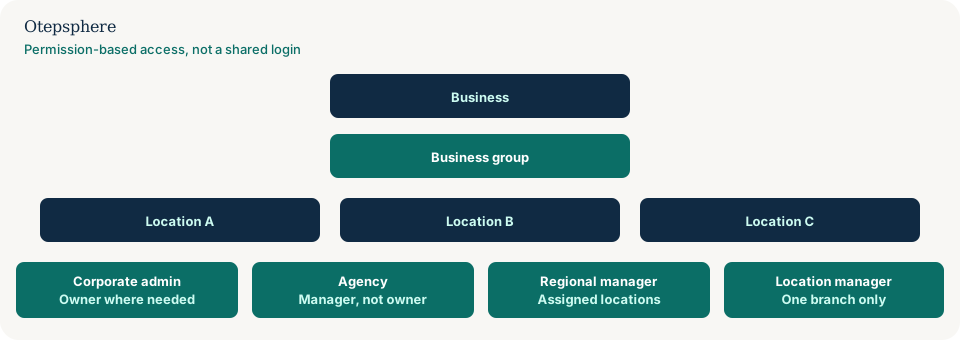
GBP Access Governance Checklist
- Every person has their own Google Account. No shared passwords.
- Primary owner is a company-controlled account, not a vendor and not a personal inbox.
- A second owner or manager exists so primary ownership can be transferred.
- Managers do the daily work; owners are limited to people who must manage users.
- Locations sit in a business group when many profiles share the same management set.
- Separate brands that need different access use separate groups.
- Agencies are invited; they do not take primary ownership by default.
- Leavers are removed as users. Past posts and replies remain.
- Review People and access after staff changes and agency handovers.
What not to assume
Do not assume Google Groups can be added as managers. Do not assume a location can sit in two groups. Do not assume manager access can delete a hijacked listing.
What not to do
Practical action plan
- Export or screenshot current users on each profile or group.
- Create or confirm a company primary-owner account.
- Invite corporate, regional, location and agency users with the matrix above.
- Remove the shared user and any leavers.
- Document who may add users. Revisit after every agency change.
When professional help makes sense
Help is useful when ownership is split across personal accounts, when a franchise cannot invite managers without sharing a password, or when an agency still holds primary ownership. It cannot recover an account Google will not return. Before a bulk listing or website change, export yesterday’s facts first: why you should back up Local SEO data before large website or Business Profile changes.
Sources and further reading
- Google Business Profile Help: Manage owners and managers
- Google Business Profile Help: Manage agency business groups
- Google Business Profile Help: Overview for agencies
- Google Business Profile Help: Verify Business Profiles in bulk
Too many people sharing access to your Business Profiles?
Otepsphere can review your multi-location profile structure and help identify a cleaner access model for internal teams, agencies and location managers.
Contact OtepspherePublished by Otepsphere
Published by Otepsphere, founded by Joseph Enmanuel. Learn about Otepsphere and its approach to local SEO.