Why back up before a bulk change?
So a bad upload, theme swap or mass edit can be compared with yesterday’s URLs, titles, redirects and listing fields — and rolled back or corrected with evidence.
Typical pattern: a national hours file, a CMS find-and-replace, or a theme migration ships; someone asks what the old title or phone was; nobody has the export. The job is rollback prep, not a ranking tactic.
Is this a bulk-upload error?
That guide is the error messages and duplicates a Business Profile import can create.
Use why Google Business Profile bulk uploads fail when the file itself errors. Stay here for the snapshot you take before any large website or listing change.
Is this day-to-day profile monitoring?
No. Monitoring watches unexpected edits after you are already live.
Use how to monitor Google Business Profile changes for ongoing listing fields. Stay here for a one-off export before you push a bulk change. Access control for many profiles is how to manage multiple profiles securely.
Export
URLs, titles, redirects, profile fields? A CSV or crawl you can open later.Date
Stamp the file before the edit A backup taken after the upload is not a backup.Change
Then run the theme swap or bulk upload Website and listing changes both need a snapshot.Sibling
Upload errors are a different job Use the bulk-upload guide if the file itself failed.Next
A backup is not a ranking tactic Compare live facts with yesterday’s export.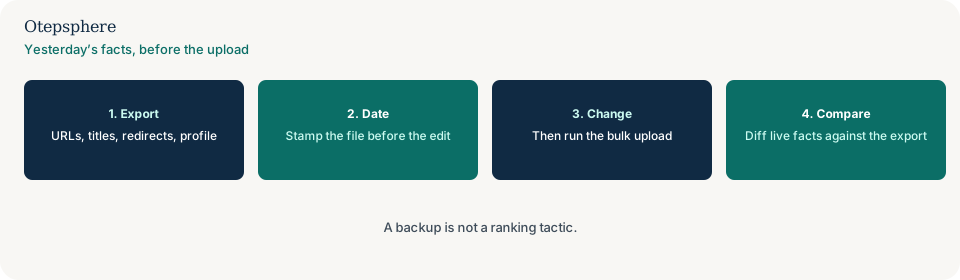
What should the export contain?
A crawl or CMS export of location URLs, titles, canonicals, robots and redirects, plus a listing export of name, address, phone, hours, categories and store codes.
Google documents bulk listing updates separately from website migrations. Sources: Import and update Business Profiles in bulk and Site moves with URL changes. A backup is not a ranking tactic. Do not skip the date stamp.
What do you do after the change?
Diff live facts against the dated export. Restore fields that should not have moved; keep the ones you intended.
If a plugin overwrite or a missing redirect map is what you find, switch to CMS updates overwriting SEO settings or URL changes without a redirect plan.
Backup decision table
| What you see | What it usually means | Decision | What not to assume |
|---|---|---|---|
| Theme swap or mass hours file tomorrow | A bulk change is coming | Export site and listing fields today | That a backup is a ranking tactic |
| The import file already failed | Upload errors | Use the bulk-upload guide | That this page diagnoses the error codes |
| Unexpected listing edits next month | Ongoing monitoring | Use the profile change-monitoring guide | That one pre-upload CSV is monitoring |
| Export taken after the upload | Not a backup | You can only describe the new state | That a post-edit file is yesterday’s facts |
What should I not do?
Action checklist
- Export location URLs, titles, redirects and listing fields.
- Date-stamp the files before the change.
- Run the theme swap, slug rename or bulk listing file.
- Diff live facts against the export.
- If the import errors, switch to the bulk-upload guide.
- If you need ongoing listing alerts, switch to monitoring.
When professional help makes sense
Help is useful before a national hours or URL change when nobody has last month’s export. It cannot promise that a backup will undo Google’s review of a listing file.
Sources and further reading
- Google Business Profile Help: Import and update Business Profiles in bulk
- Google Search Central: Site moves with URL changes
- Google Search Central: SEO starter guide
A bulk edit is coming and nobody has yesterday’s export?
Otepsphere can snapshot URLs, titles, redirects and listing fields first — without treating a backup as a ranking tactic.
Contact OtepspherePublished by Otepsphere
Published by Otepsphere, founded by Joseph Enmanuel. Learn about Otepsphere and its approach to local SEO.