What should happen to the Google Business Profile?
The closed location’s Business Profile should be marked permanently closed on the existing listing, not replaced with a second profile for the same shut site.
Google currently says that if your business or any of its locations closes, you can update the Business Profile so it displays as temporarily closed or permanently closed on Maps and Search. For a location that is not coming back, use permanently closed. Google also provides a bulk action in Business Profile Manager for marking several locations closed. If the shop is only shut for more than seven days, off-season, or indefinitely with a planned return, temporarily closed is the tool Google currently points to. A genuine one-location shutdown of a franchise, dental group, clinic, restaurant group or retail chain is a permanent-closure job. Source: Mark your business as closed.
If Google says an open location is closed, that is a different diagnosis. Use why Google says an open business is closed. If the whole operation is moving rather than ending, use how to move a business without losing Local SEO visibility.
Should I delete the Business Profile?
Usually no. Marking the location permanently closed is different from removing profile content and managers from your Google Account.
Permanent closure tells the public the site has ended. Removing a Business Profile from your account is an access-and-content action. Google currently says that after you remove the profile from your Google Account you cannot manage it on Search and Maps, that only primary owners can remove profile content and managers, and that if you mark the business as closed it will not disappear from Maps right away — it will slowly disappear from search results and then be completely removed. Removal of content and managers is described as permanent for owner posts, photos, videos and review replies; user-generated content and reviews remain. After that removal, Google says you must re-verify to manage the business again. For a location that truly closed, the public closed label is usually the customer-facing need. Stripping management is a separate decision about whether anyone should still administer that listing. Source: Remove a Business Profile from your Google Account.
Will a permanently closed profile disappear immediately?
No. Google currently says a permanently closed Business Profile may still appear on Search and Maps for people who search for it, clearly showing that the business is closed.
That remaining visibility is often useful. Former customers searching the old name should see “permanently closed” rather than an open pin at an empty unit. Do not treat delayed disappearance as a ranking bug you must force with a second listing. Source: Mark your business as closed.
What should happen to existing reviews?
Leave the reviews on the closed profile. Do not try to move them onto another branch or invent a replacement listing to “keep the stars.”
Reviews belong to the Business Profile. Google documents review combination when two profiles for the same business are merged, with a warning that replies may be lost. That merge path is for duplicates of the same business, not a method for transferring one clinic’s reviews onto another suburb. Do not ask customers to copy old reviews onto a different location. Do not report genuine reviews to make a closed listing look cleaner.
What should happen to the location page?
Decide from the page’s remaining job for customers, not from a universal “delete or 301” rule. Linked 404s after a close or URL change are worked through in what to do with old local URLs that still have backlinks.
| Question | If yes | If no |
|---|---|---|
| Does another branch replace this location for the same customers? | Add clear closure information, then consider a redirect to that relevant location or a locator that names the replacement. | Do not send people to an unrelated city or service. |
| Does the closed URL still help customers? | It may temporarily remain useful: hours ended, last day, where to go next, how to retrieve records. | Do not keep selling appointments at a site that no longer exists. |
| Is there no equivalent destination? | Avoid an automatic irrelevant redirect. A truthful closure page or a 404/410 after a notice period can be more honest. | — |
Google’s site-move documentation treats consolidating pages and returning 404 or 410 for deleted content as legitimate when that is what actually happened. It does not require every retired URL to 301 to the homepage. Source: How to move a site.
Should the page redirect to the homepage?
Not automatically. A homepage redirect is only appropriate when the homepage is the best remaining equivalent, which for a closed branch is often not true.
A dental group closing one clinic usually has another clinic page, a locations hub, or a records-request page that better matches the old URL’s intent. A restaurant group may need a nearby remaining dining room. Dumping every closed-branch URL onto the brand homepage confuses customers and mixes unrelated search queries.
What happens to location-specific internal links?
Internal links that still present the closed site as open should be updated or removed as soon as the closure is public.
Typical sources: the locations index, header locators, service pages that named that suburb, schema, sitemaps, and “book this clinic” buttons. Leaving those links in place sends crawlers and customers to a URL whose job has changed. See internal linking for Local SEO.
What should happen to citations?
High-impact listings that still show the closed address as open should be updated to permanently closed or to the remaining location’s true facts, depending on what that directory actually represents.
Do not bulk-edit every obscure citation on day one at the expense of Maps, the website and the remaining branches. Do not point a closed shop’s directory listing at a different company’s phone. NAP cleanup context is in why business information differs across the web. When other sites still link to the closed location URL, see what to do with backlinks pointing to old or closed location pages.
What about appointment, menu or booking links?
Disable or retarget booking, menu, order and appointment links that still complete a transaction for a location that cannot receive the customer.
Google Business Profile action links should not send someone into a scheduler for a shut site. Website forms and call tracking numbers dedicated to that branch should be rerouted or retired with a message. Link diagnosis for profiles is in why a Google Business Profile website or booking link is missing or not working.
How should customers find the nearest active branch?
Tell them on the closed page, in the remaining location pages, and in Maps by keeping other profiles accurate — not by pretending the closed pin is still the nearest shop.
A locator that lists only open sites, with distance or suburb names, is usually clearer than an automatic redirect that ignores travel time. If the locator still shows the shut shop as open, that is stale location data: why a store locator shows closed, missing or outdated locations. Multi-location measurement should treat remaining branches as the live set. See Local SEO for multi-location businesses and how to track Local SEO across multiple locations.
What should happen to analytics and reporting?
Keep historical data, but stop including the closed location in normal active-location comparisons without a closure annotation.
A blended “all clinics” ranking or lead report will look like a company-wide drop when one site simply closed. Segment the closed URL and listing, note the date, and compare remaining locations to their own baselines.
Location closure checklist
Status
Location closing One site is ending. Other branches may still operate.Listing
Google Business Profile Mark the closed location permanently closed. Do not delete first.Site
Website Keep useful closure information, redirect to a relevant replacement, or retire the URL.Directories
Listings Update or close citations that still send people to the shut site.Customers
Customer routing Help people find the nearest remaining branch without a fake redirect.Reporting
Measurement Stop treating the closed location as an active branch in normal comparisons.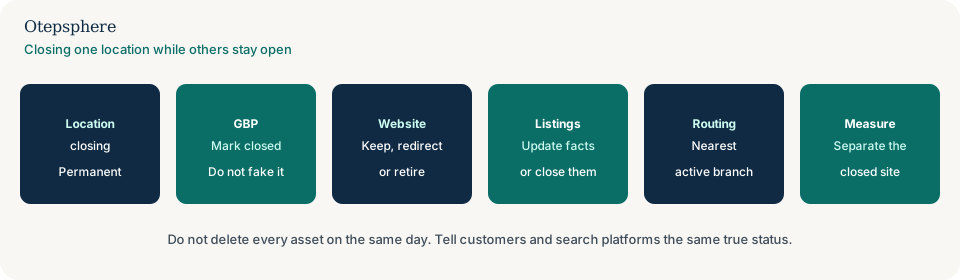
- Permanently closed is set on the correct Business Profile, not on a remaining branch by mistake.
- The website no longer offers bookings at the shut site.
- A remaining equivalent URL is used for any redirect; otherwise the page explains the closure.
- Internal links, ads and locators match the live network.
- Priority citations are updated or closed.
- Reporting excludes the closed site from active-location scorecards, with the date recorded.
What not to assume
Do not assume deleting the profile preserves anything. Do not assume reviews can be moved to another suburb. Do not assume a homepage 301 is the SEO-safe default. Do not assume Google will hide a closed listing overnight.
What not to do
Practical action plan
- Record the Maps URL, website URL, phone, booking link and remaining substitute locations.
- Mark the closing profile permanently closed when the last trading day is real.
- Publish a short, true closure notice on the location page the same day.
- Update locators, internal links and action links.
- Redirect only where a relevant remaining page exists.
- Annotate analytics and rank tracking so the closed site is not scored as an active branch.
When professional help makes sense
Help is useful for franchise or clinic groups with many citations, mixed locators and ads, or a previous vendor who created duplicate listings for the same site. Nobody can guarantee how long a closed profile remains visible or how remaining branches will rank after demand shifts.
Sources and further reading
- Google Business Profile Help: Mark your business as closed
- Google Business Profile Help: Remove a Business Profile from your Google Account
- Google Search Central: How to move a site
Closing one location while the rest of the business remains active?
Otepsphere can review the Business Profile, location page, redirects, listings and tracking so customers and search platforms receive a clear transition.
Contact OtepspherePublished by Otepsphere
Published by Otepsphere, founded by Joseph Enmanuel. Learn about Otepsphere and its approach to local SEO.