This page is about the website, booking, ordering and similar action links on a Business Profile. A Google review request URL that does not open the review form is a different diagnosis: why a Google review request link is not working.
Why isn't my website link showing?
A website link may not show because the profile is not verified, the URL is invalid, Google has not approved the edit, or the destination does not follow current website and business-link rules.
Google’s representation guidelines require a website that represents the individual business location, and they forbid URLs that redirect people to a different business, including social-media landing pages used as a substitute site. Edits can also stay pending or be rejected. Source: Guidelines for representing your business on Google. Pending edits are covered in why Business Profile edits are pending or not approved.
What URL format should be used?
Use a complete https URL with no spaces, no backslashes, and a single valid protocol.
Google’s business-link help lists malformed links as a reason you cannot add or update a link: spaces or symbols, backslashes, or an invalid protocol such as a duplicated http://. Paste the live URL from the browser address bar after a successful load. Source: Business links policies and guidelines.
Can Googlebot access the page?
If Google’s automated systems cannot load the destination, Google may be unable to verify the link and may remove it.
For ordinary website indexing, Googlebot’s access still matters for Search. For Business Profile action links, Google currently names a dedicated verification crawler. Blocking that crawler is a link-verification problem, even if humans can open the page.
Why does crawlability matter?
Crawlability matters because Google says it verifies Business Profile links with automated crawlers, visiting at most daily, and may remove links those crawlers cannot access.
Current requirements include unrestricted access for the user agent Google-BusinessLinkVerification, no rate limiting that blocks the crawler, no CAPTCHA or login for the crawler, no IP blocking, no cloaking, a successful HTTP status such as 200 rather than 404, 403, 500 or 503, a complete load of images, CSS and JavaScript, and no geoblocking. Google states that these verification crawlers do not follow robots.txt. Source: Business links policies and guidelines.
Why was my booking link rejected?
A booking link can be rejected because the business is not eligible for that link type, the profile is not verified, the URL is invalid, the page does not let customers complete the booking, the landing page is too generic, or another link already uses that domain.
Google requires dedicated landing pages for the business, and for multi-location businesses a page for that specific location. Action links must allow customers to complete the designated action. Social sites, messaging links, app-store links and link shorteners are not allowed as local business links. Source: Business links policies and guidelines.
Why is a third-party booking provider appearing?
A third-party booking or ordering provider can appear when that provider, or the business, already added a link on that domain, because Google allows only one link per domain for a transaction type.
Google currently says if you add a third-party provider link that has the same domain as one already added, the new link is removed. The example is two different paths on website.com for online ordering: the second is not accepted. That can look like “OpenTable took the booking button” when the real constraint is the domain rule. If the unwanted button appeared automatically from a partner, rather than as a second path on the same domain, use why the wrong booking or ordering provider is showing. Source: Business links policies and guidelines.
What business-link types are available?
Google currently documents action links such as booking, food ordering, and pickup and delivery, in addition to the standard website field. Menus are a separate website URL type with their own rules.
Not every surface appears for every business. Google notes that some countries and regions are not eligible for certain business links, and that businesses can have a maximum of 20 links per transaction type. Menu URLs for restaurants must represent the items available and must not be direct links to third-party ordering or delivery services. Sources: Business links policies and guidelines and Guidelines for representing your business on Google.
Can every business use every link type?
No. Not every business can use every link type.
Google’s example is that a hair salon might allow appointment booking but is not eligible for online ordering links. Eligibility depends on business type and location. Do not treat a missing order button as a technical error if the category cannot have one.
Where should appointment links lead?
Appointment links should lead to a dedicated page for that business — and for that location, if you have more than one — where the customer can complete the booking.
A homepage that only describes the company, a location picker that forgets the branch, or a page that asks the customer to call instead of booking, does not meet the “complete the designated action” standard Google currently publishes. Social profiles and messaging apps are not valid business-link destinations. If Instagram or Facebook icons are missing from the listing itself, that is a different field: why social media links are not showing on Google Business Profile. A phone number on the website that will not open a dialler is why click-to-call is not working on the local website, not a missing Profile button.
Should GBP link to homepage or location page?
For a single-location business, the homepage can be appropriate if it is clearly about that location. For several locations, the website field and action links should usually go to the page for that specific location.
That is customer-experience and representation guidance aligned with Google’s “website that represents your individual business location” and dedicated-landing-page rules. It is not a published ranking bonus for using one URL pattern. A thin location template is still a poor destination. Destination choice when the button already works is whether every location should link its Google profile to the corporate homepage. See also when to create location pages and Google Business Profile optimisation.
What if there are multiple locations?
Each location profile should use links that belong to that location, not a national homepage or another branch’s booking page.
Google states that for businesses with multiple locations, action links must lead to a website for a specific location, and that general landing pages or another location’s page should be avoided.
1. Format
Is the URL valid? Spaces, backslashes and broken protocols can stop a link from saving.2. Access
Can Google’s verification crawler load it? Login walls, CAPTCHAs, blocks and error status codes can cause removal.3. Eligibility
Is this link type available to the business? Not every category or country can use every action link.4. Destination
Does the page complete the named action? Multi-location links should represent that specific location.5. Domain
Is another provider already using that domain? Google may keep the first qualifying link and reject a duplicate domain.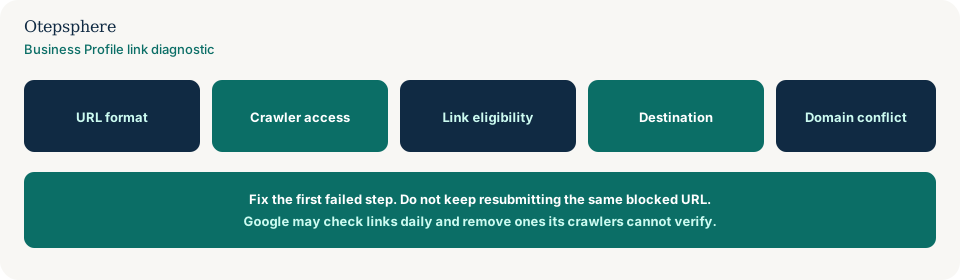
GBP Link Diagnostic Checklist
- The profile is verified before you expect links to publish.
- The URL is a clean https address with no spaces or backslashes.
- The page returns a successful status code and loads fully.
- Login walls, CAPTCHAs, bot blocks and geoblocks are not stopping Google-BusinessLinkVerification.
- The link type is available to this business and country.
- The customer can complete the named action on that page.
- Multi-location links go to that location, not a generic hub.
- Another provider is not already occupying the same domain for that transaction type.
What not to assume
Do not assume a missing button is a Maps ranking penalty. Do not assume robots.txt is honoured by the business- link verification crawler. Do not assume every category gets ordering, booking and menu links.
What not to do
Practical action plan
- Open the public listing and note which links customers actually see.
- Test the destination in a private window. Confirm it completes the action.
- Fix format and server errors before editing the profile again.
- Ask whoever runs bot protection to allow Google-BusinessLinkVerification without a CAPTCHA.
- For multi-location brands, switch generic URLs to location-specific pages.
- If a provider domain is already in use, change domain or work with that provider rather than stacking paths.
When professional help makes sense
Help is useful when booking, ordering and website URLs disagree across a chain, or when crawler blocks sit in a CDN you do not control. It cannot guarantee Google will restore a link.
Sources and further reading
- Google Business Profile Help: Business links policies and guidelines
- Google Business Profile Help: Guidelines for representing your business on Google
- Google Search Central: Overview of Google crawlers
Missing or incorrect links costing customers bookings?
Otepsphere can review the Business Profile links, destination pages and Local SEO setup to identify where the customer journey is breaking.
Contact OtepspherePublished by Otepsphere
Published by Otepsphere, founded by Joseph Enmanuel. Learn about Otepsphere and its approach to local SEO.