What does a broken review link actually mean?
It means the URL you send does not take a willing customer into Google’s review form for the listing you intended.
Typical failures: the link opens a Maps search for the business name; it opens a different branch; it asks the person to sign in and they stop; or the listing cannot accept new reviews because of a restriction. The customer may still like the business. The request path is what broke.
How is this different from creating a review link?
Creating the official link is a how-to. This page is a diagnosis of a URL that already exists and does not work.
Google’s current help for generating the URL is Read Reviews, then Get more reviews, then copy. That sequence, plus QR codes from a computer, is covered in how to get more Google reviews ethically. A missing website or booking button on the listing is a different field: why a Google Business Profile website or booking link is missing or not working.
Source
Was it copied from Get more reviews? Google’s help is Read Reviews, then Get more reviews, then Copy.Place
Does it open the intended listing? A shared QR from the flagship store will review the wrong branch.Access
Is the customer signed in? Google says customers must be signed into a Google Account to leave a review.Yes
Replace the link you actually send Do not keep a shortened URL that lands on a Maps search.Next
Do not invent a Place ID URL as policy Use the official generator. Restrictions can also block new reviews.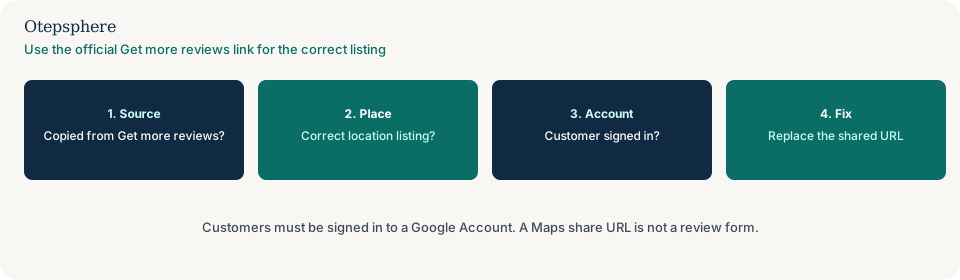
Where should the link come from?
Copy it from the Business Profile’s Get more reviews screen for that listing, on a computer.
Google documents that path, including a QR code download from a computer rather than a phone. Incentives in exchange for posting, changing or removing a review are prohibited on the same help page. Source: Create a Google link or QR code to request reviews. Do not treat a hand-built Place ID URL as the official method. If Google’s generator is available, use it.
Why does a Maps URL fail?
A Maps share, search or pin URL is a place page, not the review-request flow Google generates for that listing.
Shorteners, email tracking wrappers and “share this business” buttons often land on a search result that includes competitors or a duplicate listing. Test the exact string you send: paste it into a private window while signed out, then again while signed in. If you have several locations, generate a fresh Get more reviews link for the branch the customer actually used. A working URL that belongs to another shop is a routing process problem: why customers are sent to the wrong location when asked for a review. Reviews that then land on the wrong shop are already posted: what to do when customers review the wrong location.
Does the customer need a Google Account?
Yes. Google currently says customers must be signed in to a Google Account to leave a review.
A person who opens the link on a shared tablet, a work browser that blocks Google sign-in, or a device with no Google Account will not complete the form. That is not a broken listing. Tell them they need to sign in, then stop. Do not stand over them on the premises until they post. Google’s Maps policy says merchants should not pressure users to leave ratings while on the premises. Sources: Tips to get more reviews and Prohibited and restricted content.
Can a restriction block new reviews?
Yes. A Business Profile restriction for policy violations can hide reviews or stop new ones from appearing.
If the official Get more reviews link opens the right listing and the customer is signed in, check Google email and the profile for a restriction notice. Appeal through the official process. Do not create a second listing to collect reviews. Source: Business Profile restrictions for policy violations. Reviews that were posted but never show are a different check: why Google reviews disappear or stop showing.
Link-failure decision table
| What you see | What it usually means | Decision | What not to assume |
|---|---|---|---|
| Signed-out test opens a Maps search, not a review form | The shared URL is not the official request link | Copy a new Get more reviews URL from the correct listing and replace every copy you send | That customers “do not want to review you” |
| The form is for a different branch | The QR or URL belongs to another location | Generate one official link per location and stop sharing a single brand QR | That Google will move the review later |
| Customer is not signed in | Google requires a Google Account | Explain sign-in; do not pressure them in the shop | That a workaround URL removes the sign-in step |
| Official link is correct, new reviews still fail | Possible restriction, delay or policy review | Check restriction mail; wait the documented delay for new reviews; do not buy replacements | That a new Business Profile will reset the problem |
What should I not do?
Action checklist
- On a computer, open the intended Business Profile, go to Read Reviews, then Get more reviews, and copy the link.
- Test that URL signed out and signed in. Confirm the listing name and address match the branch you mean.
- Replace every email footer, SMS, receipt and printed QR with the tested URL for that location.
- If you have several locations, generate and label a separate link for each profile.
- Tell staff that customers must be signed in, and that on-premises pressure is not allowed.
- If the official link is correct and reviews still fail, check for a restriction and for delayed reviews.
When professional help makes sense
Help is useful when several locations share one QR, when duplicate listings make the signed-out test ambiguous, or when a restriction may be blocking new reviews. It cannot make Google accept a review from someone who is not signed in, and it cannot promise that every customer will complete the form.
Sources and further reading
- Google Business Profile Help: Create a Google link or QR code to request reviews
- Google Business Profile Help: Tips to get more reviews
- Maps User Generated Content Policy: Prohibited and restricted content
- Google Business Profile Help: Business Profile restrictions for policy violations
Customers willing to review, but the link never opens the form?
Otepsphere can test the request URL against the correct listing and location setup — a path check, not a promise that more reviews will appear.
Contact OtepspherePublished by Otepsphere
Published by Otepsphere, founded by Joseph Enmanuel. Learn about Otepsphere and its approach to local SEO.