Has the review been posted, or is the request link wrong?
Start with the state of the review. If a customer has already published on the wrong branch, you are dealing with a live post on a real listing. If the request they were given still opens another location’s profile, you are dealing with a process failure before anyone posts. Those need different actions.
- Open the request as a customer. Which Business Profile does the form belong to?
- Is the same QR code, SMS or email used at every counter?
- Does the review text name a suburb, staff member or service that belongs to another site?
- If the review is already live on the wrong listing, follow the posted-review steps below.
- If the link 404s or never opens a form, that is a broken URL, not routing.
A wrong-location review means a customer posted on a Business Profile that is not the place they visited, while that profile is still a real, separate listing. Typical pattern: one QR code on every receipt, a receptionist who always shares the flagship link, or a customer who searched the brand name and picked the first pin. The review is genuine about the visit. The listing is wrong.
Wrong routing means the customer was sent a request that opens another location’s Google review form — usually because one QR code, one SMS template or one “leave a review” button is reused across the network. The fix is to issue the request that belongs to the shop they used, before they post.
Uneven volume across a chain is a related outcome, not the same diagnosis. One shop may have many recent reviews because that is where every request points. Measure the imbalance on why one location gets almost all the reviews. A link that never opens a working form is why a Google review request link is not working. A working link can still belong to the wrong shop.
Staff
Is one person sending every SMS and QR? Front-of-house habits often beat the CMS.Link
Was it copied from that location’s Get more reviews screen? Generate it on a computer for the listing the customer visited.Test
Does a signed-out visit open the intended shop? A Maps search URL is not a review request.Yes
Issue and label one official link per site No incentives. No on-premises pressure.Next
If they already posted on the other shop, change playbooks You cannot generally move that one review between live branches.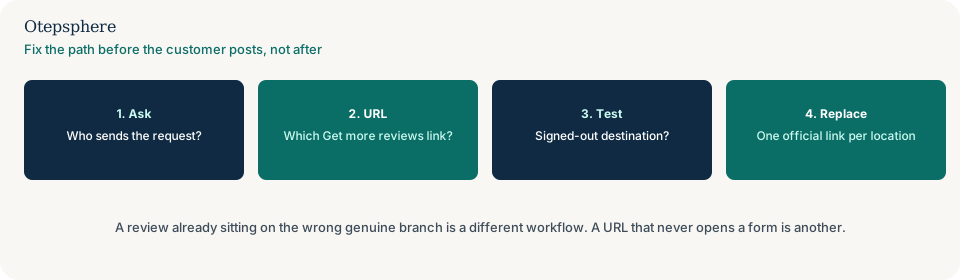
A real branch versus a duplicate profile
A duplicate is two profiles for the same business. A wrong-location review is one genuine review on the wrong genuine profile. Confirm whether the second listing is a second shop with its own address, or a clone of the same shop.
Merging two distinct shops is the wrong tool. Google’s merge help says the profiles must represent the same business. If you merge two live branches, you create a new identity problem. Source: Resolve duplicate profiles and ownership issues. If the second listing is actually a duplicate of the same shop, that is a merge diagnosis: what to do about a duplicate Google Business Profile.
Do not create a new Business Profile to “park” the review. Google’s review-move help says not to create a new profile because of a change in physical location or ownership. Source: Move reviews from one Business Profile to another.
What to do about a review already on the wrong location
Leave the review on the profile where it was posted unless Google’s documented move or merge case applies. Google does not provide a general tool to move one customer review between two genuine, separate locations. Google’s current article on moving reviews covers limited cases: duplicate profiles of the same business, and relocation when the business keeps the same name and moves address (automatic in many categories). It is not a hop from Location A to Location B. Source: Move reviews from one Business Profile to another.
Reply on the listing where the review sits, state the current facts, and invite a private follow-up — without accusing the customer of posting in the wrong place. Google’s reply guidance says responses should be professional, not promotional, and that a mix of positive and negative public feedback can feel more trustworthy to other readers. A useful reply names the location they visited if that is clear, confirms whether you can help from this site, and offers the contact details already on the profile. Do not ask them to delete the review in exchange for a discount. Do not ask them to post again on the “right” listing after they already reviewed the wrong one. Offering incentives to post, change or remove reviews is prohibited. Source: Tips to get more reviews.
If a reply you already wrote never appears, that is moderation, not location routing: why a Google review reply is not showing. If the content looks fabricated or coordinated rather than a mis-click, report it against Maps policy. Do not treat every wrong-shop review as fake.
Type
Same business, two addresses? Two verified branches are different places. A duplicate listing is a different diagnosis.Move
Can this one review transfer? Google documents review moves for relocation or duplicate same-business profiles, not branch-to-branch hops.Reply
Tell customers the current facts Do not accuse them of posting on the wrong shop.Yes
Fix the request link per location Each profile has its own Get more reviews URL.Next
Do not merge distinct shops Merging combines listings that represent the same business.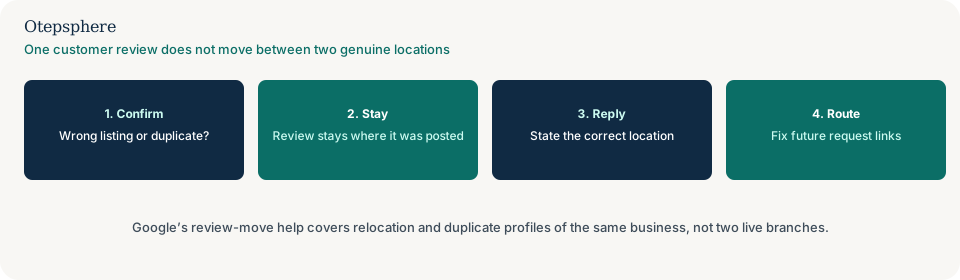
Fix review links and QR codes for each branch
Give each location its own official Get more reviews link and stop sharing a single brand QR. Google’s own request link is generated per Business Profile, on a computer browser rather than a phone. Copy the link or save the QR from that location’s profile, then put that asset only at that site. Source: Create a Google link or QR code to request reviews.
Label print and messages with the shop name so a mix-up is obvious. Staff at Location B should not send Location A’s link. In email or SMS, include the suburb or shop name in the message. If several locations share one phone number, callers may also be asked for a review of the wrong shop: whether one phone number for every location creates problems.
A broken or generic URL is a different diagnosis. If the link 404s, hits a login wall, or is only a Maps search URL rather than a review request, use why a Google review request link is not working. How to create the official link without incentives, gating or scripted ratings is in how to get more Google reviews ethically. Reprinting the same broken URL once per shop will not help.
Audit SMS, email, receipts and website requests
List every asset that asks for a review: counter QR codes, receipt templates, appointment follow-ups, SMS messages, emails and website buttons. Record the intended branch and the Business Profile each link actually opens. A working link can still point to the wrong shop.
Generate or retrieve the official request link for the correct profile and label the asset with the branch name. Test the destination without posting a review, including the signed-out path a customer might encounter. Check that staff and automated messages select the branch the customer visited.
For a review already posted elsewhere, keep the existing guidance on professional responses and Google's limited review-move cases. Do not merge two genuine branches or promise a review transfer merely to correct routing.
Front-of-house habits often beat the CMS. Inventory shared print runs, POS messages and review vendors as well as website buttons. One person sending every SMS, or one receipt template used at every till, will keep filling the flagship listing even after you generate the correct links.
Test the destination before reissuing requests
Test each official request signed out, on a computer, without posting. Confirm the form belongs to the shop the customer visited. A Maps search URL is not a review request. Customers must be signed into a Google Account to leave a review; that sign-in step is expected, but the destination profile still has to be the right branch. Source: Tips to get more reviews.
Do not replace every QR and SMS until the new destination is confirmed. Do not treat routing as a ranking tactic. A correctly routed link does not promise more reviews. It only sends the next customer to the location they actually used.
| What you see | What it usually means | Decision | What not to assume |
|---|---|---|---|
| Two verified addresses, one review on the other shop | Genuine locations, misposted review | Leave the review; reply with facts; fix the request link for next time | That Google will transfer that one rating |
| Two listings, same address, same business | Possible duplicate | Follow duplicate-profile help, not a branch-to-branch move | That every second pin is a duplicate |
| Same QR at every counter; form is headquarters | Shared request asset | Print a unique official request per location and label it with the shop name | That Google will attach the review to the shop they visited |
| Link never opens a form | Broken URL | Use the review-link-not-working guide | That reprinting the same broken URL per shop will help |
| One shop has almost all new reviews | Possible routing plus other causes | Fix request assets first, then read the volume guide | That quieter shops must have inauthentic reviews |
| Review looks fabricated or coordinated | Possible policy-violating content | Report against Maps policy; do not treat it as a simple mis-click | That every wrong-shop review is fake |
Prevention checklist
- Decide first: live review on the wrong listing, or a request that still opens the wrong profile.
- Confirm whether the second listing is a genuine branch or a duplicate of the same shop.
- Leave a posted review where it sits unless Google’s documented move or merge case applies.
- Reply professionally with true facts for that listing. Do not offer a deal for changing the review.
- Inventory every QR, SMS, email, receipt, appointment follow-up and website button that asks for a review.
- Record the intended branch and the Business Profile each link actually opens.
- Replace shared assets with a request generated from that location’s profile on a computer.
- Label print and messages with the shop name so mix-ups are obvious.
- Test each destination signed out, without posting, before you reprint or resend.
- Train staff and check automated messages so they select the branch the customer visited.
- If the URL never opens a form, switch to the broken-link guide.
- If volume is uneven after routing is fixed, switch to the unbalanced-reviews guide.
- Do not merge two live branches, open a new listing to hide a review, or reuse one request URL across shops.
Help is useful when several locations share one request path, one review vendor, one POS message or one print run, or when staff cannot tell which profile a QR opens. It cannot move a single review between two genuine locations, and it cannot promise Google will remove a misposted genuine review or produce more ratings from a correctly routed link.
Sources and further reading
- Google Business Profile Help: Move reviews from one Business Profile to another
- Google Business Profile Help: Resolve duplicate profiles and ownership issues
- Google Business Profile Help: Tips to get more reviews
- Google Business Profile Help: Create a Google link or QR code to request reviews
- Google Business Profile Help: Guidelines for representing your business on Google
Reviews landing on the wrong branch?
Otepsphere can map which listing each request link opens and how locations are set up — a routing review, not a transfer of existing ratings.
Contact OtepspherePublished by Otepsphere
Published by Otepsphere, founded by Joseph Enmanuel. Learn about Otepsphere and its approach to local SEO.