This page is about the business response missing under a review that already exists. If the customer’s review itself never appeared, start with why Google reviews disappear or stop showing. If the review is abusive rather than unanswered, use what a business can do about fake or malicious reviews. If replies do publish but tone, facts or promises differ wildly by branch, that is governance, not moderation: why inconsistent review responses hurt a multi-location brand.
Does the Business Profile need to be verified to reply?
Yes. Google currently requires the business to be verified before you can reply to reviews.
After verification, replies are available where reviews exist for that country, region and category. Reviews themselves are not available everywhere. If you cannot see a Reply control, confirm verification and whether reviews are offered for that listing. Source: Manage customer reviews.
How long does Google review a business reply?
Google currently says replies usually take up to 10 minutes to review, but sometimes a review can take up to 30 days.
That window is about the owner reply, not the customer’s original review. A reply that is still in review is not the same as a rejected reply. Check the public listing rather than only the manager view. Source: Manage customer reviews.
Why was my reply rejected?
A reply is not published when Google’s review finds that it does not follow Maps content policies. Google currently says that if a reply is not approved, you will be asked to edit it.
Policies that commonly affect owner replies include prohibited content, harassment, personal information about other people, and advertising or solicitation. Google’s review-reply tips also ask you to stay professional, avoid personal attacks, and not share a reviewer’s private information. Rewrite the reply to address the experience without threats, insults or promotional copy. Sources: Manage customer reviews, Tips to get more reviews and Prohibited & restricted content.
Can links be added to review responses?
Treat links as a moderation risk. Maps content policy currently prohibits posting links to other websites in reviews as advertising or solicitation.
Owner replies must follow the same content policies. Google does not publish a separate “links are always allowed in owner replies” rule. If you need the customer to use a page, point them to information already on the Business Profile or ask them to contact the business without pasting a URL. A reply that exists only to promote a landing page is more likely to fail review.
Can phone numbers be included?
Google’s Maps content policy currently lists posting phone numbers in reviews under advertising and solicitation, while the personal-information section allows merchants to post contact information related to their business.
Those two passages can pull in different directions. Google’s official reply tips say that for a complex situation you should politely request that the reviewer contact you via phone or email to resolve it privately — without requiring you to paste the number. Because replies are reviewed before they go live, the safer operational habit is to invite contact through details already on the listing rather than inserting a new number, tracking line or personal mobile. Do not treat forum anecdotes as policy. Sources: Prohibited & restricted content and Tips to get more reviews.
Can I edit a published reply?
Yes. Google currently documents editing or deleting a published owner reply.
Open Read reviews, select Edit under the reply, change the text, then Update. Deleting is available from the same flow. An edited reply can go through review again. Source: Manage customer reviews.
Does Google notify the reviewer?
Yes. Google currently says the person who wrote the review is notified when you reply.
The public reply appears as the business. Your personal name is not shown. Source: Manage customer reviews.
Can customers change their review after seeing the reply?
Yes. Customers can still change their review after reading your reply. If they do, the review date updates to the latest change.
That is current Google wording. A reply is not a lock on the rating. Do not write a reply whose only goal is to pressure a star change; incentivising revision or removal is a policy problem. Source: Manage customer reviews.
What should a business do if replies repeatedly fail?
If replies repeatedly fail, shorten the message, remove URLs and extra contact details, stay specific to the review, and confirm the profile is still verified and not restricted.
Keep a copy of what you submitted. If Google asks you to edit, change the failing element rather than pasting the same text. If you cannot reply at all, check ownership, verification and whether the listing is suspended. See review and reputation management for a process that stays inside Google’s rules, and what to do if a Business Profile is suspended if the whole listing is restricted.
1. Review
Did the customer’s review publish? A missing owner reply is a different problem from a missing customer review.2. Access
Is the Business Profile verified? Google currently requires verification before the business can reply.3. Moderation
Has Google finished reviewing the reply? Replies usually take up to 10 minutes, but Google currently says review can take up to 30 days.4. Policy
Were you asked to edit the reply? Replies must follow Maps content policies. If a reply is not approved, Google asks you to edit it.5. Public
Does the reply show when you are signed out? Approved replies appear as the business, not as your personal name. The reviewer is notified and can still change their review.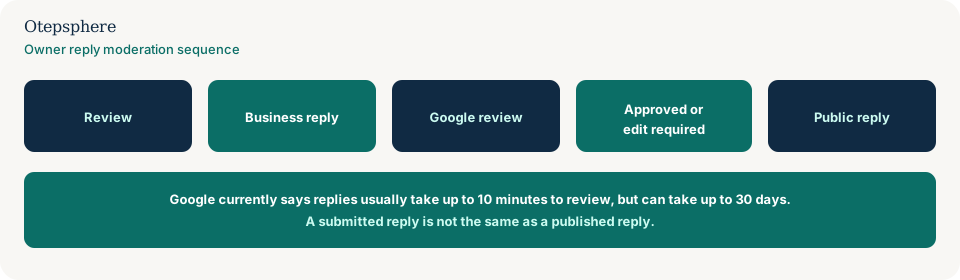
Review Reply Troubleshooting Checklist
- Confirm the customer review is public. This article is not about missing reviews.
- Confirm the profile is verified.
- Wait: usually up to 10 minutes, sometimes up to 30 days.
- Check the listing signed out, not only while logged in as manager.
- If Google asked you to edit, remove policy-sensitive content and resubmit.
- Avoid URLs and extra phone numbers unless you have a clear, policy-safe reason.
- Do not demand that the reviewer change their rating.
- Edit or delete a live reply from Read reviews if you need to correct it.
What not to assume
Do not assume a delay means Google deleted the customer review. Do not assume the manager screen is what customers see. Do not assume a competitor’s live reply with a phone number proves that format will pass for you.
What not to do
Practical action plan
- Open the review in an unsigned-out Maps view and confirm whether any owner reply is public.
- If you submitted recently, wait through the documented review window before rewriting.
- If you were asked to edit, write a shorter reply that only addresses the visit.
- Invite offline follow-up without stuffing the reply with URLs.
- If replies never send, check verification, access and profile status.
When professional help makes sense
Help is useful when you cannot tell a moderation queue from a wider Business Profile or access problem, or when a team’s reply templates keep failing review. It cannot guarantee Google will publish a reply.
Sources and further reading
- Google Business Profile Help: Manage customer reviews
- Google Business Profile Help: Tips to get more reviews
- Maps User Generated Content Policy: Prohibited & restricted content
Unable to respond to customers through Google reviews?
Otepsphere can review the profile status and reputation-management process to help distinguish a moderation issue from a wider Business Profile problem.
Contact OtepspherePublished by Otepsphere
Published by Otepsphere, founded by Joseph Enmanuel. Learn about Otepsphere and its approach to local SEO.