Why is a new Google review not showing?
A new Google review may not show yet because Google is checking it against review policies, because the reviewer’s app failed to post it, or because the content was removed as a policy violation.
Google’s missing-review help says reviews are usually removed for policy violations such as spam or inappropriate content, and that the policy check can take a few days. Customers on older phones or software may also have trouble leaving reviews; Google recommends updating the Maps app. Source: About missing or delayed reviews.
Ask the customer to open their Google Account contributions. If the review is not there, it was not posted. If it is there but hidden on the profile, the next checks are delay, filtering, merge and restrictions. How to ask for future reviews without breaking the rules is a different guide: how to get more Google reviews ethically.
Can reviews be delayed?
Yes. Google says the policy-check process might take a few days, which can delay a review’s appearance.
A delay is not a ranking tactic and it is not something a business can rush with a second post. Asking the same customer to submit the review repeatedly can look like spam. Wait, then check again from an unsigned-in browser and from the owner dashboard.
Delay
Policy review can take a few days New reviews are checked before they appear.Merge
Recently merged profiles can take a few days to show combined reviews Google says reviews from both profiles should display after that wait.Removal
Policy-violating reviews are not restored Spam and inappropriate content stay down.Next
Contact support after reinstatement losses or a temporary restriction Do not buy replacement reviews or create a new profile.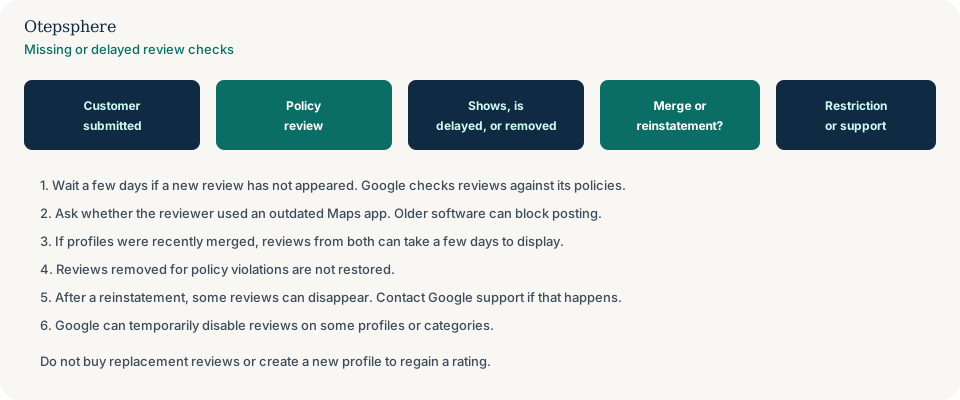
Can Google remove reviews?
Yes. Google removes reviews that violate its user-generated content policies or legal obligations.
Maps policy says contributions must be based on real experiences, and that deliberately fake content, off-topic reviews, defamatory language and personal attacks violate the policy. Google uses automated systems and human review. Reviews removed for policy violations will not be restored. Sources: Maps user-generated content policy and About missing or delayed reviews.
Can legitimate reviews be filtered?
A review that looks legitimate to the business can still be held or removed if Google’s systems treat it as spam, off-topic, or otherwise against policy. That does not mean every missing review was fake, and it does not mean every visible review has been manually approved.
Google does not publish a complete list of ranking-style “filters” for reviews. What it does say is that content is scanned for suspicious activity and may be removed or flagged. Treat a missing review as a moderation outcome unless Google or the reviewer shows a different cause. Do not tell customers their honest review was “stolen by a competitor.”
What happens to reviews after a profile merge?
After a merge, reviews from both profiles are combined, but it can take a few days for those reviews to display on Search and Maps. Replies to reviews may be lost.
Those two statements come from Google’s duplicate-help page and the missing-review page. If you recently requested a merge, wait before concluding the reviews were deleted. Merge process detail is in why a profile is marked as a duplicate. Sources: Resolve duplicate profiles and ownership issues and About missing or delayed reviews.
Can reviews disappear after GBP reinstatement?
Yes. Google says reviews might be removed after a Business Profile is reinstated, and that you should contact support for assistance if that happens.
That is a support path, not a promise that the reviews will return. Do not create a new profile to “recover” the old rating. Reinstatement itself is covered in what to do if a Google Business Profile is suspended. Source: About missing or delayed reviews.
What if all reviews disappear at once?
If all reviews disappear at once, treat it as a profile-level event until you have evidence of a more specific cause. Do not assume one explanation.
Google documents several profile-level possibilities: a temporary disablement of user-created content for certain profiles or categories; a Fake Engagement restriction that can unpublish existing reviews for a set period; a merge that has not finished displaying combined reviews; or a reinstatement cleanup. Some education categories also have reviews removed and disabled as a category policy. Check email from Google, the profile dashboard, and whether the public listing still exists. Sources: About missing or delayed reviews and Business Profile restrictions for policy violations.
If the whole listing is gone, start with Maps visibility and suspension diagnosis, not with review replacement. See why a business is not showing on Google Maps.
What evidence should I keep?
Keep dated screenshots of the public review list, the approximate review count and rating, the Maps URL or profile ID if you have it, and the dates of any merge, reinstatement or profile edit.
Those records help you describe what changed when you contact Google or a consultant. They do not force Google to restore content. Do not collect reviewers’ personal documents or publish customer identities. If you reported a review, Google Maps can show report status such as processing, content removed, content not removed, content restored, or report cancelled. Source: Report or fix content.
When should Google support be contacted?
Contact Google support when reviews disappear after a reinstatement, when you received a restriction notice you want to appeal, or when a merge has not shown combined reviews after several days.
Google’s missing-review page specifically says to contact support after reinstatement removals. Fake Engagement restrictions can be appealed through the process described on the restriction-help page. For ordinary delayed reviews, wait out the documented few days first. Start from Google Business Profile support or the review-management workflow Google provides in the Help Center.
What should businesses NOT do?
Do not ask customers to post the same review repeatedly, buy replacement reviews, incentivise a mass posting, attack competitors, or create a new profile just to regain a rating.
Those actions can create new policy problems, including Fake Engagement restrictions that hide reviews or block new ones. If the missing item looks like a policy-violating attack rather than a lost genuine review, use what a business can do about fake or malicious reviews instead of trying to out-post the other side. If the customer’s review is public but your owner response never appears, that is a moderation problem: why a Google review reply is not showing. If they never reached the review form at all, the request URL may be wrong: why a Google review request link is not working.
Missing Reviews Troubleshooting Checklist
- Confirm the customer actually posted the review on their Google Account.
- Wait a few days for a new review. Policy review can delay it.
- Ask whether the reviewer used an up-to-date Maps app.
- Note whether one review is missing or the entire rating count changed.
- Check for a recent profile merge and wait a few days for combined reviews.
- Check for a recent reinstatement. Contact support if reviews vanished afterwards.
- Read any Google email about review restrictions and use the official appeal if one exists.
- Keep screenshots, dates, the Maps URL and the previous review count.
- Do not buy reviews, gate replacements, or create a new Business Profile.
- Continue asking real customers ethically for new genuine reviews.
When professional Local SEO assistance makes sense
Help is useful when you cannot tell whether the profile merged, was restricted, or simply delayed a few reviews, and when the wider reputation process needs a policy-safe rebuild. No consultant can restore a review Google removed for a policy violation.
Ongoing response process sits in review and reputation strategy.
Official Google sources
- About missing or delayed reviews
- Business Profile restrictions for policy violations
- Maps user-generated content policy
- Manage customer reviews
- Resolve duplicate profiles and ownership issues
Reviews disappeared and you’re unsure what changed?
Otepsphere can review your Business Profile history, profile changes and broader reputation setup to help identify the most likely next step. Review restoration is decided by Google and cannot be promised.
Contact OtepspherePublished by Otepsphere
Published by Otepsphere, founded by Joseph Enmanuel. Learn about Otepsphere and its approach to local SEO.