Why did a booking provider appear that I didn't add manually?
A partner can attach a booking, reservation or ordering link when it tells Google it has a relationship with the business. That is different from a URL you typed into the profile editor.
Google currently says it works with select third-party providers, and that links to certain services can appear automatically on Search and Maps, provided and updated by third-party partners or through automated data from Google. Source: Manage your local business links.
A missing or rejected website URL is a different diagnosis, covered in why Business Profile links are missing or not working. That article also explains Google’s one-link-per-domain rule, which can look like a provider “took” the button.
Can Google display third-party links automatically?
Yes. Google currently documents automatic listing of third-party providers who state they have authorized relationships with the business.
For food ordering, Google currently says availability can come from those providers and update automatically. Automatic appearance is therefore a documented behaviour, not a glitch by default. Source: Manage online ordering options and Manage your local business links.
Can I set my own link as preferred?
When more than one link exists for a transaction type, Google currently lets you set a preferred link marked as “Business preferred”.
For booking, food ordering, or pickup and delivery, open that transaction type and use Set preferred link, then save. For pickup and delivery, Google currently also lets you mark preferred separately for pickup and for delivery when the provider offers that option. Preferred status is not documented as a ranking factor; it is a customer-facing preference among eligible links. Source: Manage your local business links and Manage online ordering options.
How do I remove an unwanted provider?
Use Google’s current Remove Provider / Remove link flow for that transaction type, then wait the documented processing window.
Google currently says: on Search, select Booking then Remove Provider; on Maps, Edit profile, Booking, Remove Provider. For food ordering, select the provider or link and choose Remove link. Providers need to remove third-party links within five days of a removal request for booking, and within five business days for ordering links. Source: Manage your local business links and Manage online ordering options.
What if the provider does not remove itself?
If the provider does not process the request, Google currently says to report a violation of third-party policy.
Google’s third-party policies cover online ordering, scheduling and booking providers as well as agencies. Report through the Business Profile third-party violation complaint process documented in Google’s third-party help. Google currently says it might not respond personally, but it investigates. Keep the date of your removal request. Source: Tips for working with third parties and Business Profile third-party policies.
Can I disable online ordering entirely?
For ordering, Google currently says that if you turn off “Accept orders on your profile”, ordering options and links — both first-party and third-party — are hidden.
That control is documented for ordering. It hides all order options, including ones you added. It is not documented as a way to hide only one rival provider while keeping your own order button. Booking removal still uses Remove Provider. Source: Manage online ordering options and Manage your local business links.
Why does the link return after I removed it?
It can return if the partner re-supplies the relationship, if you are looking at a manually added URL that was never removed, or if automated data still associates that provider with the location.
Distinguish three sources: a link you added, a third-party integration, and other automated data Google mentions in the local-links help. Also check the domain rule: a second path on a domain already used for that action type will not replace the first. Broken or rejected URLs are still diagnosed in why Business Profile links are missing or not working. Menus that point at third-party ordering are a related but separate issue in wrong or outdated Business Profile menus.
Could the wrong link send customers to another location?
Yes. A booking URL that opens the wrong shop, a location picker that forgets the branch, or a partner profile for a different address can send the customer elsewhere.
Google currently requires action links for multi-location businesses to lead to a website for a specific location, and forbids landing pages for another location of the same business. Test the live button as a customer. Location-specific destinations are also required in Business Profile link policies. Wrong-branch booking on the website is diagnosed in booking systems that open the wrong location. Source: Business links policies and guidelines.
How should multi-location booking links be managed?
Each profile should complete the action for that location. Do not point every branch at one generic booking homepage.
Preferred links and partner removals need to be done per location. Measurement of those clicks belongs with tracking Business Profile leads in GA4, which will not tell you if the partner booked the wrong shop.
Third-Party Link Diagnostic
Profile
Google Business Profile Booking and ordering links can be added by the business or by partners.Yours
First-party link A URL you add to complete the action on your own site.Partner
Third-party provider Can appear automatically when a partner states a relationship.Preferred
Preferred provider Marked as business preferred when more than one link exists.Customer
Customer booking The destination the searcher actually uses.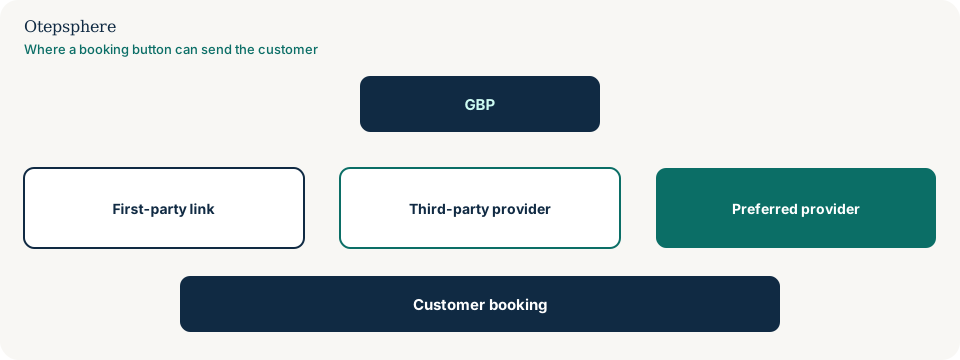
Booking-provider diagnostic table
| What you see | Likely source | Documented control |
|---|---|---|
| Provider you never added | Partner integration or automated data | Remove Provider / Remove link, then wait the documented window |
| Your URL rejected | Format, crawl, eligibility or domain already used | Fix the destination; do not stack the same domain |
| Several valid links | First-party plus partners | Set preferred link |
| All order buttons gone after a toggle | Accept orders turned off | That hide is global for ordering options |
What not to assume
Do not assume a third-party button means the profile was hacked. Do not assume Google will prefer your website automatically. Do not assume hiding orders removes booking. Do not assume a 404 booking page is the same problem as an unwanted partner.
What not to do
Practical action plan
- Record the live provider name, URL and whether the booking completes for this location.
- Add an eligible first-party link if you do not have one, on a domain that is not already used.
- Set that link as preferred when Google offers the control.
- Use Remove Provider or Remove link for the unwanted partner.
- Wait the documented five-day or five-business-day window, then escalate through Google’s third-party complaint process if needed.
When professional help makes sense
Help is useful when partner buttons return after removal, or when a chain’s booking domains collide. It cannot force Google to keep a non-compliant link.
Sources and further reading
- Manage your local business links
- Manage online ordering options
- Business links policies and guidelines
- Tips for working with third parties
- Business Profile third-party policies
Google sending customers to an unwanted booking or ordering provider?
Otepsphere can review the profile links and customer journey to identify where the third-party integration is coming from.
Contact OtepspherePublished by Otepsphere
Published by Otepsphere, founded by Joseph Enmanuel. Learn about Otepsphere and its approach to local SEO.