Why can Google mark a business closed?
Google can show a closed status when an owner sets it, when another source reports a closure, or when earlier closure information has not been replaced with current open hours.
Google documents owner controls for temporarily closed and permanently closed, and says that if it receives an update that a location is temporarily closed, you may get an email notification. It also gathers information from user reports and licensed content and may update a profile when sources say information is inaccurate. Those are the supported possibilities. Do not add rumours about secret closure scores. A renovation that is closed for more than seven days is an operational choice documented in temporary relocation and renovation Local SEO. Sources: Mark your business as closed and Understand Google updates on your Business Profile.
A suspension can also hide or limit a listing, which is not the same as a closed label. If you cannot open the public profile at all, start with Google Business Profile suspended.
Short closure
Use special hours when the business is closed six days or fewer Google currently points closures of seven or more days, off-season, or unknown length to temporarily closed.Still the same business?
Reopen the existing profile with main hours If you never marked it closed, check Google updates, user reports and the website before creating another listing.Closed as part of a move or name change
Do not reopen that profile Google currently says to add and verify a new business in that situation, and to contact Google if reviews should move.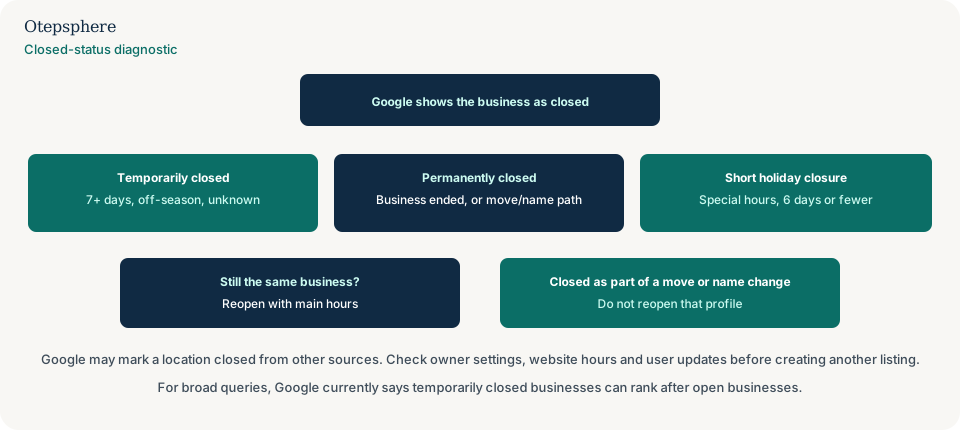
Temporarily closed vs permanently closed
Temporarily closed means the business is expected to return; permanently closed means the business at that listing has ended, though the profile may still appear with a closed label for people who search for it.
Google currently says to use temporarily closed if the business is closed for more than seven days, closed for the off-season, or closed indefinitely, and to use special hours if it is closed for seven days or less. A permanently closed profile may still appear on Search and Maps, clearly marked closed. Seasonal off-season closure is covered in how a seasonal business should manage Google Business Profile and Local SEO. If one location is genuinely ending while other branches stay open, that is not an incorrect closed label: how to close one business location without creating Local SEO problems. Source: Mark your business as closed.
What not to conclude: that permanently closed deletes the listing from Google’s memory, or that temporarily closed is a ranking strategy for a quiet Tuesday.
When should Special hours be used instead?
Use special hours when the business adjusts hours or stays closed for six days in a row or fewer, including a public holiday, rather than marking the whole profile temporarily closed.
Google’s special-hours article uses the six-day wording; the closed-status article uses seven days or less for special hours. Treat a one-week shopfitting as temporary closure, and a Boxing Day shutdown as special hours. Special hours need main hours set to “Open with main hours” before they display. See why Business Profile hours can be wrong and How to set Special hours.
How do I reopen my Business Profile?
Reopen by editing Hours and selecting Open with main hours, then saving the days and times the business now operates; the temporarily or permanently closed label is then removed from Search and Maps.
If you do not want hours to display, Google currently offers Open with no main hours. Multi-location operators can mark locations open in bulk from Business Profile Manager. Important exception: if the profile was marked permanently closed as part of a location or name change, Google currently says not to reopen it. Add and verify a new business instead, and contact Google if reviews should be moved. Source: Mark your business as reopened.
If the reopen save itself is pending or not approved, treat that as an edit-review problem: why Business Profile edits stay pending or are not approved.
What if I never marked the business closed?
If you never marked it closed, another source or a previous manager may have, so check Google updates, user reports, the website, and any former owner or agency access before assuming Google invented the label.
A leftover “we’re moving in January” page, a directory that still says permanently closed, or a staff member who used the wrong hours option can all produce the same public result. Restore open hours on the real profile, align the website, and log the incident with Google Business Profile change monitoring. If you cannot open the dashboard, recover access rather than creating a spare listing: lost access to a Google Business Profile.
What if the business moved?
If the business moved and is still the same business, update the existing profile’s address rather than reopening a listing that was closed as part of Google’s move or name-change path, and follow the relocation guide for website and citation updates.
Google’s reopen help is explicit: do not reopen a profile that was marked permanently closed as part of a location or name change. The practical Local SEO sequence for a genuine move is how to move a business without losing Local SEO.
Should I create another profile?
No, not for the same eligible business that is still operating and should be represented by the existing listing.
Create a new profile only when Google’s current guidance says the old one should stay closed because the business identity or location change requires it, or when you are opening a genuinely new eligible location. A second profile for the same shop that is merely labelled closed by mistake is a duplicate risk: why a Google Business Profile is marked as a duplicate.
What happens to rankings while temporarily closed?
Google currently says that for broad queries, temporarily closed businesses can rank after open businesses, and that this effect depends on category, query type, and how many matching businesses are temporarily closed.
That is the documented ranking note. Google does not publish a numeric drop, a guaranteed recovery time after reopening, or a claim that branded searches are unaffected. Use temporary closure when you are actually closed for a week or more so customers do not travel to a locked door. Do not use it as an SEO tactic, and do not expect Maps to pretend you are open. Source: Mark your business as closed.
What should multi-location businesses check?
Multi-location businesses should confirm which location is labelled closed, whether bulk actions were used, and whether the website location page and Business Profile landing page for that branch still describe an open premises.
One closed flag on the wrong row of Business Profile Manager will send customers to a branch that is still trading while hiding the one that is not. Check hours, address and website URL per location. Measure locations separately after you reopen so a single branch’s status change is not buried in a brand average: how to track Local SEO across multiple locations.
Incorrect Closure Checklist
- Read the public label: temporarily closed, permanently closed, or a dated special-hours closure.
- Open Hours in the owner editor and see which option is actually saved.
- Use special hours for closures of six days or fewer.
- Use temporarily closed for seven or more days, off-season, or an unknown shutdown.
- Reopen with main hours if the same business is still operating at that listing.
- Do not reopen a profile Google says was closed as part of a move or name change; follow that separate path.
- Align the website and important listings so they no longer say closed.
- Check Google updates and former user access if you never set the status.
- For chains, confirm the closed location is the intended row in Business Profile Manager.
- Do not create a second profile for the same operating business.
When professional Local SEO assistance makes sense
Help is useful when the listing stays closed after you set open hours, when a move and a mistaken permanent closure are tangled, or when several locations were bulk-marked closed. Otepsphere can review the profile, website and local information. Google still controls the public status.
Official Google sources
- Mark your business as closed
- Mark your business as reopened
- How to set Special hours
- Understand Google updates on your Business Profile
Google showing your open business as closed?
Otepsphere can review the Business Profile, website and important local business information to identify what should be corrected.
Contact OtepspherePublished by Otepsphere
Published by Otepsphere, founded by Joseph Enmanuel. Learn about Otepsphere and its approach to local SEO.