Can a seasonal business have a Google Business Profile?
Yes. Seasonal businesses are eligible for a Google Business Profile under Google’s current eligibility exceptions, provided they still meet the in-person contact rules when they are open.
Google’s example is an ice-skating rink only open in winter months. Ski businesses, summer camps, Christmas attractions, seasonal tourism operators and seasonal recreation businesses can fit the same pattern when they actually receive customers in person, or travel to them, during the season. Source: Business eligibility and ownership guidelines. A seasonal service URL on the website (for example air-conditioning servicing that only runs in summer) is a different job from this whole-business profile question: should seasonal service pages be deleted and recreated each year. A one-time pop-up or exhibition booth is also a different case: whether a temporary event can have a Business Profile.
Does Google require permanent signage?
Yes, for the seasonal-business eligibility exception Google currently documents: these businesses must display permanent signage at their location year-round.
That is in addition to the general storefront rule that businesses showing an address should maintain permanent fixed signage of the business name at that address. A banner that comes down with the last customer does not match the year-round signage Google names for seasonal eligibility. If you do not show an address because you are a service-area business, follow service-area rules instead of forcing a public pin. Sources: Business eligibility and ownership guidelines and Guidelines for representing your business on Google.
What should I do when the season ends?
When the season ends, update the Business Profile and website so customers can tell that the business is not currently serving, and when it is expected to return.
Google’s seasonal-hours guidance is: during the open season, set regular hours (and special hours for holidays or short events); you may also say in the business description that you are open only for a specific seasonal period. During off-season, you can mark the business as temporarily closed, then set regular hours again when you reopen. Source: Guidelines for representing your business on Google.
Should I mark the profile temporarily closed?
Yes, when the business is closed for the off-season, closed for more than seven days, or closed indefinitely, Google currently instructs you to use “Temporarily closed.”
Google also notes that for broad queries, temporarily closed businesses can rank after open businesses, and that this effect depends on category, query type, and how many matching businesses are temporarily closed. That is not a reason to leave hours looking open. It is a reason to tell the truth and plan for lower discovery while you are shut. Source: Mark your business as closed.
Special hours vs temporarily closed
Use special hours for a short change of up to six consecutive days. Use temporarily closed for seven or more days, an unknown-length closure, or the off-season.
| Situation | Google’s current tool | Typical seasonal example |
|---|---|---|
| Closed or different hours for up to 6 days in a row | Special hours | A holiday inside the open season |
| Closed 7 or more days, unknown length, or off-season | Temporarily closed | The months the ice rink or summer camp is shut |
| The business will not return | Permanently closed | The attraction has ended, not paused |
Special hours also require the profile to be set to “Open with main hours” for those dates to display. Sources: How to set Special hours and Mark your business as closed.
Should I remove my Business Profile during the off-season?
No. You should not delete a legitimate seasonal Business Profile only because the season ended.
Google’s documented off-season action is temporary closure, then restoring regular hours at reopen. Deleting the profile discards the public record customers already use, including reviews attached to that listing. Recreating it later can look like a duplicate of the same business. Use permanently closed only when the business will not return.
What should the website show during the off-season?
The website should tell customers that the business is out of season, when it is expected to reopen, and how to enquire or book for the next period.
Useful, honest information includes the next opening period, enquiry or waitlist details, booking availability if you take off-season reservations, which seasonal services return, and expected reopening dates you can actually honour. Do not leave “open today” copy, live chat that promises same-week visits, or schema hours that contradict the closed profile. The page should still be crawlable. Hiding the whole site until spring helps nobody who is planning next season.
Should SEO stop during the off-season?
No. There is no universal rule that Local SEO must stop in the off-season.
Demand falls. That does not mean you should noindex the site, pause measurement, or let the profile drift. Off- season work is usually maintenance: keep the website accessible, keep important pages accurate, keep business entity information consistent, update dates and FAQs when they change, keep tracking working, and prepare the profile and pages before the next opening. Creating a dozen thin “best time to visit” posts is not required.
When should pre-season Local SEO begin?
Pre-season Local SEO should begin early enough that hours, pages and booking paths are accurate before customers start looking — not on the morning you unlock the gate.
Google does not publish a ranking calendar for seasonal businesses. Do not treat a 30-day or 90-day “SEO countdown” as a Google rule. Use your own booking pattern: if people research ski hire in August for a December trip, August is when the site and profile should already say the next season’s dates. If the business is a local ice rink that fills the week it opens, the urgent job is reopening the profile and hours on time.
Seasonal Business Annual SEO Cycle
1. Off-season
Maintenance Keep the profile. Mark it temporarily closed when the location is shut for the season.2. Pre-season
Preparation Update hours, pages and booking information before customers start looking.3. Reopening
Set regular hours Remove the temporary-closed status when customers can actually visit or book.4. Active season
Keep facts current Hours, services and website copy should match operations.5. Post-season
Review, then maintain Do not delete a legitimate profile only because the season ended.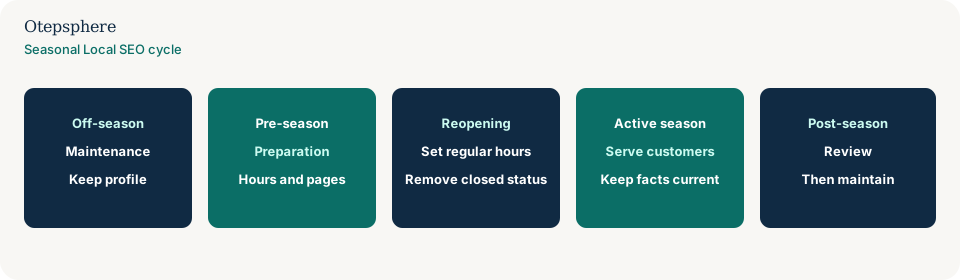
| Phase | Business Profile | Website | Measurement |
|---|---|---|---|
| Off-season | Temporarily closed; do not delete | Next opening, enquiries, honest closed state | Keep properties and tracking intact |
| Pre-season preparation | Draft hours, photos, services, description dates | Update dates, booking, seasonal services | Confirm forms, calls and tags still fire |
| Reopening | Restore regular hours; remove temporary closure | Remove “closed for the season” as the lead message | Annotate the reopen date in reports |
| Active season | Keep hours and special hours true | Keep availability and offers current | Watch leads, not only rankings |
| Post-season review | Close accurately again | Record what confused customers this year | Compare seasons with the same definitions |
What not to assume
Do not assume a seasonal business must delete its listing. Do not assume special hours can cover a three-month shutdown. Do not assume temporary closure “kills SEO” as a Google-stated rule; Google only notes that for some broad queries, closed businesses can rank after open ones. Do not assume year-round content volume is required to remain eligible.
What not to do
Practical action plan
- Decide the last customer-facing day and whether the gap is six days or more.
- Set special hours or temporary closure using Google’s current definitions.
- Update the website with reopen information customers can use.
- Leave the profile in place. Confirm signage still matches a public address if you show one.
- Before the next season, restore hours and remove the closed status on the day customers can actually visit or book.
- Measure enquiries against the same season last year, not against a year-round competitor’s chart.
Seasonal Local SEO checklist
- The business is genuinely seasonal and still meets in-person eligibility when open.
- Year-round permanent signage is in place if you rely on the seasonal storefront exception.
- Off-season status is temporarily closed, not permanently closed, if you will return.
- Special hours are only used for short in-season changes.
- The website states next opening, enquiries and booking rules.
- Search Console, analytics and forms still work while you are shut.
- The same profile is reused at reopen.
When professional help makes sense
Help is useful when several seasonal locations close on different dates, when the website and profile disagree, or when a previous vendor deleted listings each winter. It cannot guarantee off-season or in-season rankings.
Sources and further reading
- Google Business Profile Help: Business eligibility and ownership guidelines
- Google Business Profile Help: Guidelines for representing your business on Google
- Google Business Profile Help: Mark your business as closed
- Google Business Profile Help: How to set Special hours
Running a business that opens only part of the year?
Otepsphere can help align your Business Profile, website and Local SEO activity with the actual customer season instead of treating the business like a year-round operation.
Contact OtepspherePublished by Otepsphere
Published by Otepsphere, founded by Joseph Enmanuel. Learn about Otepsphere and its approach to local SEO.