What does this problem actually mean?
It means a service you only offer in part of the year has its own URL, and each off-season you have to decide whether that page stays live, goes 404, or comes back as a new path.
Pool opening, heating installs, Christmas lighting, air-conditioning recharge and similar work often sit on dedicated service URLs. Customers still search those services in the closed months. The page’s job in the off-season is to tell the truth about availability, not to vanish.
Is this the same as managing a seasonal Google Business Profile?
No. This article is about one website service URL. Opening status, hours and signage for a business that closes as a whole belong on the Business Profile guide.
If the entire shop or attraction shuts for months, follow how a seasonal business should manage Google Business Profile and Local SEO. If only one service pauses while the rest of the business stays open, keep this page. Permanently stopping a service is a different decision: what to do when a discontinued service page still ranks.
URL
Keep the same address Returning customers and crawlers should not hit a missing page each winter.Copy
State the season clearly When it runs, how to book, what happens off-season.GBP
Is the whole business seasonal? Hours and open status belong on the seasonal Business Profile guide.Yes
Update, do not recreate Change dates. Do not mint a new slug each year.Next
Watch soft 404s An empty off-season page can look like a missing document.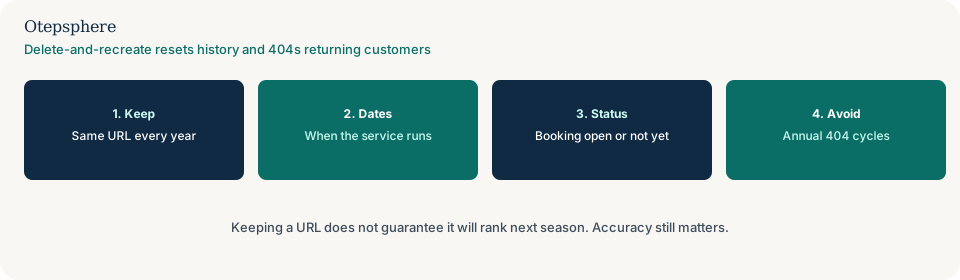
Should I keep the URL through the off-season?
Usually yes. Keep the same URL and update dates, booking status and next-season copy rather than deleting the page.
A stable URL is easier for customers, internal links and Search Console measurement. Deleting the document means the next season’s page is a new URL unless you restore the exact same path. Restoring a path after a long 404 is not the same as never having removed it. Google does not document that keeping a URL “saves” last year’s ranking.
What should off-season copy say?
It should say the service is not bookable now, when you expect to take bookings again, and how to enquire in the meantime if that is genuine.
Put that answer in the first screen, the title if needed, and any form or button that would otherwise look like an immediate booking. “Heating installs resume from March; leave your details and we will confirm when the diary opens” is usable. A page that still says “book this week” while the crew is not doing that work is not. People-first guidance is about helping the person who would use the page. Source: Creating helpful, reliable, people-first content.
Does keeping the URL preserve last season’s rankings?
No. Google does not document that leaving a seasonal service URL live preserves its previous rankings.
Keep-and-update is a customer and measurement choice: the URL stays findable, history in Search Console stays on one path, and you avoid an annual 404 cycle. Ranking for the service query still depends on relevance, usefulness and competition when people search. Do not treat a kept URL as a ranking guarantee.
What happens if I delete and recreate the page each year?
Deletion tells crawlers the URL is gone. Recreating it later — especially on a new path — starts a new URL history and sends returning visitors and bookmarks to a missing page until you rebuild it.
If you remove the page with no equivalent, return a real 404 or 410, not a 200 empty shell. Google can treat a success status with “not found” or empty content as a soft 404. Annual delete-and-republish also breaks internal links and any citations you control that still point at last year’s path. See why Google treats a local page as a soft 404.
Keep-and-update versus delete-and-recreate
| Approach | What the customer sees | What happens to the URL | Usual fit |
|---|---|---|---|
| Keep and update | Honest off-season state and when booking resumes | Same URL; Search Console history stays in one place | Service that returns every year |
| Delete and recreate | 404 in the closed months; a “new” page next season | History on that path is interrupted; a new path has none | Rarely the default for a repeating seasonal service |
| Permanent retirement | Service will not return | Rewrite, redirect or 404/410 as a discontinued service | You stopped offering it, not a seasonal pause |
| Empty 200 “coming soon” | Looks unpublished or broken | Risk of soft 404 | Avoid; use real copy or a real gone status |
What should I not do?
Action checklist
- Decide whether the service will return. If not, treat it as discontinued, not seasonal.
- Keep the URL. Update the first screen with availability and the next booking window.
- Disable or relabel booking actions that would accept work you will not do until the season returns.
- Align related site copy, ads and any profile service list with the same dates.
- Before the season, restore live booking copy on the same URL. Do not invent a new path.
- Watch that URL in Search Console across seasons. There is no published ranking calendar.
When professional help makes sense
Help is useful when seasonal service URLs, whole-business closure status and leftover 404 cycles are mixed in one site, or when last year’s path was replaced without a redirect. Updating availability copy does not guarantee seasonal rankings.
Sources and further reading
- Google Search Central: Creating helpful, reliable, people-first content
- Google Search Central: Troubleshoot crawling errors (soft 404)
- Google Crawling Infrastructure: How HTTP status codes affect Google's crawlers
- Google Business Profile: Guidelines for representing your business on Google
Seasonal service pages being deleted and rebuilt every year?
Otepsphere can review whether those URLs should stay published with honest off-season availability, rather than an annual delete-and-recreate cycle — without promising that last season’s rankings will return.
Contact OtepspherePublished by Otepsphere
Published by Otepsphere, founded by Joseph Enmanuel. Learn about Otepsphere and its approach to local SEO.