Inventory old URLs that still receive links or visits
Other sites still point at local URLs that no longer represent a useful destination. Chambers, newspapers, directories, partners and old blog posts often keep linking to last year’s location or service path. A 404 on your site does not delete those links. A closed-location page that still returns 200, or that already dumps visitors onto the homepage, can be just as misleading.
This is a URL-and-link decision after a redesign, rename, CMS change or closure. Prioritise URLs with remaining backlinks, historical Search Console clicks, or a Google Business Profile that still names them — not every 404 in the log. Export 404s from Search Console and a crawl, then match them to a backlink report you actually have. Also list closed-location URLs that still serve 200, soft-404 templates, or poor redirects.
Build a sheet: old URL, current HTTP status, link count or referring domains if you have them, last known intent (service, location, blog), and a candidate destination. Skip vanity 404s that never had a purpose. After a name or domain change, the recovery job is how to recover local backlinks after a rebrand, not this inventory. Redirect chains on URLs that already move are covered in whether redirect chains are hurting location and service pages.
Find
404s that still attract links Search Console, a crawl and a backlink export show which expired local URLs still matter.Equivalent
Redirect to the matching page Same service, same remaining location, or the renamed URL that still answers the visitor.Closed branch
Honest replacement or closure page A remaining nearby location can be the target when it actually helps. Otherwise explain the closure.No replacement
404 or 410 A homepage redirect wastes the visitor and dilutes what the link was about.After
Update what you control Internal links, citations you can edit, and the Business Profile should not keep sending people to the 404.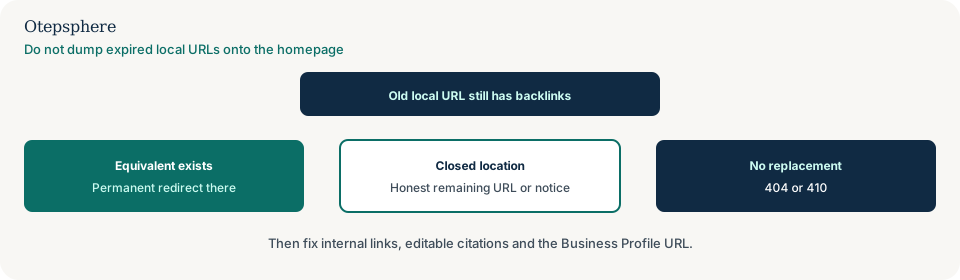
Choose a relevant replacement rather than the homepage
Redirect when a live page is the same job: the renamed location URL, the same service on a new path, or the remaining branch that actually serves that customer. Use a server-side permanent redirect and point it at the equivalent page in one hop, not at a random popular URL.
If you cannot name why a visitor from that old link would be satisfied, it is not equivalent. A homepage redirect is rarely the right default. Google can still discover the URL from remaining links. A true 404 or 410 tells Google you do not want that URL indexed. A permanent redirect tells Google the replacement is the representative URL. Source: Specify a canonical URL and soft 404 guidance on gone versus moved pages. Google’s site-move help recommends server-side permanent redirects to the mapped URL, kept for a long time, and warns against long redirect chains. Source: Site moves with URL changes. Do not treat a 301 as a ranking bonus you purchased.
Handle backlinks to a closed business location
First confirm whether the location is actually closed, or whether only the URL changed. A rename of an open shop belongs on the equivalent-page path above, and on rebrand link recovery or how to rebrand without losing Local SEO visibility when the trading name or domain changed. Closing the Maps listing, the locator row and the public hours is the operations playbook: how to close one location without creating Local SEO problems. Return here for leftover links after that sequence, not instead of it.
A remaining location is only a good redirect target if it helps that person. Travel time, service availability and the closed page’s original intent all matter. Sometimes a short, true closure notice is more honest than a redirect to a far branch. Typical remaining referrers are a chamber directory, a “stores in this town” blog, a supplier locator, or last year’s sponsorship page. The visitor still expects that premises.
Find
Which sites still point at the closed shop URL? Search Console, a crawl and a backlink export name the referring pages.Honest
Is there a remaining location or service page? Only redirect if that page is a fair next step for the visitor.Serve
Set the status your site should return Equivalent redirect, a closure notice, or 404/410 — not a homepage dump.Yes
Your URL decision is not the publisher’s copy Important directories and partners still need an updated destination.Next
Ask those publishers to change the link That outreach is this page. Your 404 inventory is a different guide.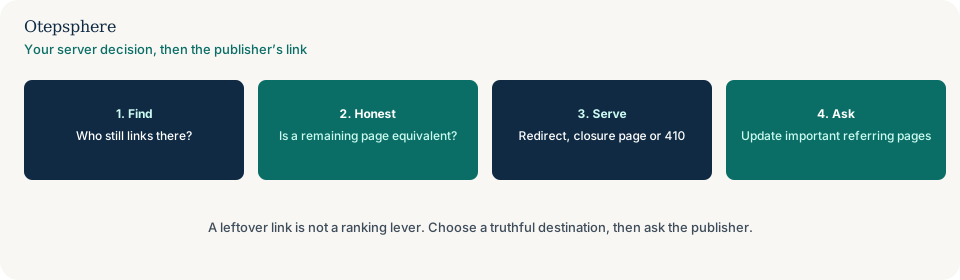
When a closure notice helps and when to return 404 or 410
Distinguish a useful, substantive closure-information page from an empty page that says only “not found.” A remaining equivalent location or service page, a short closure notice, or a real 404 or 410 can each be honest. The corporate homepage is not the default.
A useful custom 404 can still help people; it must return 404, not 200. Soft 404s happen when you 200 an empty or “not found” template: why Google treats a local page as a soft 404. Where content is permanently removed without a relevant replacement or useful remaining purpose, return an appropriate 404 or 410 response. Do not invent a location page just to catch old links. A service you no longer offer but that still ranks is what to do when an old service page still ranks.
Update referring links and outdated listing descriptions
A redirect changes what happens on your website. It does not update a directory that still advertises a closed shop. After choosing the correct response for the old URL, review important referring pages and any listings you control.
If a remaining branch genuinely serves the same customer need, provide its current URL and explain the change. If no equivalent remains, ask the publisher to mark the old location closed or remove the misleading reference. Keep a record of the referring page, requested correction and outcome.
Distinguish a useful, substantive closure-information page from an empty page that says only “not found.” Where content is permanently removed without a relevant replacement or useful remaining purpose, return an appropriate 404 or 410 response. Do not redirect every closed branch to the homepage just because it has backlinks.
Ask when the referring page still describes the shut shop as open, or when the link is a directory row you can edit. Unlinked name-only mentions are how to find and reclaim unlinked brand mentions. Citation records you control are a separate hygiene job: local citation management. A locator that still lists the closed shop is how to fix a store locator that still shows closed locations.
Test redirects and update internal references
Implement one-hop permanent redirects where an equivalent page exists. Return 404 or 410 where nothing honest remains. Then update internal links, editable citations and Business Profile URLs so you are not still sending people to the old path. Re-crawl the old URLs and confirm the chosen status or destination.
If developers are about to rename location paths, plan the map first: what happens when developers change local URLs without a redirect plan. Help is useful when a migration left hundreds of linked 404s, when closure redirects were pointed at the homepage in bulk, when dozens of directories still show a shut clinic as open, or when backlink data and Search Console do not agree. Redirects cannot guarantee recovered traffic, and leftover hrefs are not a documented ranking factor.
- Collect old URLs that still have links, historic search demand, or a misleading 200/homepage dump.
- Classify each as equivalent, closed-with-replacement, useful closure notice, or gone.
- Implement one-hop permanent redirects where equivalent.
- Return 404 or 410 where nothing honest remains.
- Update internal links, editable citations and Business Profile URLs.
- Record important referring pages, the requested correction, and the outcome.
- Re-crawl the old URLs and confirm the chosen status or destination.
Old-URL decision table
| Old URL job | Honest destination | HTTP outcome | Avoid |
|---|---|---|---|
| Renamed location path, shop still open | New location URL | 301/308 in one hop | Treating this as a closure playbook, or chaining through two old folders |
| Service page moved | Matching service URL | 301/308 | Redirect to a blog post about a different service |
| Closed branch, nearby equivalent | Remaining location that can actually serve them | 301/308 after a truthful notice if needed | Farthest high-traffic location, or the homepage |
| Closed branch, no equivalent | Closure page or none | Useful 404 page with 404 status, or 410 | Homepage dump; assuming leftover links will keep the shop ranking |
| Directory still lists the shut shop as open | Your URL decision plus an updated listing | Whatever you chose above; then edit or request a correction | Assuming a 301 on your site rewrites their copy |
| Thin city doorway | Best remaining useful URL, or gone | Redirect or 404 based on a cleanup audit | Keeping the doorway “for the links” |
Sources and further reading
- Google Search Central: Troubleshoot crawling errors
- Google Search Central: Specify a canonical URL
- Google Search Central: Site moves with URL changes
- Google Search Central: Redirects and Google Search
Expired location URLs still picking up links?
Otepsphere can map those old URLs to equivalent live pages where they exist, and flag homepage dumps or stale directory copy that still send people to a closed shop — without promising recovered rankings.
Contact OtepspherePublished by Otepsphere
Published by Otepsphere, founded by Joseph Enmanuel. Learn about Otepsphere and its approach to local SEO.