What does link recovery after a rebrand mean?
It means other sites still point at the old hostname or still label the link with the previous name, so customers and crawlers need a mapped path to the current site.
Recovery is redirects plus a short list of publisher updates. It is not a new-business launch.
Is this Google’s rebrand decision?
No. That guide is whether you keep the same Business Profile when the public name changes.
Start with how to rebrand without losing Local SEO visibility if the listing identity is still open. Then recover links here.
Map
Does each old URL have an equivalent live page? Same location or service job, not a homepage dump.301
Use a server-side permanent redirect Google’s site-move help recommends one hop, kept for a long time.Ask
Update publishers that still show the old name or host Redirects catch crawlers; humans still click the old brand.Yes
Identity is a different diagnosis Whether Google treats the name change as a rebrand is another guide.Next
Do not start a second Maps listing Link recovery is not a new-business launch.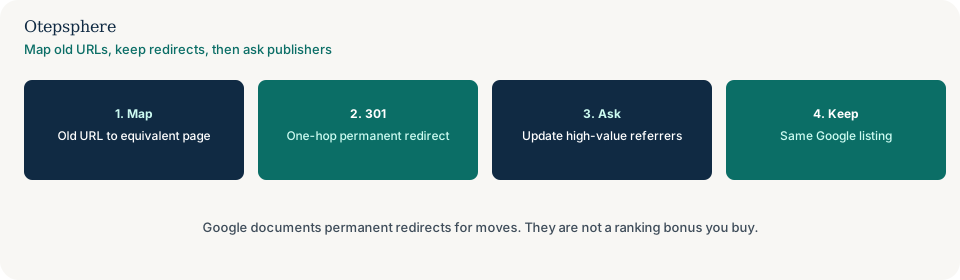
Is this a generic 404 backlink inventory?
Related. That page is any expired local URL. This page is the name or domain change as the cause.
Use what to do with old local URLs that still have backlinks for the status-code map. Closed shops are backlinks pointing to old or closed location pages.
What should the redirects do?
One server-side permanent redirect from each old URL to the equivalent current page, kept for a long time.
Google’s site-move documentation recommends permanent redirects, warns against long chains, and notes that permanent redirects do not cause a loss of PageRank. Source: Site moves with URL changes. Do not treat that as a promise that rankings stay still.
When should publishers update?
When the visible brand or hostname on a high-traffic page would confuse a customer, even if the redirect works.
Give them the current URL. Do not demand keyword-stuffed anchors. Mentions with no href are how to find and reclaim unlinked brand mentions.
Recovery decision table
| What you see | What it usually means | Decision | What not to assume |
|---|---|---|---|
| Old domain; shop still open | Host move | One-hop 301 to the equivalent URL; keep them | That you should create a second Maps listing |
| Name changed; same host | Copy and citation job | Update titles and important referring pages | That every old mention must be deleted |
| Old URL 404s; no map | Missing redirect | Use the 404-backlinks guide to pick a destination | That the rebrand “failed” |
| Google listing identity still undecided | Rebrand eligibility | Use the rebrand guide first | That link recovery replaces that decision |
What should I not do?
Action checklist
- Map old URLs to equivalent live pages. Note gaps.
- Set one-hop permanent redirects. Crawl a sample.
- Finish the rebrand identity decision on the listing.
- Email publishers whose visible brand or host would confuse a customer.
- If a shop closed rather than renamed, switch guides.
- Keep redirects for at least a year, generally longer.
When professional help makes sense
Help is useful when a domain change, a CMS migration and a name change happened in the same quarter. It cannot make Google treat the move as risk-free, and it cannot force every publisher to update the visible name.
Sources and further reading
- Google Search Central: Site moves with URL changes
- Google Search Central: Redirects and Google Search
Old domain or brand still in other sites’ links?
Otepsphere can map old URLs and a short publisher list after a rebrand — without treating redirects as a ranking guarantee.
Contact OtepspherePublished by Otepsphere
Published by Otepsphere, founded by Joseph Enmanuel. Learn about Otepsphere and its approach to local SEO.