Why can a Google Maps pin be wrong?
A pin can be wrong because the stored address is incomplete, because the map marker was placed on the building centroid instead of the entrance, or because Google combined owner edits with other sources that still point at an old or nearby location.
Google compiles Business Profile information from owner edits, websites, licensed data and user contributions. A user-suggested edit, an old website, or a previous tenant at the same complex can pull the marker off your door. Source: How Google sources and uses info in Business Profiles.
Representation guidelines also require a precise, real-world location. P.O. boxes and remote mailboxes are not acceptable storefront addresses. Virtual offices are not eligible. Source: Guidelines for representing your business on Google.
Is the address wrong or only the pin?
The address is wrong when the published street, number or suite does not match where customers should arrive. Only the pin is wrong when the text address is correct but Directions drops people at the wrong entrance, car park or neighbouring unit.
Those are different edits. Changing the street number when the number is already right will not move a pin that sits on the rear loading dock. Leaving a missing suite number can send people to the correct building and the wrong door. Diagnose before you type.
Address
Edit Location details, including suite or floor Use landmarks only where the official street address does not pinpoint the place.Pin
Use Adjust and point the pin at the real entrance Google also uses this when a street number cannot be found.Service-area
Hide the public address if customers do not visit Do not invent a shopfront pin.Website
Show the same real address plus access notes Do not create a second profile to force a better pin.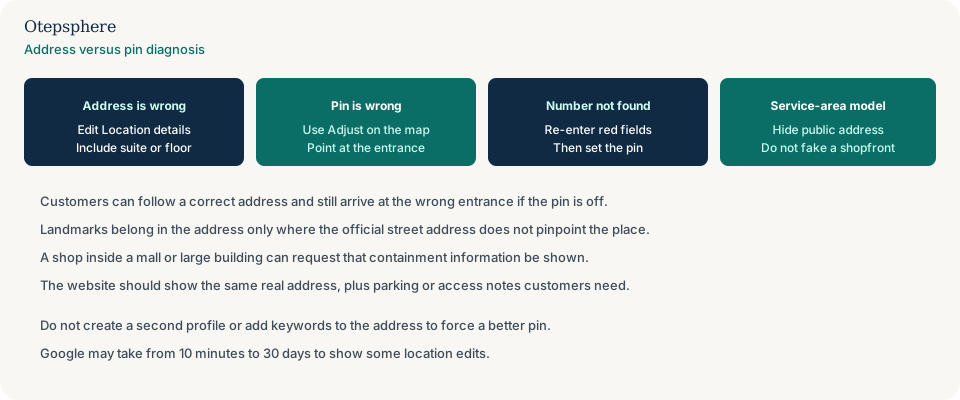
How can I correct the Business Profile address?
Correct the address from the Business Profile Location editor: Edit profile, Location, then Business location.
Enter a complete street address. Include building, suite and floor numbers. If Google highlights fields in red, re-enter those parts. Google says changes usually take about 10 minutes and can take up to 30 days. If the business sits inside another business, such as a store in a shopping mall, you can request to have that containment shown. Source: Manage your business address.
If you cannot open the editor, you have an access problem first: lost access to a Google Business Profile.
How can I adjust the map pin?
Adjust the pin from the same Location editor by selecting Adjust, moving the map so the pin points to the business, then saving.
Google says you can pin the business directly on the map if the address has no street number or the system cannot find the business at the address you entered. Use that control to place the marker on the customer entrance, not on a nearby landmark you hope will “rank better.” Source: Manage your business address.
If driving directions stay wrong after the pin looks right, Google’s address help also links to reporting incorrect driving directions in Maps. That is a directions report, not a second Business Profile.
What if Google cannot recognise the street number?
If Google cannot find the street number, re-enter the highlighted address fields, then use Adjust to set the pin on the real location.
That sequence is Google’s current address-help path. Do not replace a real number with a nearby business’s number. Do not drop the number and write only a landmark in Address line 1. If the official address is genuinely unnumbered, pin the place and add a landmark only in the way Google permits. When Google cannot recognise the address at all — new street, rural site, missing number — use what to do if Google cannot find the business address rather than treating it as a misplaced pin on a recognised street.
What if the business is inside a shopping centre or large building?
If the business is inside a shopping centre or large building, enter the official address including unit or level, place the pin on the entrance customers use, and request containment information when Google offers it.
Google’s address help says a business located in another business, such as a store inside a shopping mall, can request to have that information shown. Based on category and location, the profile may also show a location description that you cannot edit on Search or Maps — that generated line is a different layer from the address and the pin. Use photos and website directions for the last 50 metres: car-park level, lift, or food-court entrance. Setup for the listing itself — eligibility, unit address and located-in context — is in how a business inside a shopping centre should set up Google Business Profile.
Do not put “inside Westfield” in the business name. Name guidelines treat containment information in the name as not permitted. Source: Guidelines for representing your business on Google.
Should landmarks be added to the address?
Add landmarks or cross-streets only in regions where the official street address does not accurately pinpoint the business. Do not replace a usable street address with “across from the park.”
Google’s representation guidelines and address help both say this. They also say to avoid showing the address as “Corner of Main St. and Broadway Ave.” or “Across from Central Park” when a real street number exists. Suite numbers belong on Address line 2. Sources: Guidelines for representing your business on Google and Manage your business address.
What if I run a service-area business?
If customers do not visit your address, hide the public address and set a service area. Do not drop a shopfront pin on a home, warehouse or virtual office they cannot enter.
Google says you should only choose not to show the address if you are a service-area business. A hidden address shows the service area instead. Service-area setup is covered in Google Business Profile for service-area businesses. Source: Manage your business address.
What should the website show?
The website should show the same real address as the profile, plus directions, landmark context and parking or access details that help a person finish the journey.
- The official street address, including unit or floor.
- A map or directions block that matches the pin you set.
- Landmark context in the body copy, not stuffed into the business name.
- Parking, lift, loading-bay or after-hours access notes when they prevent missed appointments.
If the website still lists last year’s street, Google and customers have a conflicting source. That wider consistency problem is inconsistent business information online. A map iframe on your location page that points at the wrong entrance — while the listing pin is fine — is why the map on the website sends customers to the wrong place.
What not to do:
- Do not create a second Business Profile to “pull” the pin.
- Do not add keywords or nearby suburbs to the address fields.
- Do not use a competitor’s or landlord’s number as a shortcut.
- Do not mark the real listing closed so a new pin can be born.
Wrong Location Diagnostic Checklist
- Write down the official address, including suite or floor.
- Compare that text with the public Maps listing.
- Run Directions and note where the route ends relative to the customer entrance.
- Edit Location details if the street, number or unit is wrong.
- Use Adjust if the text is right and the pin is not.
- Re-enter red fields, then pin the place, if the street number is not recognised.
- Add a landmark only when the official address does not pinpoint the place.
- Request mall or building containment if Google offers that field.
- Hide the address if customers never visit.
- Match the website, schema and profile to the same address.
- Wait for Google’s stated edit window before creating another listing.
When professional Local SEO assistance makes sense
Help is useful when the pin keeps reverting, when several public sources still advertise the old unit, or when a shopping-centre entrance is hard to describe from address fields alone. It cannot place a pin on a location the business does not occupy.
Profile accuracy work sits in Google Business Profile optimisation.
Official Google sources
- Manage your business address
- Guidelines for representing your business on Google
- How Google sources and uses info in Business Profiles
- Edit your Business Profile
Are customers being sent to the wrong location?
Otepsphere can review your Business Profile, website and important business-location references to identify where inaccurate location information may be coming from. Google still reviews address and pin edits.
Contact OtepspherePublished by Otepsphere
Published by Otepsphere, founded by Joseph Enmanuel. Learn about Otepsphere and its approach to local SEO.