What is a Google location description?
A location description is extra place wording Google may show to help customers find the business by a landmark, location or nearby business.
Google’s address help currently says that, based on business category and location, a profile may show a location description, and that you cannot edit that description on Search or Maps. It is generated context, not a second address field you type. Source: Manage your business address.
Is it the same as my address?
No. The address is the official street information you enter. The description is additional generated wording.
You can edit the address in the Location editor. You cannot replace the description with a custom sentence such as “next to the station.” If the street number or suburb is wrong, that is an address problem, not a description problem.
Is it the same as my map pin?
No. The pin is the marker on the map. The description is text that may mention a nearby place.
A correct pin can still sit next to a generated line that names the wrong landmark. A wrong pin can also produce a misleading description because the marker is associated with the wrong spot. Diagnose the pin separately: wrong Google Maps pin.
Why might Google say “Located in XYZ”?
Google may be describing containment or proximity: a mall, a building, a campus or a nearby business.
Address help says that if the business is located in another business, such as a store inside a shopping mall, you can request to have that information shown. That is a request for containment information, not a free-text “Located in” editor. Google also compiles profile information from owner edits, websites, licensed data and user contributions, so a neighbouring brand can appear in generated context when the systems associate the two places. Source: How Google sources and uses info in Business Profiles.
Can I edit the location description?
Not directly on Search or Maps. Google currently states that you cannot edit the location description there.
There is no documented field that lets an owner type a replacement description. Putting the landmark into the business name or Address line 1 is not an edit of the description. Name guidelines treat containment information in the name as not permitted.
Can correcting the address help?
It can correct underlying information. It does not guarantee the generated description will change.
If the published address is incomplete or names the wrong unit, fix that first. Then wait through Google’s stated edit window. Watch the description; do not assume a rewrite. If public sources still disagree, see inconsistent business information online and how to monitor Google Business Profile changes.
Can adjusting the pin help?
Only when the pin itself is inaccurate.
Moving a correct pin will not give you a custom description. Moving a pin that sits on the neighbouring tenancy can remove a false association with that neighbour. Use Adjust for the entrance you occupy, not to aim at a landmark you prefer to be named.
What if Google says my business is inside the wrong building?
Check the address, the pin and whether you can request the correct containment. Do not rename the profile “inside Building B.”
Large sites and shopping centres often have one street number and many internal identities. Enter unit or level details, pin the entrance customers use, and request containment when Google offers it. Photos and website directions still do the last 50 metres.
What if the neighbouring business is being shown instead?
Confirm you do not share an eligible listing with that neighbour, then correct pin, address and duplicates.
Two distinct businesses at one address have their own rules: two businesses at the same address. If the neighbour’s name is appearing because the pin sits on their door, fix the pin. If a merge or duplicate listing is involved, treat that as a listing-identity problem, not a description-field edit.
Location Information Comparison
Owner-controlled
Address, pin and service area You can edit street details, move the marker, or hide an address for a service-area business.Google-generated
Location description and Located In Google may show a landmark, building or nearby business. You cannot type over that wording in Search or Maps.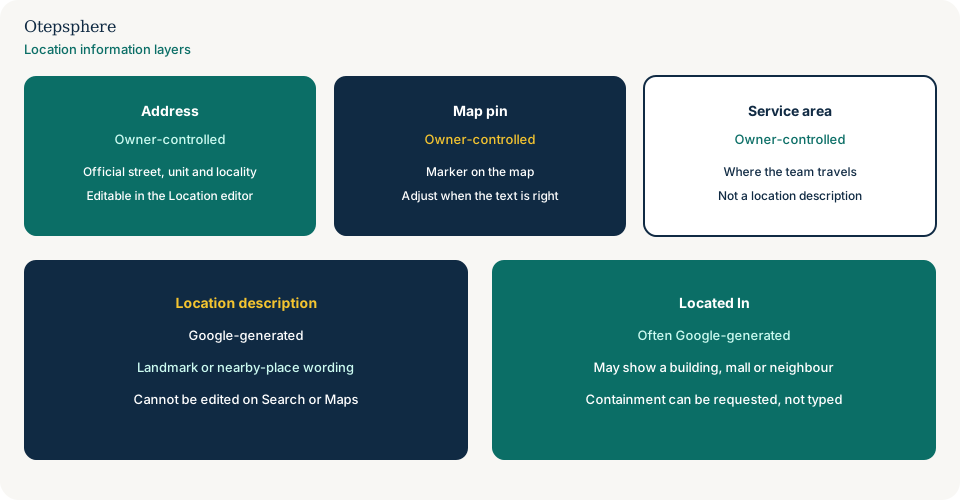
| Layer | What it is | Owner-controlled? |
|---|---|---|
| Address | Official street, unit and locality | Yes, in the Location editor |
| Map pin | Marker used for the place | Yes, via Adjust |
| Location description | Generated landmark or nearby-place wording | No direct edit on Search or Maps |
| Located In | Containment or nearby-place label | Request containment where offered; not free text |
| Service area | Where a travelling business serves customers | Yes, and it is not a location description |
What not to assume
- That a wrong description means the address is wrong.
- That you can file a form to set custom landmark copy.
- That adding the landmark to the business name will replace the description.
- That a description change is guaranteed after a pin move.
What not to do
- Do not put “Located in Westfield” in the business name.
- Do not create a second profile to force a different label.
- Do not move a correct pin onto a landmark you prefer to be named.
- Do not treat this as an address-not-found problem if Google already recognised the street.
Practical options
- Write down the address, the pin location, and the generated wording as three separate facts.
- Fix the address if the official details are wrong.
- Fix the pin if Directions miss the entrance.
- Request mall or building containment if Google offers that path.
- Update website directions and photos for the last part of the journey.
- Monitor the profile. Do not edit daily to force the description.
When professional help makes sense
Help is useful in a shared building where the neighbour’s brand keeps appearing, or when address, pin and generated copy all disagree. Nobody can type a replacement location description into Search or Maps.
Sources and further reading
- Google Business Profile Help: Manage your business address
- Google Business Profile Help: How Google sources and uses info
- Google Business Profile Help: Representation guidelines
Google describing your location incorrectly?
Otepsphere can review the editable location information and surrounding entity signals to identify what can actually be corrected.
Contact OtepspherePublished by Otepsphere
Published by Otepsphere, founded by Joseph Enmanuel. Learn about Otepsphere and its approach to local SEO.