Why would Google confuse two business names?
Google can match a branded query to the wrong organisation when several entities share similar names, or when public sources still describe a different company at that name or address.
This is not the only possible explanation. A knowledge panel, a Map Pack, an ads unit or an organic result can each show a different entity. The job is to make your business easier to identify, not to assume a secret ranking glitch. How Google assembles local facts is summarised in How Google sources business information and in entity SEO for local businesses.
Brand query
People search the business name Ambiguous names can match more than one organisation.Candidates
Other entities with similar names Include old profiles, former occupants and similarly named companies.Sources
Website, Business Profile, directories Conflicting facts make the wrong entity easier to attach.Outcome
Correct entity identification Align the public record. Structured data can express facts; it does not guarantee the result Google shows.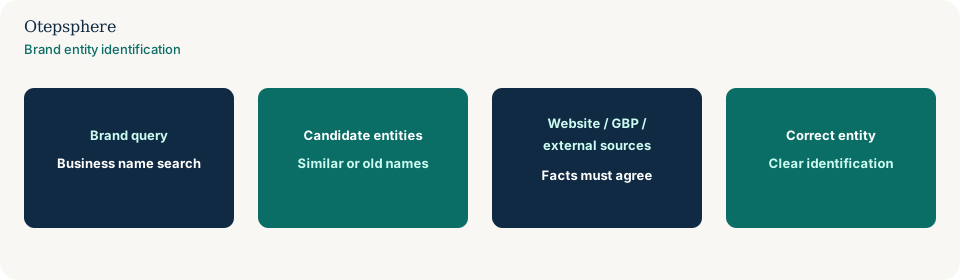
Is there another business with the same or similar name?
Yes, that is often the first cause. Search the exact name nationally and in your city, including spelling variants, former trading names and franchise lookalikes.
Two unrelated “City Dental” practices, a software product with the same name as a local shop, or a chain location versus an independent with a similar sign can all compete in branded results. Your website title and About page should include distinguishing facts: place, offer, and the name customers actually use. If a generated answer blends those identities, that is why AI systems mix information from different branches or similar businesses.
Is an old business profile still visible?
An old Google Business Profile can still appear for the name if it was never closed, merged or updated.
Search Maps for the name and the address. A listing with old photos, an old phone or “permanently closed” mixed with your current site is a common mix-up. Duplicate and leftover-profile handling is in why a Google Business Profile is marked as a duplicate.
Did the business rebrand?
If the business rebranded, Google and directories may still attach the old name to another listing or to the previous identity.
Follow Google’s current rebrand-versus-new-business rules on the surviving profile, then update the website and high-impact listings. The sequence is in how a business can rebrand without losing Local SEO visibility.
Did another company previously use the location?
Yes. A previous occupant’s name, phone or website can remain attached to the address in Maps and directories.
Customers searching your name may still be shown the old shop if the pin was never updated. Treat this as a location-history problem: confirm the current profile’s address and website, then correct leftover citations. Moves are covered in how to move a business without losing Local SEO visibility.
Does your website clearly identify the business?
If the website does not state the business name, location, contact details and what you do, Google has fewer first-party facts to attach to the brand query.
Check:
- Business name in the title, header and About content, matching real-world use.
- About copy that says who you are, not only what you sell.
- Contact information that matches the profile.
- Location or service-area explanation that is true.
- Services described in customer language.
- Organisation information that does not contradict the listing.
People-first pages still need to be identifiable. Source: Creating helpful, reliable, people-first content. A directory that ranks above the official URL is a different problem from a wrong Maps listing: why a directory ranks above the official website.
Is structured data accurate?
Structured data can help express organisation, location and contact facts that already appear on the page. It does not guarantee how Google displays branded results.
If markup names a different company, a closed branch, or a review rating you do not display, fix or remove it. Markup that does not match visible content is a quality issue. Do not add fake LocalBusiness data to “force” a knowledge panel. If the LocalBusiness block vanished after a theme update, that is why LocalBusiness structured data disappeared after a template update.
Are important external listings outdated?
Outdated directories, registries and data partners can keep serving the wrong name, phone or website for a branded search.
Prioritise high-impact sources customers actually use, plus any listing that still ranks for your name. Process is in why business information differs across Google and the web.
Could a duplicate GBP be involved?
Yes. Two profiles for the same or overlapping identity can send branded searchers to the listing you do not control.
Identify the public Maps URL before you delete anything. See duplicate Google Business Profile.
Could this be an indexing problem instead?
Sometimes. If your current site is not indexed, or the important URLs are canonicalised away, branded results can keep showing an older domain or a directory page.
Check Search Console for the homepage and About/contact URLs. “Not indexed” is a different job from “indexed but another entity is preferred.” Google still does not guarantee serving. Source: How Search works.
Brand Entity Clarity Checklist
- You have searched the exact name and close variants, including other cities.
- The current Business Profile opens and matches the live business.
- Old profiles, former occupants and closed listings are identified.
- The website states name, location, contact details and services clearly.
- Structured data matches visible organisation facts.
- Priority citations use the same name, address or service area, phone and URL.
- Branded queries in Search Console are mapped to the URLs you intend.
- You have not assumed ads, the Map Pack and organic results must show the same entity.
What not to assume
Do not assume trademark registration automatically controls Search. Do not assume a knowledge panel is a ranking you can buy. Do not assume one mismatched directory is the whole problem. Do not assume the other company “stole” your listing without checking duplicates and former occupants.
What not to do
Practical action plan
- Capture the branded query, device and which result is wrong: Maps, knowledge panel, ads or organic.
- Inventory same-name businesses, old listings and former occupants.
- Align the surviving Business Profile, website identity and priority citations.
- Fix structured data so it matches the visible organisation.
- Request ownership, suggest edits or close leftover profiles using Google’s current tools.
- Re-check branded queries after sources agree. Do not expect an overnight entity switch.
When professional help makes sense
Help is useful when several historic names, a franchise and an independent share results, or when the wrong listing is the one with the reviews. It cannot guarantee Google will attach the brand query to your entity.
Sources and further reading
- Google Business Profile Help: How Google sources business information
- Google Business Profile Help: Guidelines for representing your business on Google
- Google Business Profile Help: Resolve duplicate profiles and ownership issues
- Google Search Central: How Search works
- Google Search Central: Creating helpful, reliable, people-first content
Customers searching your name but seeing the wrong business?
Otepsphere can review your Business Profile, website and key external business references to identify where entity information may be ambiguous or outdated.
Contact OtepspherePublished by Otepsphere
Published by Otepsphere, founded by Joseph Enmanuel. Learn about Otepsphere and its approach to local SEO.