What does “on Google but missing from the site” mean?
It means the Business Profile for the new premises is live — or at least findable — while the company website still has no representative URL, no locator row, or both.
Operations often create the Maps listing first so staff can collect reviews. The website then lags: CMS tickets, legal copy, or a locator feed that was never updated. Customers who tap the website on Maps then land on the homepage or another shop.
Is this a new-business Local SEO launch?
No. A new business with no existing domain is a launch sequence: website, profile, citations, from scratch.
Diagnose that on how to launch Local SEO for a new business. This page is the extra branch of a brand that already publishes locations. Closing a different shop at the same time is how to close one location without harming the rest.
GBP
Was the listing created before the website caught up? Common when operations verify Maps first.Page
Is there an indexable URL for this address? Without one, the website field has nowhere honest to point.Nav
Can a customer find it from the homepage or locator? An orphan URL helps neither users nor crawlers.Yes
Publish, link, then update the profile website field Do not leave Maps as the only public page.Next
If the locator is crawl-blocked, fix that too A missing row and an uncrawlable finder can both be true.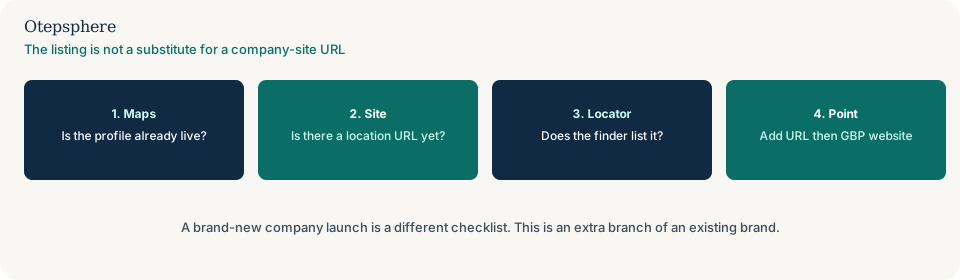
Does the new shop need its own URL?
Usually yes, if it is a real staffed location with facts that differ from the homepage.
That decision is whether every business location needs its own website URL. Do not invent a suburb URL for a place you do not occupy. What to write on the page is when to create location pages for Local SEO.
What about the store locator?
Add the row to the same location source the rest of the network uses, then confirm the public locator lists the shop.
A locator that still omits a live shop is the same class of stale data as a locator that still lists a closed one: why a store locator shows closed, missing or outdated locations. If the locator has no HTML links, that is also crawlability: why Google cannot crawl a store locator.
Where should the Business Profile point?
At the representative URL for that shop, once the page is accurate — not the corporate homepage if shops differ, and not another location’s URL.
Destination choice is whether every location should link its Google profile to the corporate homepage. Google’s action-link rules still require a specific location, not a general landing page. Source: Business links policies and guidelines.
Publish-gap decision table
| What you see | What it usually means | Decision | What not to assume |
|---|---|---|---|
| Maps live; no location URL | Website lag | Publish a representative path; add locator row and internal links | That the Maps listing creates the website page |
| URL exists; locator omits the shop | Stale locator source | Add the row; use the outdated-locator guide if other shops are wrong too | That Maps will update the locator |
| Profile still points at the homepage | Destination lag | Point it at the new URL once the page is accurate | That creating the URL automatically updates Maps |
| Brand-new company; no domain yet | Launch, not this problem | Use the new-business launch guide | That this extra-branch checklist applies |
What should I not do?
Action checklist
- Confirm this is an extra branch of an existing brand, not a first-time launch.
- Publish a representative URL with that shop’s hours, address and services.
- Add the shop to the locator source and to internal links from the hub and nearby pages.
- Point the Business Profile website field at that URL once the page is accurate.
- If the template would inherit headquarters hours, bind the location record first.
- If a different shop has closed, run the closure sequence so the locator does not list both wrongly.
When professional help makes sense
Help is useful when Maps, the CMS and the locator are owned by different teams and none will publish first. It cannot make Google recrawl on a timetable, and it cannot promise the new shop will rank because a URL now exists.
Sources and further reading
- Google Business Profile Help: Guidelines for representing your business on Google
- Google Business Profile Help: Business links policies and guidelines
New shop live on Maps but missing from the website?
Otepsphere can help sequence the location URL, locator row and Business Profile destination — without treating a Maps listing as a website.
Contact OtepspherePublished by Otepsphere
Published by Otepsphere, founded by Joseph Enmanuel. Learn about Otepsphere and its approach to local SEO.