What does wrong review routing mean?
It means the customer was sent a request that opens another location’s Google review form — usually because one QR code, one SMS template or one “leave a review” button is reused across the network.
The fix is to issue the request that belongs to the shop they used, before they post. Google’s own request link is generated per Business Profile on a computer. Source: Get more reviews from Business Profile.
Is this a review already on the wrong location?
No. Once the review is live on listing B, you are in a different problem: the customer already posted.
Diagnose that on why a Google review appeared on the wrong location. Google’s move-reviews help is for relocation or duplicates of the same business, not transferring one review between two real branches.
Staff
Is one person sending every SMS and QR? Front-of-house habits often beat the CMS.Link
Was it copied from that location’s Get more reviews screen? Generate it on a computer for the listing the customer visited.Test
Does a signed-out visit open the intended shop? A Maps search URL is not a review request.Yes
Issue and label one official link per site No incentives. No on-premises pressure.Next
If they already posted on the other shop, change playbooks You cannot generally move that one review between live branches.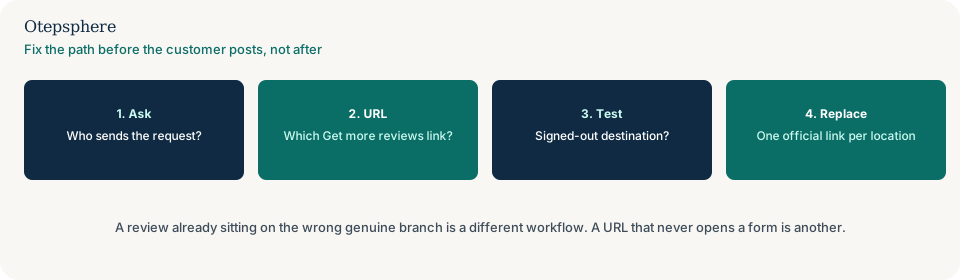
Is this unbalanced review volume?
No. Unbalanced volume is the outcome: one shop has many recent reviews and another has almost none.
Wrong routing is a common cause of that outcome. Measure the imbalance on why reviews are unbalanced across locations. This page is the request process that sent people to the wrong form.
Is this a broken review link?
No. A broken link never opens a working form — 404, login wall, or a URL that is not a review request.
Diagnose that on why a Google review link is not working. A link can work perfectly and still belong to the wrong shop. A book button that opens another branch’s calendar is why the booking system sends customers to the wrong business location.
How should each location’s request be built?
Generate the request from that location’s Business Profile, label it with the shop name, and keep it off shared print and shared SMS.
Put the QR at that counter only. In email or SMS, include the suburb or shop name in the message so staff notice a mix-up. If several locations share one phone number, callers may also be asked for a review of the wrong shop: whether one phone number for every location creates problems.
Routing decision table
| What you see | What it usually means | Decision | What not to assume |
|---|---|---|---|
| Same QR at every counter; form is headquarters | Shared request asset | Print a unique request per location from that profile | That Google will attach the review to the shop they visited |
| Review already live on the other listing | Posted to the wrong place | Use the wrong-location review guide; do not transfer it | That this routing page can move the live review |
| Link never opens a form | Broken URL | Use the review-link-not-working guide | That reprinting the same broken URL per shop will help |
| One shop has almost all new reviews | Possible routing plus other causes | Fix request assets first, then read the volume guide | That quieter shops must have inauthentic reviews |
What should I not do?
Action checklist
- Inventory every QR, SMS, email, receipt and website button that asks for a Google review.
- Open each as a customer. Confirm which Business Profile the form belongs to.
- Replace shared assets with a request generated from that location’s profile.
- Label print and messages with the shop name so mix-ups are obvious.
- If a review is already on the wrong listing, switch to the posted-review guide.
- If the URL never opens a form, switch to the broken-link guide.
When professional help makes sense
Help is useful when many locations share one review vendor, one POS message or one print run. It cannot move a review that already posted, and it cannot promise more reviews from a correctly routed link.
Sources and further reading
- Google Business Profile Help: Get more reviews from Business Profile
- Google Business Profile Help: Guidelines for representing your business on Google
Review requests still opening the wrong shop?
Otepsphere can help map which request assets belong to which Business Profile — without moving posted reviews or promising more ratings.
Contact OtepsphereWho writes this
This page is published by Otepsphere, a specialist Local SEO consultancy. A named founder biography, photograph and professional profiles will be added here only when they have been verified. Until then, treat Otepsphere as the responsible organisation rather than a fictional expert.