Can I use a PO box?
No. A PO box is not an eligible Business Profile location.
Eligibility help lists “any business whose address is listed as a P.O. box or mailbox in a remote location” among ineligible examples. Source: Business eligibility and ownership guidelines.
Representation guidelines repeat the same rule in the address section: use a precise, accurate address, and “P.O. boxes or mailboxes located at remote locations aren't acceptable.” Source: Guidelines for representing your business on Google.
Can I use a private mailbox?
No, if that mailbox is a remote mail drop rather than a place the business operates from.
A numbered box inside a mail store is still a mailbox. Putting “Suite 214” on the form does not turn a locker into a staffed office. If you must record a mailbox or suite number for a genuine physical address, Google currently says to put the physical address on line 1 and the mailbox or suite on line 2. That instruction is for suite identification at a real location, not permission to list the mail store as your shop.
What about a UPS-style mailbox or mail-receiving service?
Treat it as a mailbox or virtual office unless the business actually operates there under current coworking or storefront rules.
Retail mail-receiving services sell a street address that looks more “real” than a PO box. Google still describes a rented physical mailing address that you do not operate from as a virtual office, and says that location is not eligible. A staffed office inside the same building is a different fact pattern. For a coworking membership that might include a desk and an office, see whether a coworking address can be used. That page is about coworking conditions. This page is about mailing addresses.
Why isn't a mailing address enough?
A mailing address receives post. An eligible location is where the business makes in-person contact with customers, or where a genuine service-area business is based.
Customers cannot visit a PO box during stated hours. They cannot see your signage on a locker. Video verification of a wall of mailboxes does not look like your business. The profile would describe a place people cannot use.
This is also why a service-area setup is a different product. Hiding a real home base because you travel to customers is not the same as publishing a mailbox as if it were a clinic. See Google Business Profile for service-area businesses and Local SEO for service-area businesses.
What if my business works from home?
Working from home can be eligible when the in-person contact test is still met — either customers visit the home, or you travel to them.
Google’s plumber example is to hide a residential address when customers are not received at the house, and to set a service area instead. That is a service-area model, not a mailbox model. A home used only as a registered office, with all work done online, is closer to online-only ineligibility.
Should a home-based service business show its address?
Only if customers are genuinely served there and current Google requirements are met.
Businesses that show an address should maintain permanent fixed signage of the business name at that address. If the home never receives customers, showing it as a storefront is inaccurate. If customers do visit by appointment, the address, hours and website should describe that honestly.
What if I don't want my home publicly visible?
Use a service-area profile from a genuine base, and hide the address, when that matches how you work.
Do not replace the hidden home with a rented mailbox so a pin still appears on a high street. Hiding the home is the documented privacy model for service-area businesses. Substituting a mail drop reintroduces an ineligible location.
Can I rent an address just for Maps?
No. An unused pin is a fake location, not a Local SEO strategy.
Google requires the profile to describe the actual, real-world location. Renting a mailbox, virtual office or unused desk to appear closer on Maps is the same class of problem as listing a PO box. For reaching another city from a real base, see whether a business can rank in a nearby city without an address there.
What if Google already verified the mailbox?
Verification does not override eligibility.
A postcard can arrive at a mail-receiving service. That proves someone can collect post. It does not prove customers can interact with the business there. Ineligible listings can still be suspended or removed later. If verification failed, or later fails, start with why verification fails rather than buying a second mailbox.
Address eligibility checklist
PO box, mailbox, virtual address
Not eligible A rented mailing point that the business does not operate from is a virtual office.Real staffed location
Review eligibility Customers can interact there during stated hours, with current signage and staffing rules.Service-area base
Hide unused home addresses Travelling to customers is a different model from listing a mailbox as a shop.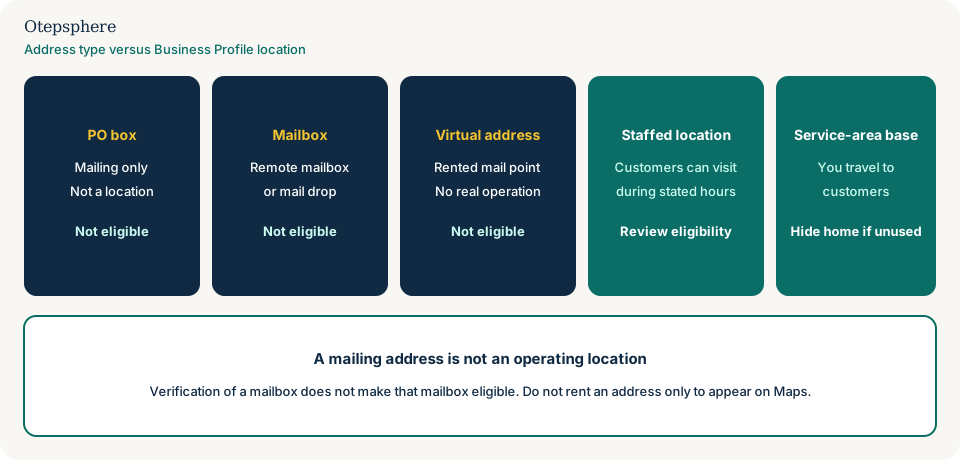
- The published address is a real operating location or a genuine service-area base, not a PO box.
- A private mailbox or UPS-style drop is treated as a mailbox unless the business actually operates there.
- A virtual office used only for mail is not listed as a storefront.
- A home address is shown only if customers are served there and current signage rules can be met.
- No address was rented solely to place a pin in another city.
What not to assume
- That a street-style mailbox address is safer than a PO Box number.
- That a verified postcard proves the location is eligible.
- That hiding a home requires a replacement public mailbox.
- That this page is a substitute for service-area setup instructions.
- That a coworking invoice automatically cures a mail-drop plan.
What not to do
- Do not enter a PO box as the Business Profile address.
- Do not present a mail locker as a suite that customers can visit.
- Do not rent a mailbox so the business appears in a target city.
- Do not create a second listing after a mailbox fails verification.
- Do not show a home as a walk-in shop if customers are never received there.
Practical action plan
- Write down where post arrives, where staff work, and where customers actually meet you.
- If those three places differ, the Maps address cannot be the mailbox by default.
- Choose storefront, hidden service-area base, or no profile.
- Compare the chosen model with Google’s current PO box, virtual-office and service-area wording.
- Search Maps for an existing mailbox listing of the same business before adding anything.
When professional help makes sense
Help is useful when the business has a mix of home working, client sites and a mail address, or when a mailbox listing is already verified and attracting customers to the wrong door. It is not useful if the brief is to buy a city-centre box so the pin moves.
No consultant can guarantee that Google will accept an address. Eligibility and verification are separate decisions.
Sources and further reading
- Google Business Profile Help: Guidelines for representing your business on Google
- Google Business Profile Help: Business eligibility and ownership guidelines
- Google Business Profile Help: Verify your business on Google
Unsure what address your business is allowed to use?
Otepsphere can review the real operating model and help distinguish between a customer-facing location, service-area setup and an ineligible mailing address.
Contact OtepspherePublished by Otepsphere
Published by Otepsphere, founded by Joseph Enmanuel. Learn about Otepsphere and its approach to local SEO.