Find where location information is lost
Attribution fails when operations cannot say which premises produced the enquiry. The lead can be genuine and still leave the shop field empty. Typical pattern: one “contact us” form, one inbox and one number on every listing. Local SEO then cannot be judged per location because the conversion record never named the shop.
Trace one week of enquiries and note where the location disappeared:
- Does the form ask which location, or does everything land in one national inbox?
- Did the customer convert on a location URL or on the homepage?
- Did they call a shared helpline or a shop line?
- Does the CRM row, email subject or payload include a location name or ID?
This is a conversion-path problem. It is not per-location rank tracking. Rank tracking asks where each listing appears on a grid. Attribution asks which shop owns the conversion. Keep grids as a visibility report and use how to track Local SEO across multiple locations for that job. A location URL for the conversion path is whether every location needs its own website URL. Create a location page only when the premises is real and the page has unique local information; see when to create location pages.
It is also not review-request routing. Review routing is which Google listing the request URL opens before a customer posts. Diagnose that on Google reviews on the wrong location. Do not use review QRs as your only lead-source field.
Path
Where did the enquiry actually happen? Homepage form, location URL, Maps call or a shared inbox.URL
Did the thank-you page name a shop? A national form with no location field cannot split credit.Call
Did they tap a shared helpline? GBP calls then sit on one listing or none.Yes
Stamp location on the lead record URL, form field or local number — pick one source of truth.Next
Review routing is a different process Wrong review QR is not the same as a missing lead field.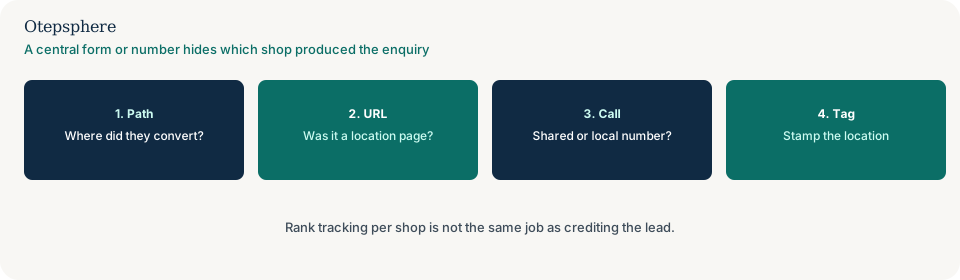
Fix a generic contact form shared by several branches
A shared form component is fine if every submission carries the correct branch. On a location page, bind a stable location ID to the page's actual branch record. On a general contact page, provide a clear location choice when the customer must choose. Validate submitted IDs against real locations rather than trusting an arbitrary hidden-field value.
Keep the location identifier in the backend lead record and pass it to the correct CRM field or inbox route. Do not rely on the thank-you message alone as evidence that the information arrived.
Submit one clearly labelled test enquiry for every branch and confirm the payload, delivered message and CRM record agree. If no message arrives, investigate delivery separately. If historical records never captured the location, report them as unknown unless other reliable evidence identifies the branch.
The usual design cause is a global “Get in touch” block on every location page that posts to one inbox. Staff then argue about which shop the lead was for. Open two location URLs and confirm whether the form is the same block. Inspect the submitted payload for a location name, ID or hidden field. A visible location field, a hidden field bound to that URL, or a separate form per shop that posts to that shop’s mailbox all work. Guessing the suburb later does not.
A location field is operations, not a ranking factor. Helpful pages make the next step usable for that premises. Source: Creating helpful, reliable, people-first content. Do not add dummy shops to the dropdown so the page “covers more areas.” Do not invent extra locations for keywords. Do not keep one generic form only so the site “looks consistent.” Do not create a second Business Profile to split leads. Google’s representation guidelines still require each profile to represent a real business location. Source: Guidelines for representing your business on Google.
Form
Is every shop using the same form? A global contact block with no location context cannot credit a premises.Field
Does the payload name the shop? A hidden location field or a per-URL form both work. Guessing later does not.Inbox
Who reads the mail? One shared mailbox is the design cause of later attribution arguments.Sibling
Reporting after the fact is different Use the attribution guide once the form already failed to stamp the shop.Next
Do not invent a second listing to “catch” leads Fix the form. Do not treat a shared form as an SEO feature.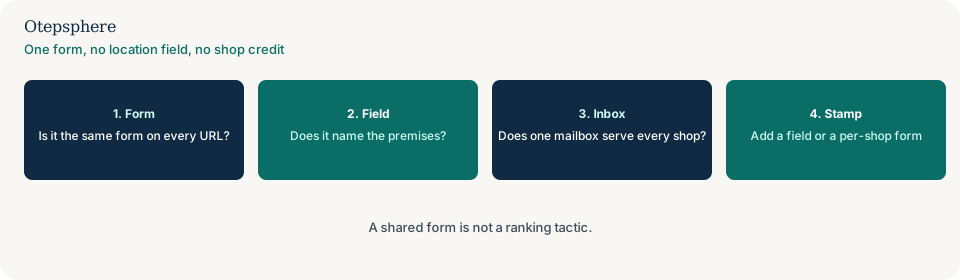
Capture the location in the CRM
Stamping the shop on the website is only half the job. The identifier has to survive into the CRM field your reports actually use. Put a location field on the form, convert on a location URL that writes the shop into the CRM, or use a number that rings that shop — then map that value to one source-of-truth field. Do not leave the location only in the email body or the thank-you page.
Reconcile the website payload against the CRM row. If the form sent location_id=southbank and the
CRM created a nameless deal, the integration dropped the field. Fix the mapping before you judge which branch
produced the lead. Tagging listing traffic in GA4 still needs a location dimension if you care about shops:
how to track Google Business Profile traffic and leads in GA4.
GA4 will not guess the shop from the city name.
Do not create extra location URLs only to game reports. Do not treat missing credit as a ranking penalty. Do not merge two Business Profiles to “simplify” attribution. Central-inbox reconciliation is a data job: match the incoming message to the location field you already captured. It is not a reason to invent branch credit after the fact.
Separate call attribution from form attribution
A shared helpline hides call credit. A generic form hides written-enquiry credit. They are related, but they are not the same path. Fix the form even if the phone design stays shared.
If every profile publishes the same helpline, Google Business Profile call taps cannot tell you which shop the customer meant, and the PBX may not either. Use a local number that rings that shop, or an IVR that captures the suburb, if you need call-level credit. Maps will not split the calls for you. Diagnose the number design on whether one phone number for every location creates problems. Call taps versus answered calls are why GBP call clicks do not match actual phone calls.
Keep the reports separate. A stamped web form does not attribute a helpline call. A shop-line recording does not stamp a homepage form. Treat forms, phone calls, central inboxes and CRM reconciliation as distinct branches of the same attribution problem.
Route the enquiry and test delivery
Once the payload names a shop, send that enquiry to the people who work there — or to a queue that still keeps the location field. Align the Business Profile website and call fields with that path so Maps traffic does not bypass the stamp you just built.
Submit one clearly labelled test enquiry for every branch. Confirm three things agree: the submitted payload, the delivered message, and the CRM record. If the thank-you page appears and nothing arrives in any inbox, the first job is delivery, not attribution. Use why location page contact forms are not delivering leads until a test message reaches an inbox. A location dropdown will not create mail that never left the server.
| What you see | What it usually means | Decision | What not to assume |
|---|---|---|---|
| Same form HTML on every location URL; no location field | No shop context in the payload | Add a visible location field, bind a hidden ID to that URL, or use a per-shop form | That one form is better for SEO, or that GA4 will guess the shop from the city |
| Mail arrives; nobody knows which shop | Design cause of later reports | Stamp the premises on the next submit and keep the ID in the CRM | That a spreadsheet can reconstruct last year |
| Every GBP uses one helpline | Shared call path | Use local numbers or an IVR that captures suburb; keep call credit separate from form credit | That Maps will split the calls for you |
| Thank-you; nothing in any inbox | Delivery failure | Use the form-delivery guide first | That a location dropdown will create the mail |
| Grids exist per shop; CRM does not | Visibility without conversion credit | Keep the grids; fix the lead record | That a better average rank will attribute leads |
| Review QR is the only “source” | Wrong tool | Fix review routing separately; stamp leads on the form, call or CRM path | That a review is a lead attribution system |
Report historical unknowns honestly
If historical records never captured the location, report them as unknown unless other reliable evidence identifies the branch — a booking that names the premises, a shop-line recording, or a location URL that wrote the shop at submit time. Do not assign leftover leads to the flagship shop by default. Do not reallocate historic untagged leads as if they were measured. A later form field does not rewrite old rows.
Branch attribution checklist
- Trace one week of leads. Note which records name a shop and where the others lost it.
- Open two location URLs. Confirm whether the form is the same block.
- Inspect the submitted payload for a location name or ID bound to that page’s actual branch.
- On a general contact page, require a real location choice. Validate IDs against live locations.
- Keep the identifier in the backend lead record and map it to the CRM field you report on.
- Route that shop’s mail to the people who work there, without dropping the location field.
- Submit one labelled test enquiry per branch. Confirm payload, delivered message and CRM row agree.
- If nothing arrives, switch to the form-delivery guide before changing attribution reports.
- Keep call credit on the phone path. A shared helpline is a separate design job.
- Align GBP website and call fields with the path that stamps the shop.
- Keep rank tracking and review-request routing as separate reports.
- Report historic untagged leads as unknown unless other reliable evidence names the branch.
- Do not invent shops in the dropdown, extra URLs for reports, or default credit for the flagship.
Help is useful when a global CMS form is hard-coded into the layout, or when CRM, call tracking and Maps are owned by three teams and none stores location. It cannot reconstruct which shop produced last year’s untagged inbox, and it cannot promise more leads or rankings from a new form field.
Sources and further reading
- Google Business Profile Help: Understand your Business Profile performance and insights
- Google Business Profile Help: Guidelines for representing your business on Google
- Google Search Central: Creating helpful, reliable, people-first content
Leads still landing in one inbox with no shop name?
Otepsphere can map the conversion path so each new enquiry carries a location — without treating that stamp as a ranking lever or inventing credit for old untagged rows.
Contact OtepspherePublished by Otepsphere
Published by Otepsphere, founded by Joseph Enmanuel. Learn about Otepsphere and its approach to local SEO.