What does a form that never arrives mean?
It means a visitor completed the location-page form and the message never reached a human inbox or the CRM row you expected.
Typical pattern: the page shows a thank-you; staff say nothing came in. The job is delivery — action URL, mail route, spam folder — not whether Analytics counted the click.
Is this spam inflating the lead count?
No. That guide is bots filling the form so the reported lead total looks healthy.
Use why spam contact forms are inflating Local SEO lead counts when the inbox is noisy. Stay here when the inbox is empty after a real person submitted.
Is this GA4 counting fewer leads than the CRM?
Only if the message did arrive and Analytics simply never saw the event.
Diagnose a measurement gap on why GA4 shows fewer leads than the CRM. One enquiry counted twice is why GA4 is counting the same lead more than once. Neither page fixes a form that never left the browser.
Submit
Send a real test from the live URL A staging form that works proves nothing about production mail.Thank-you
Did submit actually leave the browser? A client-side thank-you with a JavaScript error can look successful.Route
Which mailbox or CRM should receive it? Wrong action, dead webhook or a retired inbox is a delivery failure.Sibling
Spam inflation is a different count Use the spam-forms guide if the inbox is full of bots, not empty.Next
Do not treat a broken form as a ranking drop Find the mail log before changing categories or pages.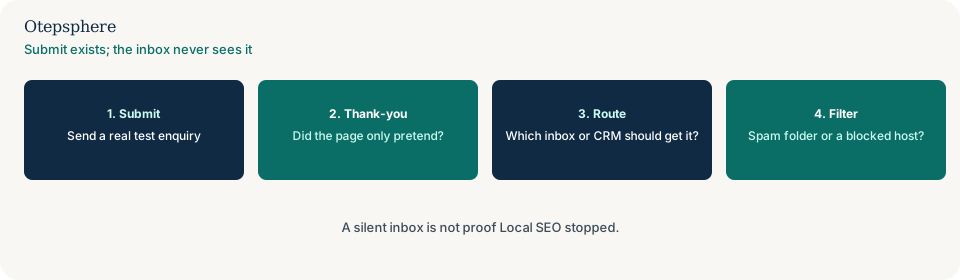
Where does submit usually break?
A JavaScript error before the request, a wrong form action, a webhook that 404s, a retired mailbox, or the host’s mail landing in spam.
People-first pages still need a contact method that works. Source: Creating helpful, reliable, people-first content. A thank-you that fires in the browser without a successful POST is a lie to the visitor, not a ranking report.
How should you test delivery?
Send a dated test from the production location URL, then open the mailbox, spam folder and CRM for that shop within the same hour.
If several shops share one form, the payload may arrive and still not name the premises — that design issue is why a generic contact form makes multi-location lead tracking difficult. Delivery first; stamping the shop second.
Form-delivery decision table
| What you see | What it usually means | Decision | What not to assume |
|---|---|---|---|
| Thank-you; empty inbox and empty CRM | Submit never left, or mail is filtered | Watch the network tab; check spam and the action URL | That Local SEO “stopped sending leads” |
| Inbox full of gibberish names | Bot volume | Use the spam-forms guide | That this delivery page is the filter |
| CRM has the row; GA4 does not | Tag or consent gap | Use the GA4-versus-CRM guide | That the form is broken |
| Mail arrives with no shop name | Shared form design | Use the generic-form guide | That delivery failed |
What should I not do?
Action checklist
- Submit a dated test from the live location URL.
- Confirm a network request succeeded, not only a thank-you animation.
- Open the intended inbox, spam folder and CRM.
- If the inbox is full of bots, switch guides.
- If the message arrives without a shop name, switch to the generic-form guide.
- Do not treat a silent mailbox as a ranking drop.
When professional help makes sense
Help is useful when a plugin, tag manager and CRM each think they own the submit. It cannot recover messages that never left the browser, and it cannot promise that a working form improves Maps position.
Sources and further reading
- Google Search Central: Creating helpful, reliable, people-first content
- Google Search Central: SEO starter guide
Location forms still saying sent while the inbox stays empty?
Otepsphere can trace the live submit path — without treating a broken form as a ranking diagnosis.
Contact OtepspherePublished by Otepsphere
Published by Otepsphere, founded by Joseph Enmanuel. Learn about Otepsphere and its approach to local SEO.