What does this problem actually mean?
It means Google found a test hostname, crawled pages on it, and stored those URLs so they can appear in Search — often next to, or instead of, the live local pages customers should use.
That is a leak of a non-production environment, not a ranking “boost” for the brand. After a redesign, leftover noindex on production is the opposite accident; that path is in why Local SEO can drop after a website redesign.
Cause
Test host is public and discoverable Google stored the staging URLs because it could reach them.Primary fix
Access control Password protection or equivalent keeps Google from fetching the HTML.If already known
noindex must be crawlable Google has to fetch the page to see a noindex tag or header.Weak alone
robots.txt is not a hide switch A disallowed URL can still appear in results if it is linked elsewhere.Cleanup
Remove leaked URLs, protect production Temporary removals hide results for a limited time. Do not ship staging robots rules to the live site.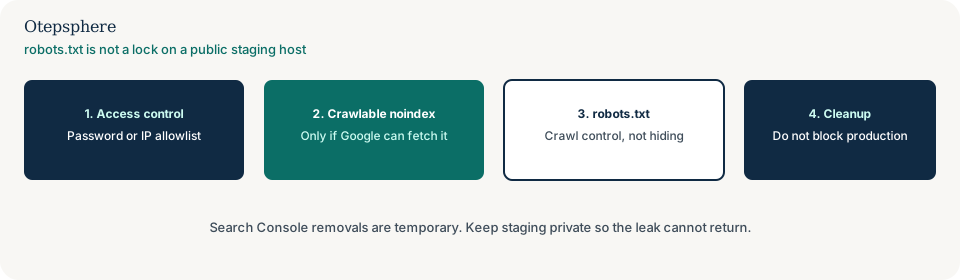
Why can staging get indexed?
Hosts such as staging subdomains, preview deployments and “coming soon” clones are often left publicly reachable, linked from tickets, emails, partner reviews or an old sitemap.
Once Google discovers a URL, it can store it if nothing prevents indexing. Linked pages are enough for discovery. A password on production does not protect a different host.
Why is robots.txt not enough?
robots.txt tells crawlers which URLs they may fetch. It is not a mechanism for keeping a page out of Google.
A disallowed URL can still appear in results if it is linked elsewhere, often without a snippet. Google’s documented ways to keep a URL out of Search are password protection or noindex — and noindex only works if Google can crawl the page to see it. Source: Introduction to robots.txt.
When does noindex work?
noindex works after Googlebot fetches the page and reads the meta tag or X-Robots-Tag header. If robots.txt blocks that fetch, Google may never see the instruction.
If staging is already indexed, allow crawling long enough for Google to see noindex, then add access control. Specifying noindex in robots.txt is not supported by Google. Source: Block indexing with noindex.
What actually keeps staging private?
HTTP authentication, VPN or an IP allowlist prevents Googlebot from receiving the HTML. That is the reliable long-term control.
For security-sensitive drafts, access control beats any combination of robots and noindex. robots.txt is not enforced on every crawler. Source: the same robots.txt introduction above.
How do I remove leaked URLs?
After staging is protected or noindexed, use Search Console removals only as a temporary hide while Google recrawls. Removals do not replace a durable indexing rule.
Verify a Search Console property for the staging host if you need host-level reports. Request recrawl of important leaked URLs after noindex is visible. Do not expect an overnight guarantee that every test URL has dropped.
How do I avoid breaking the live site?
Keep staging robots, noindex and auth scoped to the test host. The common disaster is deploying
Disallow: / or a global noindex onto production.
Also check that live canonical tags, sitemaps and Google Business Profile links point at the production host, not the preview URL. Relative canonicals on a misconfigured host are a known foot-gun in Google’s canonical documentation.
Staging control comparison
| Control | What it does | Limitation | Use it when |
|---|---|---|---|
| Password / VPN / IP allowlist | Googlebot gets no HTML | Must cover the whole host | Always, for a durable private staging site |
| noindex tag or header | Asks Google to drop the URL after a crawl | Fails if robots.txt blocks the fetch | URLs already known and still crawlable |
| robots.txt Disallow | Discourages crawling | URL can still appear if linked | Crawl-traffic control, not hiding |
| Search Console removal | Temporary hide in results | Time-limited; not a substitute for access control | After the durable fix is in place |
What should I not do?
Action checklist
- Put authentication or network restriction on the entire staging host.
- If URLs are already indexed, make noindex crawlable until Google recrawls, then lock the host.
- Remove staging sitemaps from Search Console and from public robots.txt files.
- Search for the staging hostname in Google and in Search Console; inspect leaked local URLs.
- Confirm production canonicals, sitemaps and profile links use the live host only.
- Add a launch check so staging robots or noindex cannot deploy to production.
When professional help makes sense
Help is useful when staging and production share a CMS, when leaked URLs are outranking live location pages, or when a deploy pipeline keeps copying index rules between hosts. Cleanup cannot guarantee which URL Google will rank afterwards.
Sources and further reading
- Google Search Central: Introduction to robots.txt
- Google Search Central: Block indexing with noindex
- Google Search Central: Specify a canonical URL
Staging URLs appearing beside your live local pages?
Otepsphere can identify how the test host was discovered, which indexing controls are actually in place, and how to remove the leak without shipping those blocks onto the live website.
Contact OtepspherePublished by Otepsphere
Published by Otepsphere, founded by Joseph Enmanuel. Learn about Otepsphere and its approach to local SEO.