What does the mismatch mean?
It means Google no longer shows a street on the profile, while other listings still publish one — so customers see two stories about whether they can visit you.
That is a citation-surface problem after a valid hide, not proof the hide “broke SEO.”
Is this service-area eligibility?
No. That guide is whether Google allows a hidden address because customers do not visit the premises.
Decide that on Google Business Profile for service-area businesses. Come here after the hide, when directories disagree.
Maps
Does Google hide the address because customers do not visit? That eligibility decision is a different guide.Dir
Which directories still show or require a street? Their form is not Google’s hidden-address rule.Truth
Do not publish a virtual office you do not use Representation guidelines still apply.Yes
Describe the service area in words they allow Towns served, not a fabricated unit number.Next
Keep one honest story across sources Mismatch is why listings look inconsistent.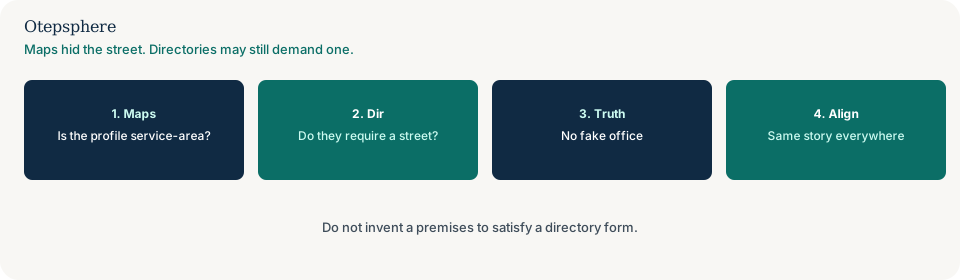
Is this an online-only business?
No. Online-only eligibility is whether you qualify for a profile at all.
Use whether an online-only business can have a Google Business Profile if you have no service area either. This page assumes a real SAB profile already exists.
Why do directories still show a street?
Many forms require an address to create a record. Aggregators also keep the last street they stored.
Google documents how to manage service areas on the profile. Source: Manage your service areas. That help does not rewrite Apple, Bing or a local directory.
What is an honest citation then?
A record that does not invent a customer-facing office. Prefer directories that allow a service-area or “hidden address” setting. Where a street is mandatory, use the real operations address only if you are allowed to publish it — not a rented mailbox you never use.
Representation on Google still forbids misleading location information. Source: Guidelines for representing your business on Google. If old streets keep coming back, use why old business information keeps coming back after citation cleanup.
Hidden-address decision table
| What you see | What it usually means | Decision | What not to assume |
|---|---|---|---|
| Maps hidden; Bing shows the house | Surface mismatch | Edit Bing if their product allows hide or SAB | That Google will push the hide to every directory |
| You have not decided eligibility yet | Wrong page | Use the service-area GBP guide first | That citation edits replace the Maps setting |
| Directory requires a street; you have no public office | Form conflict | Skip or close that record; do not invent a unit | That a virtual office is “required for Local SEO” |
| Old street returns after you cleared it | Feed | Use the returning-information guide | That you should create a second listing |
What should I not do?
Action checklist
- Confirm customers do not visit. Finish the service-area GBP setting first.
- List directories that still show a street.
- Use each product’s hide or service-area option where it exists.
- Skip forms that only accept a fake office.
- If an old street returns, switch to the reversion guide.
- Keep one honest story: you travel to the customer.
When professional help makes sense
Help is useful when a locksmith or mobile clinic has ten directories that refuse a hidden address. It cannot make every form drop the street field, and it cannot promise Maps rankings from a tidier citation set.
Sources and further reading
- Google Business Profile Help: Manage your service areas
- Google Business Profile Help: Guidelines for representing your business on Google
Directories still publishing a street Maps no longer shows?
Otepsphere can align service-area citations with a hidden Maps address — without inventing an office to satisfy a form.
Contact OtepspherePublished by Otepsphere
Published by Otepsphere, founded by Joseph Enmanuel. Learn about Otepsphere and its approach to local SEO.