What does a wrong template mean?
It means the location URL is a shared layout that still prints headquarters hours, headquarters services, or a default phone because those fields fall back to a parent record.
Customers then book the wrong day or drive to a shop that does not offer the service. Google’s representation guidelines still require accurate public facts for the location you claim. Source: Guidelines for representing your business on Google.
Is this duplicate service content?
No. Duplicate service content is the same marketing copy reused on every location URL — the same paragraphs about “our expert team,” not the same opening hours.
Diagnose cloned copy on why location pages share the same service content. This page is structured fields: hours, services, parking, phone. Identical FAQs are closer to the copy problem than to a CMS fallback.
Type
Is this block meant to be the same everywhere? Refund policy can be shared. Thursday hours usually cannot.CMS
Does the template default to HQ when a field is empty? Empty local fields should not silently inherit another shop.Check
Open the URL as a customer for that address Services this branch does not offer must not appear.Yes
Require location-true hours and services Train editors. Do not paste a flagship page into every child.Next
If only Maps hours are wrong, stop here Use the Business Profile hours diagnosis, not a template rewrite.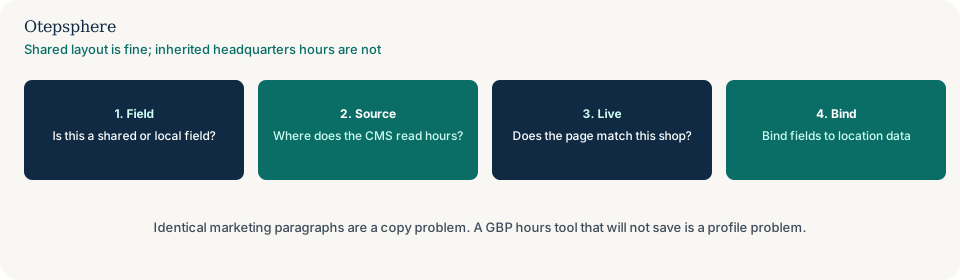
Is this Google hours being wrong?
No. The Business Profile hours tool can be wrong while the website is right, or the other way around.
Diagnose the profile on why Google Business Profile hours are wrong. Fix both to the same source of truth. A shared helpline on every listing is a different representation choice: whether one phone number for every location creates problems.
Where should the facts live?
In a location record the template is required to read — hours, services, phone, parking — with no silent fallback to headquarters when a field is empty.
Empty should show empty, or the page should not publish, rather than inherit HQ Saturday hours. Each real location still needs a representative URL: whether every location needs its own website URL. A template that is bound correctly and still advertises a service this shop cannot honour is why customers enquire about services that are not available at their location.
How does this show up on the locator?
The locator often reads the same records. If the template is wrong, the locator can list the same wrong hours or still show a shop as open.
Stale or missing shops on the locator are why a store locator shows closed, missing or outdated locations. Fix the record once; both surfaces should follow.
Template-data decision table
| What you see | What it usually means | Decision | What not to assume |
|---|---|---|---|
| Every location URL shows HQ hours | Fallback to parent record | Bind hours to the location; fail empty rather than inherit | That rewriting the marketing copy will fix hours |
| Same paragraphs on every shop; hours differ | Cloned copy, not this problem | Use the duplicate-service-content guide | That unique essays are required before fields can bind |
| Website hours right; Maps hours wrong | Profile tool | Use the Business Profile hours guide | That the CMS template is the only place hours live |
| Locator and location URL disagree | Two sources, or one stale cache | Point both at one location record | That Google will average the two |
What should I not do?
Action checklist
- Open several location URLs. List fields that are identical including errors.
- In the CMS, confirm each location has its own hours, services and phone — with no parent fallback.
- Publish a shop with deliberately different hours and confirm the URL and locator update.
- Align the Business Profile with the same record.
- If the prose is cloned but the fields are correct, switch to the duplicate-content guide.
- If only Maps is wrong, switch to the profile hours guide.
When professional help makes sense
Help is useful when a headless CMS, store platform and locator each keep a copy of hours. It cannot promise that correct hours will change local rankings, and it cannot update a profile you do not administer.
Sources and further reading
- Google Business Profile Help: Guidelines for representing your business on Google
- Google Business Profile Help: Edit your business hours
Location pages still inheriting headquarters hours?
Otepsphere can help trace which record the template reads so each shop URL shows that shop’s facts — without treating unique copy as the fix.
Contact OtepspherePublished by Otepsphere
Published by Otepsphere, founded by Joseph Enmanuel. Learn about Otepsphere and its approach to local SEO.