This article explains why the numbers disagree. If you need to implement tagged website links and key events, use how to track Google Business Profile traffic and leads in GA4 instead.
What does Google Business Profile measure?
Google Business Profile performance measures how people find the listing and which actions they take on Search and Maps — for verified profiles, when you are signed in as owner or manager.
Google currently lists metrics that apply to the business, and hides ones that do not. Documented metrics include interactions (a summary of total interactions), searches (terms people used; updated at the start of each month and may take up to five days), views, directions, calls, website clicks, messages, bookings (completed bookings through a booking provider), hotel booking clicks, products (in-store product views), menus (menu photos, links and structured menu data, counted per user per day) and offers. Views are unique-visitor oriented: a person is counted once a day, with extra limits across devices and platforms, so this figure can be lower than other view counts you see. Source: Understand your Business Profile performance & insights.
What does GA4 measure?
GA4 measures website and app interactions after a user enters a measurable Google Analytics property.
Sessions, events, key events and attributed traffic depend on the tag firing, consent mode, cookie and storage settings, redirects, and whether the hit is classified as a new session. Calls placed from Maps, direction taps that never hit the site, and in-app messages do not become GA4 sessions unless you have a separate measurement method. Call-button taps versus the phone log is why GBP call clicks do not match actual phone calls. Directions taps versus arrival is whether Maps direction requests mean customers visited. Popular Times and wait times are visit-pattern displays, not performance-report metrics: why Popular Times can look wrong or missing. Source: [GA4] Session.
What does Search Console measure?
Search Console measures Google Search impressions and clicks for website URLs you have verified, plus related query and page data — not Google Business Profile listing actions.
A Search Console click is a click from a Search result to a page on the property. It is not a Maps directions tap and not a Knowledge Panel call button. Position and impression definitions follow Search Console’s performance report, not Business Profile view rules. Source: Performance report (Search Console).
Why will GBP website clicks not equal GA4 sessions?
GBP website clicks count taps on the profile website link. GA4 sessions count visits the Analytics tag can record under session rules. Those are different events.
Possible reasons they diverge — without claiming any one of them is the cause in your account — include different counting methods, consent that blocks the tag, tracking blockers, redirects that drop parameters, session timeout and engagement rules, missing or duplicate tags, users who click then never load the page, and users who land through a different URL than the one on the profile. GBP may also include Ads-driven profile activity (see below). Do not “fix” the gap by forcing the two numbers to match.
Why will Search Console clicks not equal GBP clicks?
Search Console clicks and GBP clicks represent different search surfaces and actions.
Search Console counts clicks to website URLs from Search results associated with the property. GBP website clicks count clicks on the website link on the Business Profile, which can appear in Search and Maps. A customer who calls from the listing never becomes a Search Console click. A customer who clicks an organic blue link never becomes a GBP website click unless they also used the profile button.
Does GBP performance include Google Ads activity?
Yes. Google currently states that performance data includes views, searches and actions from both organic search results and Google Ads.
That is why a spike in GBP website clicks can accompany an Ads campaign even when organic Maps visibility looks unchanged. Source: Understand your Business Profile performance & insights.
Can GBP now be linked directly to GA4?
Yes. Google Analytics currently lets you link a property to one or more Google Business Profiles from Admin → Product links.
You need Editor or Administrator on the Analytics property and Owner or Manager on the profiles. After linking, a Google Business Profile report collection can appear with aggregated metrics: interactions, website clicks, calls, directions, messages, bookings and menus. Source: Connect Google Business Profile (GBP) to Google Analytics.
What are the limitations?
The current GA4 link shows aggregated data, keeps Business Profile metrics for six months, sums multiple linked profiles, cannot be used in custom explorations or filters, is not supported on subproperties, and shows every GBP metric even when the Business Profile dashboard would hide irrelevant ones.
You cannot segment the linked metrics by individual location. There is no control to share only some metrics. Address changes on the profile can take a short delay to appear in Analytics. Linking does not replace tagged website measurement or CRM outcomes. Source: Connect Google Business Profile (GBP) to Google Analytics.
Local Measurement Comparison Table
| Platform | Measures | Best used for | Does not measure well |
|---|---|---|---|
| GBP | Profile discovery and actions on Search and Maps, including some Ads activity | Calls, directions, listing website clicks, menus, in-store product views | On-site behaviour, lead quality, organic ranking of URLs |
| GA4 | Tagged website or app events and sessions | What people do after they reach a page you can measure | Maps calls and directions that never hit the site; untagged landings |
| Search Console | Search impressions, clicks, CTR and position for website URLs | Which queries and pages appear in Google Search | Maps pack actions, GBP calls, Ads on the listing |
| CRM | Enquiries, jobs, revenue and whether the lead was qualified | Business outcomes | Every click that never became a conversation |
Why CRM outcomes still matter
Ranking and clicking do not equal a qualified customer.
A directions request can be a tourist who never books. A GA4 key event can be a spam form. Search Console can show impressions for a query you cannot serve. Keep the outcome the business cares about — booked work, accepted patients, covered postcodes — in a system Google products do not fully see. See how to measure Local SEO performance and Local SEO reporting.
1. Business Profile
What happened on the listing? Views, searches, website clicks, calls, directions, messages, bookings, menus, products and offers — including organic Search and Google Ads activity.2. GA4
What happened after someone reached a tagged property? Sessions and events depend on consent, tagging, redirects and blockers. A GBP website click is not a GA4 session.3. Search Console
Which website URLs appeared in Google Search? Impressions and clicks to pages are a different surface from Maps profile actions.4. Linking limits
If GBP is linked to GA4, what is still missing? Current Analytics linking shows aggregated metrics for six months, sums multiple profiles, and does not support custom explorations or subproperties.5. CRM
Did the enquiry become a customer? Ranking and clicking do not equal a qualified lead. Keep outcomes that Google products cannot see.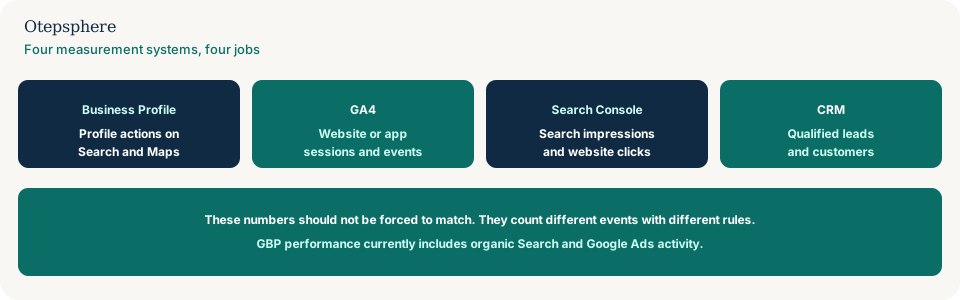
Measurement Reconciliation Checklist
- Name each metric in full: “GBP website clicks”, not “clicks”.
- Align date range, time zone and whether one location or a sum of locations is included.
- Ask whether Ads could be inside the GBP total.
- Expect GBP website clicks ≠ GA4 sessions ≠ Search Console clicks.
- If GBP is linked to GA4, remember the six-month window and the lack of per-location split.
- Keep a CRM or booking count as the outcome layer.
- Investigate tagging only after you know the counting rules.
What not to assume
Do not assume a mismatch means GA4 is “losing half the leads.” Do not assume Search Console is Maps rankings. Do not assume the native GBP→GA4 link replaces UTM tagging for on-site journeys.
What not to do
Practical action plan
- Export the same month from GBP, GA4, Search Console and the CRM.
- Label each column with the official metric name.
- Note Ads, consent and multi-location summing as known biases.
- Use GBP for listing actions, GA4 for on-site behaviour, Search Console for URL Search, CRM for outcomes.
When professional help makes sense
Help is useful when stakeholders treat three Google dashboards as one KPI, when a chain linked every profile into one GA4 property, or when tagging really is broken and needs a separate investigation. It cannot make the products count the same event.
Sources and further reading
- Google Business Profile Help: Understand your Business Profile performance & insights
- Google Analytics Help: Connect Google Business Profile to Google Analytics
- Google Analytics Help: [GA4] Session
- Search Console Help: Performance report
Reports disagree and you're unsure which number to trust?
Otepsphere can review your Business Profile, GA4, Search Console and lead tracking to explain what each system measures and where measurement gaps remain.
Contact OtepspherePublished by Otepsphere
Published by Otepsphere, founded by Joseph Enmanuel. Learn about Otepsphere and its approach to local SEO.