What are Google Popular Times?
Popular Times is a graph that can appear on a business in Google Maps and Search. It shows how busy the location typically is at different times of day.
Google currently says popularity for any hour is shown relative to the typical peak popularity for that business for the week, based on average popularity over the last few months. Source: About popular times, wait times and visit duration data.
Where does the data come from?
Google uses aggregated and anonymised data from users who have opted in to Google Location History.
Maps Help currently describes the same method and notes that Location History / Timeline is off by default. The figures are visit patterns from opted-in users, not a count of every customer and not a till report. Source: Get information about busy areas from Google Maps.
Can I manually add Popular Times?
No. You cannot manually add this information to the location.
Google states that popular times, wait times and visit duration appear only if the business gets enough visits from those opted-in users, and that you cannot manually add the information.
Can I manually change them?
No. There is no owner editor for these figures.
You can correct hours, special hours, temporarily closed status and other owner-controlled fields. Those edits do not let you redraw the Popular Times bars. If hours are wrong, fix hours. See why Google Business Profile hours are wrong.
Why doesn't my business show Popular Times?
Google requires sufficient eligible visit data. Without that, the graph is not shown.
Low footfall, a new location, a service-area business that customers rarely visit, or few opted-in visitors can all mean there is not enough data. Google does not publish a visit threshold. Do not treat a missing graph as a profile error or a penalty.
Why can the graph look inaccurate?
The graph represents aggregated historical patterns, not today’s appointment book.
A renovation week, a one-off event, a school holiday, or a recent hours change can disagree with a chart built from the last few months. Live visit information, when shown, is overlaid on that historical graph. The two layers can look inconsistent without either being “broken.”
What is “Live” visit information?
Live visit data shows how active the location is right now, updated in real time and overlaid on the Popular Times graph.
Google’s example is a highlighted section that compares current activity with the location’s usual level. It still depends on sufficient opted-in visit data. It is not a camera feed and not an owner-reported headcount.
What are wait times?
Wait time estimates show how long a customer might wait before receiving service at different times of day, including a peak wait time for each day.
Google currently bases those estimates on visit patterns over the last several weeks. Estimation differs by business type. A sit-down restaurant’s wait time, for example, reflects how long customers wait before they are seated. It is not a kitchen-ticket timer you can edit.
What is visit duration?
Visit duration shows how much time customers typically spend at the location, based on visit patterns over the last several weeks.
It is an estimate from opted-in visit behaviour. It will not match every appointment length or every retail basket.
Is Popular Times the same as business hours?
No. Hours are an owner-managed operating schedule. Popular Times is a visit-pattern graph.
A shop can be open and quiet. It can also show a busy bar while special hours say it is closed for a private event, if the historical pattern has not caught up. Fix the hours field when the door policy changed. Do not expect the graph to move the same day.
Does Popular Times affect rankings?
Google does not document Popular Times as a local ranking factor. Do not claim that it is one.
Local results are described in terms of relevance, distance and prominence. A quiet graph is not evidence that Maps visibility will fall, and a busy graph is not a ranking strategy. For how to judge Local SEO outcomes, see how to measure Local SEO.
Should I make SEO changes because Popular Times looks wrong?
Not without separate evidence that customers are being misled by something you control, or that visibility actually changed.
If the complaint is “Google says we are quiet, so we must be ranking worse,” compare Maps visibility and enquiries first. If the complaint is “customers arrive at the wrong time,” check hours, special hours and the website. Profile performance numbers that disagree with Analytics are a different diagnosis: why GBP, GA4 and Search Console numbers differ. Ongoing unexpected edits belong in Business Profile change monitoring.
Visit data explanation graphic
Aggregation
Anonymised patterns Not owner-entered schedules.Sufficient data?
Shown only if Google has enough visits Missing graphs usually mean insufficient eligible visit data.Possible display
Popular Times, live, wait, duration Owners cannot add or directly edit these figures.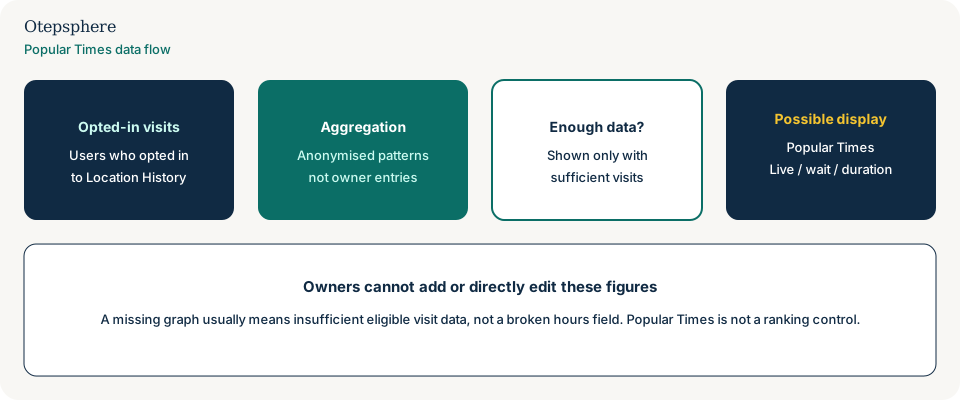
- Popular Times, live visit data, wait times and visit duration are identified as Google-generated fields.
- Hours and special hours are checked separately if customers are arriving at the wrong time.
- A missing graph is treated as insufficient visit data, not as a broken listing.
- No SEO project was opened only because a Tuesday bar looks too short.
What not to assume
- That every customer is counted in the graph.
- That a missing graph means the profile is unverified or filtered.
- That posting photos or reviews will create Popular Times.
- That a busy graph is a documented ranking advantage.
- That wait time equals the number on your pager system.
What not to do
- Do not promise a client you can add or redraw Popular Times.
- Do not change categories or create a second listing to “unlock” the graph.
- Do not treat a historical busy bar as proof the shop is busy right now.
- Do not edit hours to match a graph that does not match the door policy.
- Do not launch an SEO campaign solely because the chart looks unfair.
Practical action plan
- Separate owner-controlled fields from Google-generated visit data.
- If arrival times are wrong, audit hours, special hours and website copy.
- If the graph is missing, accept that Google may not have enough opted-in visits yet.
- If stakeholders want a busyness metric you control, use your own counts, not the Maps graph.
- Record unexpected profile edits separately from visit-data complaints.
When professional help makes sense
Help is useful when customers or franchisees are acting on a graph that disagrees with hours, or when a team is about to change categories to chase a missing chart. It is not useful if the brief is to make Popular Times appear on a low-traffic office.
No consultant can add, remove or guarantee Popular Times, wait times or live visit data.
Sources and further reading
- Google Business Profile Help: About popular times, wait times and visit duration data
- Google Maps Help: Get information about busy areas from Google Maps
- Google Business Profile Help: Edit your business hours
Popular Times confusing customers or stakeholders?
Otepsphere can help separate owner-controlled Business Profile information from visit data that Google generates automatically.
Contact OtepspherePublished by Otepsphere
Published by Otepsphere, founded by Joseph Enmanuel. Learn about Otepsphere and its approach to local SEO.