Who qualifies for bulk verification?
Google currently supports bulk verification for eligible businesses that submit 10 or more profiles from the same business.
Duplicate, suspended or disabled profiles do not count toward that minimum. If you cannot find a Verifications tab in Business Profile Manager, Google currently says you might not have enough eligible profiles and should verify individually instead. Only business owners or authorised representatives may verify. Sources: Verify Business Profiles in bulk and Understand delays in bulk verification.
This is not the same problem as a single shop failing postcard or video verification. For one location, use why Google Business Profile verification failed.
Do all locations need to represent the same business?
Yes. Google currently requires the spreadsheet to contain 10 or more profiles from the same business, and says the profiles in the account must accurately reflect the size of that business.
You may be asked for evidence if chain size differs from the number of profiles. Google currently tells you to include all the profiles you manage and not to leave businesses out, because Google needs evidence of size. Primary category should be consistent for the businesses in that group. Source: Verify Business Profiles in bulk.
Can agencies bulk verify several unrelated brands together?
No. Google currently says agencies with more than one business in one account cannot bulk verify.
Each qualifying chain should sit in a structure that represents that business. Agency organisation accounts are for managing client groups with permission, not for verifying a portfolio of unrelated brands as one chain. A verified account that already exists also blocks a second bulk-verified copy of the same organisation; Google currently says organisations should create a business group to share management. Sources: Verify Business Profiles in bulk and Overview for agencies.
Can service-area businesses bulk verify?
Only with a documented nuance. Google’s bulk-verify article currently says your business should not be a service-area business. The delays article currently says SABs such as plumbers may bulk verify only if their locations are also customer-facing during regular hours, that they will not be able to set service areas in the bulk management tool, and that SABs without customer-facing locations should verify individually.
Hidden-address vans and home offices generally stay on individual verification. A plumber with a staffed shop customers can visit is a different case from a plumber who only travels. See Google Business Profile for service-area businesses. Sources: Verify Business Profiles in bulk and Understand delays in bulk verification.
Why is bulk verification delayed?
Bulk verification can be delayed by ineligible business models, incomplete or inconsistent location data, formatting errors, an incomplete location set, account issues, or extra checks such as a non-company email domain.
Google currently lists delays from quality-guideline problems in the upload, missing required fields, fewer than 10 locations, postal-code and phone-format errors, country-code mistakes, and daily upload limits. Email addresses that do not use the official business domain may take longer. Ineligible models include businesses without in-person customer contact, individual rental or for-sale properties, and some temporary facilities. These are diagnostic areas Google documents — not a complete list of every internal review Google might run. Source: Understand delays in bulk verification.
Do I need video verification?
You might. Google currently says you may need to confirm the business with video verification, and that an authorised representative must be at the Business Profile location.
You can upload a recording or host a live video call. Treat video as evidence Google may require, not as a shortcut that replaces eligibility. Source: Verify Business Profiles in bulk.
Why doesn't spreadsheet upload automatically verify locations?
Uploading a spreadsheet does not send a verification request.
Google currently states that in a separate important note on the bulk-verify page. The file creates or updates location records. Verification is a later step: Business Profile Manager → Verifications → Chain → Start, then submit the form. After you request verification, Google reviews the account and may contact you for more information. Success is confirmed by email. Source: Verify Business Profiles in bulk.
What evidence should a multi-location business prepare?
Prepare evidence that the locations exist, that they belong to the same business, and that the number of profiles matches the real chain.
Google currently says the account must reflect business size and that you may need evidence if the numbers differ. Practical materials that support that review — without treating them as a published Google checklist — include a store locator that lists the same addresses, consistent legal or trading names, phone and website patterns that belong to those branches, and someone authorised to appear on video at a real location. Keep suspended and duplicate listings out of the eligible count. See Local SEO for multi-location businesses and who should own Local SEO accounts.
1. Eligibility
Are there 10 or more eligible locations of the same business? Duplicate, suspended or disabled profiles do not count. Agencies cannot bulk-verify several unrelated brands in one account.2. Structure
Are the locations in one account or business group? Google currently verifies eligible profiles in an individual account or, for a group, when the main owner is verified.3. Data
Does the location set match the real chain? Google currently requires all profiles you manage, not a partial spreadsheet, and may ask for evidence if the chain size does not match.4. Request
Did you submit verification, or only upload a file? Uploading a spreadsheet does not send a verification request. Use the Verifications path in Business Profile Manager.5. Review
Has Google asked for more evidence or video? An authorized representative may need to confirm the location with video. Stay verified by keeping the account free of guideline errors.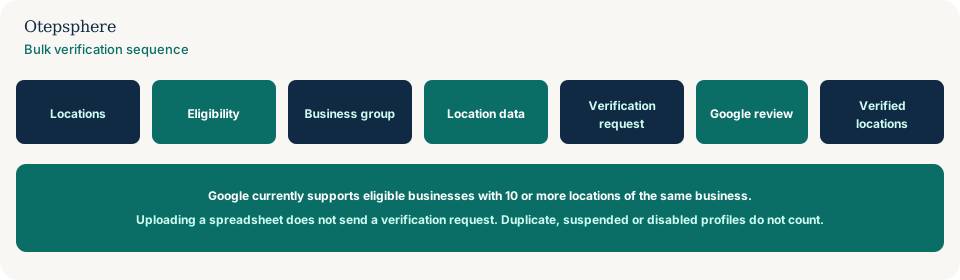
Bulk Verification Readiness Checklist
- Count eligible locations only: same business, not duplicates, not suspended, not disabled.
- Confirm you meet the current 10-location minimum.
- Put the chain in one user account or business group Google can verify together.
- Do not mix unrelated brands in an agency bulk-verify attempt.
- Fix NAP, category, phone and postal-code errors before you request verification.
- Upload the full set you manage, then submit Verifications → Chain separately.
- Prepare video access for an authorised person at a real location if Google asks.
- Use a company-domain Google Account where you can; personal emails can slow review.
What not to assume
Do not assume a successful import means the chain is verified. Do not assume 10 rows in Excel equals 10 eligible stores. Do not assume an agency login can bulk-verify every client at once.
What not to do
Practical action plan
- Inventory real locations and their current profile status.
- Clean duplicates and suspensions. Align names, categories and store codes. See bulk upload errors and duplicate locations.
- Place the chain in the correct business group with a business-owned primary owner. See managing multiple profiles without sharing passwords.
- Submit Chain verification only after the data is stable.
- Respond to Google’s evidence or video requests; then keep the account clean so verification lasts.
When professional help makes sense
Help is useful when 10-plus locations are split across personal Gmails, when an agency mixed brands, or when a franchise cannot tell eligibility problems from spreadsheet errors. It cannot guarantee Google will bulk-verify the account.
Sources and further reading
- Google Business Profile Help: Verify Business Profiles in bulk
- Google Business Profile Help: Understand delays in bulk verification
- Google Business Profile Help: Manage owners and managers
Managing 10+ locations and stuck in verification?
Otepsphere can review your Business Profile structure, location data and account organisation to identify issues before another bulk-verification attempt.
Contact OtepspherePublished by Otepsphere
Published by Otepsphere, founded by Joseph Enmanuel. Learn about Otepsphere and its approach to local SEO.