What does a deploy-stripped link mean?
It means a release shipped a new nav, footer or template that no longer includes crawlable hrefs to location or local service URLs that used to be linked.
Typical pattern: the pages still respond; Search Console still lists them; the new header has “Locations” as a JavaScript menu with no HTML href, or the footer dropped the city list. The job is a release regression, not a first-principles linking architecture.
Is this an internal-linking plan?
Related, but not the same. That guide is how services, places and articles should relate when you design the system.
Use internal linking for Local SEO to decide what should link where. Stay here when those links existed last week and a deploy removed them.
Did the paths themselves change?
If the old location URL now 404s, you have a redirect-planning job as well.
Use what happens when developers change local URLs without a redirect plan when the path changed. Stay here when the URL still works and nothing crawlable points at it.
Before
What used to link to the location URLs? Nav, footer, homepage or service pages.Release
What template or nav shipped? A new header often drops location children.Crawl
Are those URLs now orphans? Compare the pre-release crawl to live HTML.Sibling
Linking theory is a different job Use the internal-linking guide to design the system.Next
Do not treat a missing link as a penalty Restore the crawlable path, then re-check.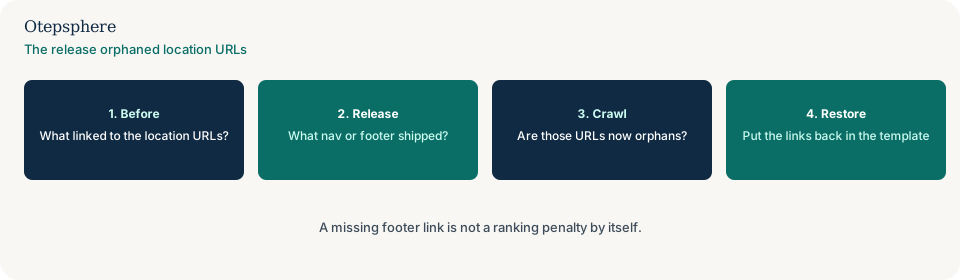
How do you prove the links left?
Compare a pre-release crawl with a crawl of the live HTML. List location URLs that lost inlinks from the homepage, header or footer.
Google’s link-best-practices still expect crawlable a hrefs, not links that exist only in a script. Source:
Link best practices for Google.
A missing footer link is not, by itself, a ranking penalty. Do not invent a penalty story from one nav change.
What should the next release put back?
HTML hrefs from a parent hub or the homepage to each indexable location URL, in the template that actually ships — not only in a staging mock.
Log the restore in the website change log so the next ranking or crawl shift can be lined up with the release.
Lost-link decision table
| What you see | What it usually means | Decision | What not to assume |
|---|---|---|---|
| Location URLs 200; nav dropped them | Release orphaned the pages | Restore crawlable hrefs in the shipped template | That this is a ranking penalty |
| You are designing links from scratch | Architecture, not a regression | Use the internal-linking guide | That a new IA is the same as a lost footer |
| Old path 404s | URL change without a plan | Use the redirect-plan guide | That restoring nav fixes a dead path |
| Links only in a JS menu | Not crawlable as HTML hrefs | Expose real anchors in the template | That a sitemap replaces inlinks |
What should I not do?
Action checklist
- Open the pre-release crawl and list location inlinks from hub pages.
- Crawl the live HTML and mark URLs that lost those hrefs.
- Restore crawlable anchors in the template that actually ships.
- If the path 404s, switch to the redirect-plan guide.
- If you are designing the system, switch to internal linking.
- Log the restore with a date.
When professional help makes sense
Help is useful when a design system ships nav without HTML hrefs across many location templates. It cannot promise that restoring a footer raises rankings.
Sources and further reading
A release orphaned the location URLs?
Otepsphere can compare the pre-release crawl with the live nav — without treating a missing link as a ranking penalty.
Contact OtepspherePublished by Otepsphere
Published by Otepsphere, founded by Joseph Enmanuel. Learn about Otepsphere and its approach to local SEO.