What happens when a domain expires?
The registrar no longer treats you as the registrant. The hostname can stop resolving, show a registrar parking page, or become available for someone else to register after any grace period the registrar offers.
That is an ownership and DNS event first. Search engines then lose a reliable way to fetch the URLs that used to live on that host. Do not invent a number of days after which “all rankings die.” Restore the domain, then inspect Search Console.
What happens when DNS stops resolving?
Crawlers cannot look up the host, so they cannot request the pages.
Google documents DNS resolution failures as site-level crawl errors: they prevent Googlebot from even requesting a URL. Search Console’s Page indexing and crawl reporting may show DNS errors while the outage lasts. Fix nameservers and records before you change titles or schema. Sources: Troubleshoot crawling errors and Search Console’s site-error categories described in Google’s crawl-error documentation.
What if the server returns 5xx errors?
Google treats many 5xx responses as temporary unavailability, then as a lasting problem if they continue.
Current crawling guidance says Googlebot retries URLs that return 503 or 429 for about two days, and that returning those codes for more than a few days can cause Google to slow or stop crawling and to drop URLs from the index. Planned-downtime guidance recommends 503 for temporary outages and warns that lasting 503 responses can be treated as a permanently unavailable server. A 2017 Search Central note said Googlebot may retry 503s for up to about a week before treating them as a permanent error. Use those documents as ranges, not as a promise. Do not return 503 for robots.txt, which can block all crawling. Sources: Troubleshoot crawling errors, Temporarily pause or disable a website and How to deal with planned site downtime.
Will rankings disappear immediately?
No. There is no guaranteed timeline for ranking loss.
Short outages may be retried. Longer outages can reduce crawling, drop URLs and cut traffic and leads because customers cannot open the pages. A parked page that returns HTTP 200 can be worse than a 503, because Google may index the parking content or treat identical error pages as duplicates. Restore the real site, then measure. A sudden lead drop has many causes: when local rankings or leads drop.
Could GBP remain visible?
Yes. The Business Profile and website availability are separate systems.
Maps can still show the listing while the website button 404s or times out. That harms the customer journey even if the pin remains. Point the profile at the restored HTTPS URL once the site is back. Do not close the profile because the domain lapsed.
What should be restored first?
Restore control and reachability in this order:
- Domain ownership at the registrar
- DNS
- Hosting
- HTTPS with a valid certificate
- Key URLs — homepage, location and service pages, contact
- Redirects that existed before the outage
- Tracking and forms
Do not start with a redesign, a new CMS, or a profile-name experiment while the host still fails. A planned migration is a different project: Local SEO after a website redesign.
What if another person registers the expired domain?
Treat it as a serious ownership and business-risk issue. This is not legal advice.
Someone else may park the domain, serve ads, or publish content you do not control. Customers and crawlers who still request the old host will reach them. Speak to the registrar and, if needed, a qualified adviser about recovery options in your jurisdiction. Do not create a lookalike hostname and pretend it is the same site without redirects you no longer control.
What if the old agency owns the domain?
Recover registrar access before you argue about SEO. Access is not the same as a useful handover.
Use the account-ownership checklist and the agency handover sequence. Keep the previous provider available until the domain, DNS and hosting are in a company-controlled account.
What should be checked after restoration?
- Search Console: DNS, server and not-found spikes; inspect key URLs.
- XML sitemap and robots.txt, including that robots.txt is not itself a 503.
- Redirects that used to send old paths to live location pages.
- Important location and service URLs, not only the homepage.
- Analytics, Tag Manager and form destinations.
- The Business Profile website link.
If you are about to make many URL or template changes after recovery, take a backup first: back up Local SEO assets before bulk changes. A structured review after the site is stable belongs in a Local SEO audit.
Website Recovery Checklist
Then
Website pages, crawling, tracking Confirm key location and service URLs, Search Console, sitemap, redirects, analytics and the Business Profile website field.Expectation
No guaranteed ranking-loss date DNS failures stop crawling. Lasting server errors can eventually drop URLs. Restore access before changing names, tags or URLs.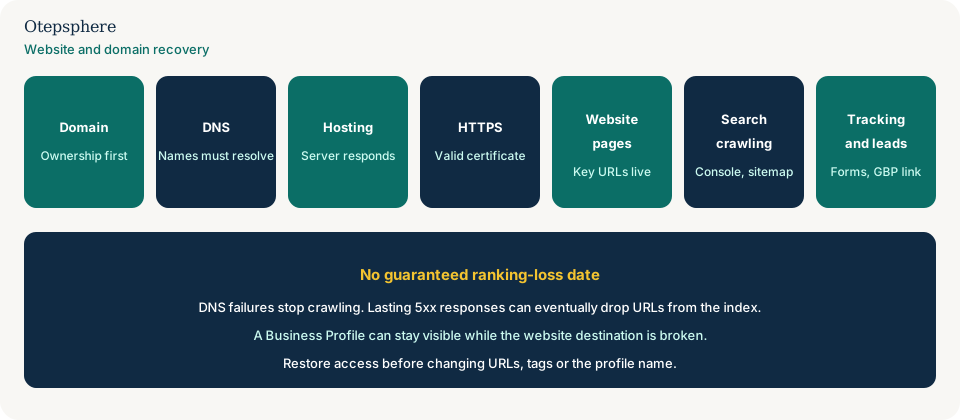
- Registrar shows the business as registrant.
- DNS resolves to the intended host.
- Key URLs return 200 with the real content, not a parked page.
- HTTPS certificate is valid.
- Search Console crawl errors are falling, not rising.
- Profile, forms and analytics point at the restored site.
What not to assume
- That rankings vanish on day one of an expiry.
- That a visible Maps listing means the website is fine.
- That a 200 parking page is safer than a 503.
- That this is the same job as a planned site move with redirects already in place.
What not to do
- Do not rebuild the site on a new domain until you know the old one cannot be recovered.
- Do not noindex the restored pages “until things settle.”
- Do not return 404 or 410 for the whole host during a temporary outage.
- Do not close the Business Profile because the website is down.
Practical options
- Regain the domain, then DNS, then hosting.
- Put the real pages back on HTTPS.
- Inspect Search Console and the profile website field.
- Only then plan URL, template or content changes.
When professional help makes sense
Help is useful after access is recovered and the question is which URLs, redirects and profile links still fail. Nobody can restore a domain another party now owns, and nobody can promise a ranking recovery date.
Sources and further reading
- Google Search Central: Troubleshoot crawling errors
- Google Search Central: Temporarily pause or disable a website
- Google Search Central Blog: Planned site downtime
- Google Search Central Blog: Closing down for a day
Local business website disappeared or domain access was lost?
Otepsphere can audit the restored site, key URLs and local-search connections after access is recovered.
Contact OtepspherePublished by Otepsphere
Published by Otepsphere, founded by Joseph Enmanuel. Learn about Otepsphere and its approach to local SEO.