What is a favicon in Google Search?
A Search favicon is the small site icon that can appear beside organic results for your site.
Google documents how to make a site eligible for that icon by placing a favicon that meets its guidelines and a
link tag on the homepage. Source:
Define a favicon to show in search results.
That documentation is for organic Search results. It is not the specification for logos in Google Ads.
Is the favicon the same as my business logo?
No. A favicon is a site icon. A business logo is a separate organisation image that can be described with Organization structured data.
The two files can share artwork, but they are different Search features with different size rules. For the logo path, see why Google may show the wrong business logo.
Why is Google showing the old favicon?
Google uses the homepage and favicon file it has already crawled and processed. An old icon usually means that processing has not caught up, or that the new file is not eligible yet.
Documented, supportable causes include:
- The homepage still points at the old file, or at a URL that redirects in a way Google has not reprocessed.
- The favicon URL changed and the new URL is not yet crawled.
- Googlebot or Googlebot-Image cannot fetch the homepage or the image.
- The new file fails the size, aspect-ratio or format guidelines.
After a rebrand or redesign, treat the homepage favicon as part of the same launch checklist as titles and visible branding. See Local SEO after a rebrand and Local SEO after a website redesign.
What favicon formats does Google support?
Google Search currently supports BMP, GIF, ICO, PNG, JPEG, PPM and TIFF.
Supported rel values are icon, the older shortcut icon,
apple-touch-icon and apple-touch-icon-precomposed. The href may be
relative or absolute, and the file may be hosted on a CDN.
What size should it be?
The favicon must be square (1:1) and at least 8 by 8 pixels. Google recommends larger than 48 by 48 pixels so it remains clear on more surfaces.
The URL should stay stable. Google also says it will not show a favicon it deems inappropriate, and may replace that image with a default icon.
Can different location pages have different favicons?
No. Google currently supports one favicon per hostname.
https://www.example.com/ and https://code.example.com/ can have different favicons
because they are different hostnames. https://www.example.com/suburb/ cannot. A multi-location
directory inherits the hostname favicon. Do not build a Local SEO project around per-location icons in Search.
Can I force Google to update it immediately?
No. There is no favicon refresh button that guarantees a new icon.
Google says crawling can take anywhere from several days to several weeks, depending on how often its systems decide the homepage needs to be refreshed.
Should I request indexing of the homepage?
You can request indexing of the homepage with the URL Inspection tool. That is the action Google currently documents. It still does not guarantee when the new favicon will appear.
What if the favicon is blocked by robots?
Then the site is not eligible for a Search favicon until Googlebot-Image can crawl the file and Googlebot can crawl the homepage.
Check robots.txt, noindex on the homepage, and CDN rules that block known crawlers. On-page
implementation details also belong in a wider
local on-page SEO
review if the homepage markup is inconsistent.
What if Google shows the default globe or icon?
A default icon usually means Google does not have an eligible favicon to show, or it replaced an image it deemed inappropriate.
Confirm the homepage link exists in the live HTML, the image returns a 200 response, and the file meets the
square-size and format rules. A missing link tag in a new theme is a common cause after a redesign.
Favicon diagnostic checklist
Crawlable image
Square, stable URL, supported format Googlebot and Googlebot-Image must be able to fetch it.Google processing
Recrawl can take days to weeks You can request homepage indexing. You cannot force the icon to change immediately.Eligible Search favicon
Possible, not guaranteed One favicon per hostname. A favicon is not the business logo.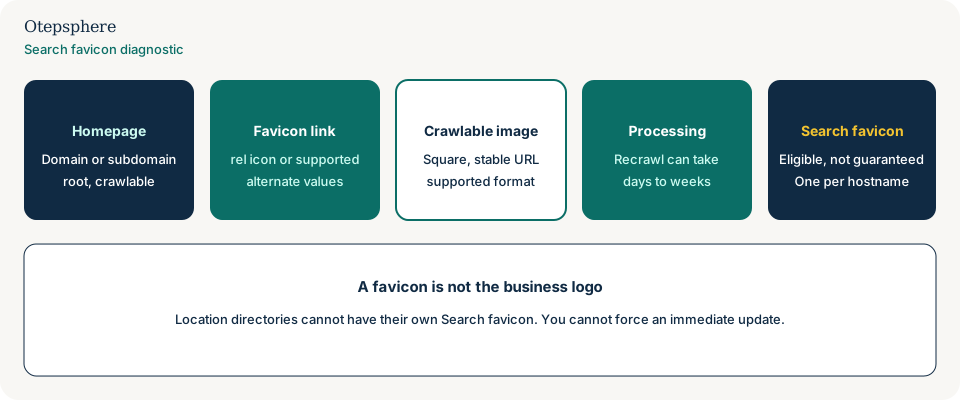
- Homepage HTML includes a supported favicon
reland a stablehref. - The image is square, at least 8×8 pixels, and in a supported format.
- Googlebot and Googlebot-Image can fetch the homepage and the file.
- Only one hostname-level icon is expected, including for location directories.
- Homepage indexing has been requested after a change, without assuming an immediate swap.
What not to assume
- That a browser tab icon proves Search will show the same file.
- That each location URL can have its own Search favicon.
- That Organization logo markup updates the favicon.
- That a valid file guarantees the icon will appear.
- That a default globe is a manual penalty.
What not to do
- Do not change the favicon URL every week.
- Do not block the image file from Googlebot-Image.
- Do not noindex the homepage to “force a recrawl.”
- Do not treat a knowledge-panel image problem as a favicon problem.
- Do not promise a same-day icon update after a rebrand.
Practical action plan
- View the live homepage HTML and confirm the favicon
link. - Open the image URL in an unauthenticated browser and confirm it is square and crawlable.
- Fix robots, format or href issues before asking Google to look again.
- Request homepage indexing, then wait through a normal recrawl window.
- If branding is still inconsistent across the site, continue with an Local SEO audit of titles, entity facts and logo markup.
When professional help makes sense
Help is useful after a rebrand or CMS change when the old icon persists and crawl access is unclear. It is not useful if the brief is to guarantee a new icon beside every result this week.
No consultant can force Google to display a favicon.
Sources and further reading
- Google Search Central: Define a favicon to show in search results
- Google Search Central: Search Essentials
Old or incorrect branding appearing beside your Search results?
Otepsphere can review the homepage implementation, crawl accessibility and wider branded-search setup.
Contact OtepspherePublished by Otepsphere
Published by Otepsphere, founded by Joseph Enmanuel. Learn about Otepsphere and its approach to local SEO.