What does this problem actually mean?
It means two or more of your service URLs are being treated as answers to the same search job, so Google splits impressions or prefers the weaker document.
Typical pairs: “emergency plumbing” and “blocked drains” that both describe the same call-out; “Invisalign” and “clear aligners” that never explain a different treatment; “house cleaning” and “domestic cleaning” with identical body copy. The conflict is between pages on one site, not between branches.
Is this the same as locations competing?
No. Location overlap is a geography problem: two branches can both appear because searchers sit between them.
Service-page cannibalisation is a document problem: two URLs claim the same service job. Diagnose branch overlap on why locations compete with each other in search. If one service URL is indexed but never preferred, that is a different check: why a service page is indexed but not ranking.
Job
Same search job? Two URLs explaining the same service to the same customer.Evidence
Which URL earns impressions? Search Console shows the winner per query, not an incognito screenshot.Test
Are the jobs actually different? Emergency plumbing and drain clearing can be two jobs. Synonyms usually are not.Yes
Differentiate or consolidate Keep one primary URL. Support it with internal links.Next
Do not publish a third variant A new URL for every keyword is not a documented fix.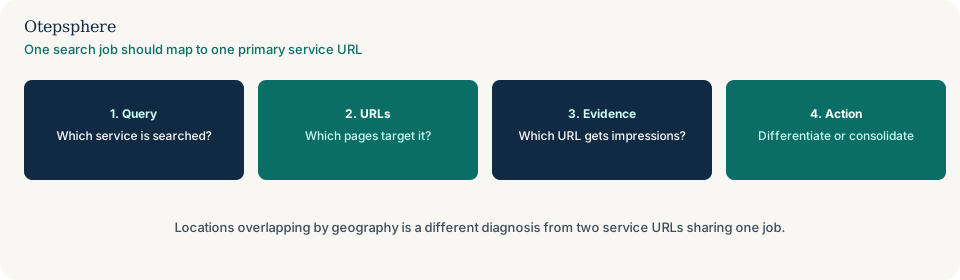
How do I see which URL wins a query?
Export the query in Search Console and read which page receives the impressions, not which URL you intended.
Filter Performance to one service query. Note the top pages. Three useful outcomes: one URL owns the query; two of your URLs share it; or a blog, homepage or location page is the winner instead. That mapping is the evidence. A single incognito screenshot is not.
When should I differentiate the pages?
Differentiate when the services are genuinely different jobs a customer would book separately.
A dentist page for examinations and a page for Invisalign can both exist if each explains eligibility, process and how to enquire. Rewrite titles, H1s and openings so each URL answers one job. Keyword mapping should assign one primary URL per job: how to map local keywords to services and locations.
When should I consolidate?
Consolidate when the URLs describe the same booking, the same process and the same customer, and only the wording differs.
Keep the stronger URL — the one with clearer copy, better internal links, or more impressions — and redirect the synonym page to it. Do not leave both live “for coverage.” Search does not need a URL for every phrasing. People-first guidance asks whether the content is useful for the person who would use it, not whether every synonym has a file. Source: Creating helpful, reliable, people-first content.
When should I keep both URLs?
Keep both when a customer would choose one and not the other, and each page can stand as a complete answer.
A plumber’s “hot water systems” page and “blocked drains” page are different jobs. If Search Console already maps each query to a different URL, and the copy matches that split, leaving both is reasonable. Keeping both is not a ranking tactic; it is a usefulness decision.
Query-to-URL decision table
| What Search Console shows | What it usually means | Decision | What not to assume |
|---|---|---|---|
| One service query, impressions split across two service URLs | Google treats them as the same job | Differentiate if the jobs differ; otherwise consolidate to one primary URL | That a third synonym URL will “cover” the leftover queries |
| The query lands on the homepage, a blog post or a location page | A different document is the stronger match | Strengthen the intended service URL, or accept the winner if it already answers the job | That the service URL is “not indexed” |
| Each query maps cleanly to a different service URL | The pages are doing separate jobs | Keep both; support each with internal links that match the job | That you still need a page for every keyword variant |
| Impressions on the intended URL, few clicks | Title, snippet or opening answer may not match the query | Rewrite the title and lede; keep the URL | That overlapping URLs are the cause |
What should I not do?
Action checklist
- List the service URLs that might share a job. Read them as a customer, not as a keyword sheet.
- In Search Console, map each important service query to the URL that receives the impressions.
- Decide per pair: differentiate, consolidate, or keep both because the jobs are truly different.
- If consolidating, redirect the weaker URL and move unique facts onto the surviving page.
- If differentiating, rewrite titles, H1s and openings so each page answers one booking job.
- Support the primary URL with internal links. Re-measure after recrawl. There is no published ranking timetable.
When professional help makes sense
Help is useful when several service templates overlap, when Search Console shows a different winner URL than the one the business is watching, or when location overlap is being mixed with service-page overlap. It cannot guarantee that one URL will win the query.
Sources and further reading
- Google Search Central: How Search works
- Google Search Central: Creating helpful, reliable, people-first content
- Google Search Central: Google Search Essentials
Overlapping service URLs splitting the same queries?
Otepsphere can map which URL Google associates with each service before more variants are published — a query-to-URL review, not a ranking promise.
Contact OtepspherePublished by Otepsphere
Published by Otepsphere, founded by Joseph Enmanuel. Learn about Otepsphere and its approach to local SEO.