Does every location need LocalBusiness schema?
Not as a mechanical rule. A genuine location page can include LocalBusiness markup when it accurately describes that location and matches visible content. A thin city URL that is not a real location should not get fake LocalBusiness markup.
Google currently says you can add LocalBusiness structured data to any page, though it may make more sense on a page that contains information about the business, and that you should define each location as a LocalBusiness type. Source: Local business structured data. That still assumes the page is about a real location.
What should each location’s markup describe?
The facts for that location that are visible on the page: typically location name, address, phone, opening hours and the location URL — only where they are accurate.
Google’s required LocalBusiness properties are name and address. Recommended properties include telephone, url and openingHoursSpecification. The url should be the fully-qualified URL of that specific business location and must be a working link. Do not mark up a branch with the homepage URL if the page is a different location.
Should the corporate homepage contain every branch?
There is no Google requirement to nest every branch inside homepage LocalBusiness markup.
Architecture options that stay honest:
- Homepage describes the organisation. Each location page describes that location.
- A store-locator page lists locations for humans. Each location still has its own URL with matching markup.
- Google’s department example nests departments of one store, not every city in a chain, inside one Store object.
Stuffing twenty PostalAddress blocks into the homepage does not create twenty local entities. It often contradicts a homepage that is not twenty location pages.
Can every location use the same phone and address in schema?
Only if that is factually true. Shared NAP in markup is correct when the business actually shares those details, and wrong when each branch has its own.
A central call centre number on every location page should match what the page tells customers. If each clinic has a local line, the markup should not silently replace it with head office. Shared contact details across branches are an accuracy question first; see multi-location SEO cannibalization when identical facts also collapse distinct location pages.
What happens if every page contains identical LocalBusiness markup?
The site tells machines that every URL is the same business location. That creates entity ambiguity.
Google does not document a ranking bonus for repeating one JSON-LD blob. Identical markup on city pages is a common companion of doorway templates. Users and search systems then struggle to tell Branch A from Branch B. This page is not when to create location pages — that guide decides whether the URL should exist. This guide decides how markup should describe URLs that already represent real places.
Should @id values be unique?
Unique identifiers per entity are a common structured-data practice. Google does not document a LocalBusiness
requirement that every location page must use a unique @id.
JSON-LD @id is a node identifier. Using the location URL as the LocalBusiness @id,
and a stable organisation URL as the Organization @id, is a clear way to relate parent and child
without inventing a Google ranking rule. Do not treat @id as a documented eligibility property
alongside name and address.
How should Organization and LocalBusiness entities relate?
Conceptually, the organisation is the parent brand. Each location is a place that organisation operates. Markup should not collapse them into one node when they are different things.
A typical pattern is an Organization on brand-level pages, and a more specific LocalBusiness subtype on each location page, optionally linked with properties such as parentOrganization or a shared identifier. Google’s LocalBusiness examples focus on the location object for that page. Keep the relationship consistent with the visible site: About describes the company; /locations/manchester/ describes Manchester.
Does schema replace a useful location page?
No. Structured data describes a page. It does not substitute for unique local information, accurate NAP and a reason for the URL to exist.
If the location page is a doorway, markup will not make it a real branch. If the page is useful, markup can describe it more explicitly. See when you should create location pages.
What if schema disappears from the template?
Then some or all location pages stop emitting markup after a theme, plugin or deploy change. Diagnose the template, not Google.
Follow Local SEO after a website redesign when the code is missing. Follow this page when markup exists but is copied, incomplete or attached to the wrong entity.
Multi-location schema architecture
Location A
Own URL, address, phone, hours Markup describes this location only.Location B
Own URL, address, phone, hours Markup describes this location only.Location C
Own URL, address, phone, hours Markup describes this location only.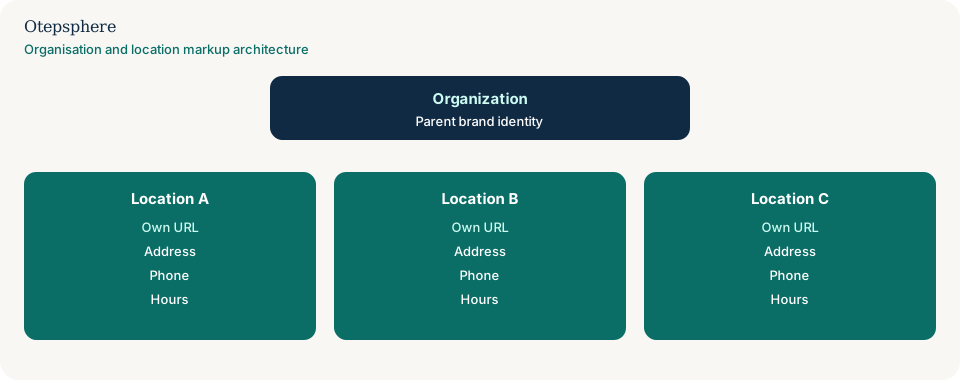
What not to assume
- That adding LocalBusiness to every URL creates a pin in each city.
- That Google requires nested department markup for ordinary multi-location retailers.
- That a unique
@idis a documented ranking factor. - That the homepage should carry every branch’s hours “for completeness.”
What not to do
- Do not generate LocalBusiness markup for suburbs you do not serve from a real location.
- Do not copy Location A’s address onto Location B’s page.
- Do not mark up a store-locator map as if it were a single shop.
- Do not add review stars for your own locations on your own site expecting a snippet.
Practical action plan
- Inventory real locations and their canonical URLs.
- On each location page, make NAP and hours visible, then mark up those same facts.
- Point
urlat that location URL, not a generic homepage, unless that is truly the location page. - Keep organisation markup on brand pages without duplicating every branch.
- Re-test a sample of locations after every template deploy.
When professional help makes sense
Help is useful when a CMS emits one global LocalBusiness object on hundreds of URLs, or when franchise pages mix corporate and local NAP. It cannot guarantee rich results for each location, and it should not add schema to doorway pages.
Sources and further reading
- Google Search Central: Local business structured data
- Google Search Central: Introduction to structured data
- Google Search Central: General structured data guidelines
Managing structured data across many business locations?
Otepsphere can review how the website represents the parent organisation and individual locations so markup remains aligned with visible business information.
Contact OtepspherePublished by Otepsphere
Published by Otepsphere, founded by Joseph Enmanuel. Learn about Otepsphere and its approach to local SEO.