Choose the mismatch: your phone or another tool
Two kinds of disagreement get treated as the same error. They are not. A rank tracker that disagrees with the Google result on your phone is a stored sample versus a live search. Two dashboards that disagree with each other are two vendors using two recipes. A phone search that matches neither tool is still the first problem, not a reason to average the dashboards.
How to design a geo-grid so you can see the geographic pattern is how to track Google Maps rankings. This page is the diagnostic when the numbers you already have do not match — one cell says position 7 and your phone in the same suburb shows position 2, or two products quote different ranks for the same town.
Match the query, coordinates, time and result type
A Google Maps ranking is the order for one query, from one geographic point, at one time. It is not a permanent score Google exports. Before you treat a discrepancy as a software error or a ranking crash, write down the inputs that produced each number.
- Exact query spelling and language.
- Sample coordinates — the pin or cell, not only the suburb name.
- Scan timestamp, including time zone.
- Result surface: Maps finder list, Search local pack, or organic website results.
- The vendor’s definition of a ranking position, including how absent results are counted.
Google’s local ranking help includes distance. A tool pin two streets away is a different searcher than you standing in the car park. Source: Tips to improve your local ranking on Google. Do not treat the software centroid as “where I am.” Read the pin coordinates.
The local pack, the Maps finder list and organic blue links are different documents. A Maps finder result, a Search local pack position and an organic website position are different observations. A tool that ranks the pack will not match a Chrome search that you read as the organic listing.
Why the same query changes across an area is why Google Maps rankings change by location. Visibility as a geographic pattern, not a single office rank, is how to measure Google Maps visibility.
When a tracker differs from a manual Google search
The number in the software and the list on your device were not produced under the same conditions until you prove otherwise. That is a method mismatch, not proof the software or Google is broken.
Point
Where did the tool sample? Most trackers use a map pin or grid cell, not your office Wi-Fi.Surface
Which result list is being ranked? Local pack, Maps finder and organic Search are different lists.You
Are you signed in on a phone nearby? Personalisation and your actual location can differ from the tool.Yes
Compare the same query, point and surface A mismatch is expected until those three match.Next
Two tools disagreeing is a different check That is tool-versus-tool, not you-versus-Google.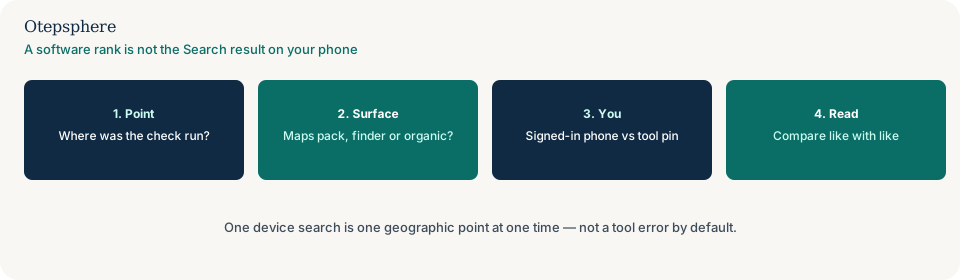
Signed-in Search and Maps can personalise what you see. Most rank trackers sample an unsigned-in view from a stated coordinate. Repeat the check signed out, as close to the tool pin as you safely can, on the same result surface the export used. A search from the office Wi‑Fi, a moving car, or a VPN endpoint is a different location estimate than the stored pin.
Do not rebuild the website because one phone search disagreed with one cell. Do not treat a tracker position as Google’s official KPI. Do not average a phone check into the geo-grid. Do not change grid size in the same hour to “make it match.”
Phone versus tracker decision table
| What you see | What it usually means | Decision | What not to assume |
|---|---|---|---|
| Tool pin is 800 metres from where you searched | Different searcher location | Search from the pin, or move the pin to your test point | That the tool “failed Google” |
| You compared a Maps finder rank to an organic URL | Different surfaces | Name the list before you quote a position | That there is one Google rank for the business |
| You are signed in; the tool is not | Personalisation | Repeat the check signed out, or accept the gap | That signed-in results are the reporting standard |
| Two vendors disagree; you did not search Google | Tool versus tool | Use the two-tools section on this page | That a phone-versus-software check will settle it |
When two rank-tracking tools disagree
Two products can both sample Maps and still use different pins or rank rules. Tool disagreement means two products measured local visibility with different recipes, so their numbers are not the same observation. Neither number is Google’s official rank. Google does not export a universal Maps position.
Export one comparable scan from each tool. Record the exact query and language, sample coordinates, scan time, result surface and the vendor’s definition of a ranking position. A Maps finder result, a Search local pack position and an organic website position are different observations.
Align the settings that both tools support. Where a setting or calculation cannot be matched, label the reports as separate series. Do not average them into an invented official Google rank or select whichever dashboard looks more favourable.
If settings match but results still differ, retain both exports and investigate collection timing, result depth and the vendors’ documented methods. For a recurring report, use one consistent method that matches the customer journey you are measuring.
Pin
Do both tools sample the same point? A 200-metre shift can change the local pack.List
Are they ranking the same list? Pack, Maps and organic positions are not interchangeable.Rule
Is “rank 3” defined the same way? Some products skip ads, Maps, or businesses without a website.Yes
Pick one method and keep it A trend needs a stable recipe, not two dashboards.Next
You versus Google is a different page Diagnose a phone search separately from two vendors.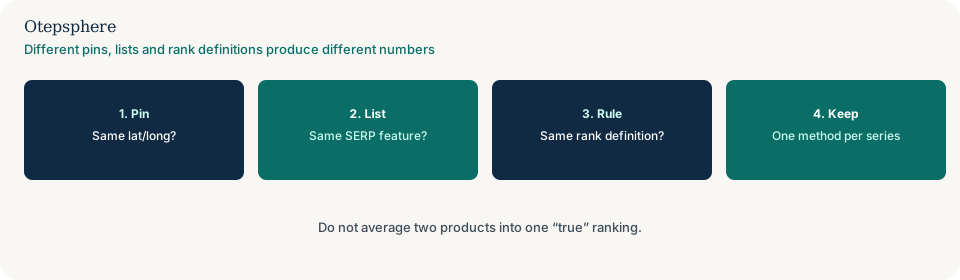
What belongs in one tracking recipe is query spelling, language, sample coordinates, grid size, radius, result surface, and the vendor’s rank rule. Write those down next to every export. If a second tool cannot match them, it is a second series, not a referee.
Vendors do not always mean the same thing by “position 1.” Some products skip ads, Maps placements, or businesses without a website. A listing that is absent in one export may still appear in another because the tools searched different lists, different depths, or treated “not found” differently. That is not proof one vendor is lying.
Pick the product whose recipe you can keep stable and whose surface matches the customer journey you care about. Use Maps-oriented tracking if customers choose from the pack. Use Search Console for website queries. Do not average the two into one “true rank.”
A wider radius or a denser grid on only one tool, or a settings change between scans, will also split the numbers. That is a broken series, not a Maps crash. How to store a comparable trend after settings move is how to track Local SEO rankings over time, including what happens when grid size, radius or centre changes.
Vendor decision table
| What you see | What it usually means | Decision | What not to assume |
|---|---|---|---|
| Pins differ by a few hundred metres | Different searcher location | Align coordinates or accept two series | That one vendor is lying |
| One ranks the pack; one ranks organic | Different surfaces | Stop comparing the numbers | That “local rank” has one meaning |
| Scans hours apart on a volatile query | Time gap | Re-run both in the same window | That the later scan is the correction |
| You changed radius on only one tool | Recipe break | Label a new series; see over-time tracking | That Maps visibility crashed |
Comparison settings checklist
- Export each tool’s query, language, timestamp and sample coordinates.
- Write the result surface and the vendor’s rank definition on the same line as the export.
- Repeat a signed-out Google search as close to the pin as you safely can, on the same surface.
- Align the settings both tools support. Label what you cannot match as a second series.
- If those inputs match and the lists still differ, note the time gap, result depth and cache.
- Pick one recipe for the trend you will actually manage. Do not average the exports.
- Keep the geo-grid recipe stable if you want a month-on-month trend.
- If someone changed grid size, radius or keywords mid-series, switch to tracking rankings over time instead of treating the jump as a ranking event.
When to keep separate measurement series
Keep separate series when a setting or calculation cannot be matched: different pins, different surfaces, different rank rules, different languages, or a grid and radius that only one tool can reproduce. A second series is still useful. It is not a referee.
Do not invent a blended “official Google rank” from unlike exports. Do not splice a phone check into a geo-grid average. If last month’s table cannot sit next to this month’s because the recipe drifted, that is a comparability problem — see how to track Local SEO rankings over time, especially why monthly reports stop being comparable — not a reason to pick the kinder dashboard.
What to investigate after settings match
If the query, coordinates, language, surface, rank rule and scan window match and the lists still differ, retain both exports. Investigate collection timing, how deep each product reads the list, and the vendors’ documented methods. Local results can move within a day. The later scan is not automatically the correction.
Help is useful when a client, a vendor and an owner each quote a different rank for the same town, or when an agency tool and an in-house tool have never used the same pin. It cannot produce a single official Google position, because Google does not publish one, and it cannot make two products identical.
Sources and further reading
- Google Business Profile Help: Tips to improve your local ranking on Google
- Google Search Central: How Search works
The rank tracker, your phone and another dashboard still disagreeing?
Otepsphere can map which query, point, surface and rank rule each number came from — without treating any figure as Google’s official rank, and without averaging incompatible exports.
Contact OtepspherePublished by Otepsphere
Published by Otepsphere, founded by Joseph Enmanuel. Learn about Otepsphere and its approach to local SEO.