What should a Business Profile description contain?
A Business Profile description should tell customers what you offer, what makes the business distinctive, how long you have been operating, and other facts that help someone decide whether to visit or enquire.
Google currently lists those points under the “From the business” field and gives an ice-cream-shop example that describes location, local use, flavours and pizza hours without packing in keywords. The bulk-upload field notes say the description must include details about the business. Sources: Edit your Business Profile and Manage your Business Profile description.
What is the current character limit?
Google currently forbids exceeding 750 characters in the description field.
That limit appears in the edit-profile article and in the bulk spreadsheet field notes. Count characters before you paste from a website About page. Source: Edit your Business Profile.
Can I add links?
No. Google currently says not to include URLs or HTML code in the description.
Put the website in the website field. Put booking and menu URLs in their own link fields. A description that reads like a landing page with tracking parameters is the wrong tool. Source: Edit your Business Profile.
Can I add prices or promotions?
Google currently asks you to focus on details about the business instead of promotions, prices or sales.
The bulk-upload notes are explicit: exclude information about deals, promotions, prices or sales. Offers, posts and product fields exist for commercial messages. A description that is mainly a coupon will often fail review. Sources: Edit your Business Profile and Create a bulk upload spreadsheet.
Can I stuff services and cities into the description?
No. The description should not be used as a keyword list of services and suburbs.
Google’s representation guidelines require the profile to represent the real business. Categories, services and location pages are the places for structured offer and geography. A paragraph that repeats “plumber Brisbane plumber Logan plumber Ipswich” is not useful customer information and is a common reason a save does not display. See why a business ranks for its name but not its services if branded search works and service search does not — stuffing the description will not fix that.
Does the description affect rankings?
Google does not document the Business Profile description as a local ranking factor. Treat it as customer information, not as a ranking lever.
Google’s local ranking help still emphasises relevance, distance and prominence. A clear description can help a person understand the business after they see the listing. That is not the same as a published ranking bonus for using a keyword in the first sentence. See Local SEO ranking factors.
Why is my saved description not showing yet?
A saved description may not show yet because Google is still reviewing the edit. Changes usually take about 10 minutes and can take up to 30 days.
That timing is the same window Google currently publishes for Business Profile edits generally. Pending is not rejected. Not approved means Google could not confirm the new information. Check the public “From the business” text signed out. Source: Manage your Business Profile description. Status meanings are unpacked in why edits are pending or not approved.
Can Google generate a description with AI?
Yes, for some users. Google currently supports AI-powered suggested descriptions in select regions and languages.
You can start from a blank field or from text you already wrote, then use Suggest description. The tool can draw on the Business Profile and other sources such as the website. You must be 18 or older and follow Google’s generative AI prohibited-use policy. The feature may not appear on every profile. Source: Manage your Business Profile description.
Should AI-generated descriptions be reviewed?
Yes. Accuracy remains the business owner’s responsibility.
Google currently calls the output creative text and tells you to review it for accuracy and update it as needed. AI can invent years in operation, services you do not offer, or a suburb you do not serve. An inaccurate suggestion that you save is still your representation of the business. Source: Manage your Business Profile description.
1. Content
Does the text describe the real business? Google currently recommends what you offer, what makes you distinctive, history and other useful facts.2. Limit
Is it 750 characters or fewer? Google currently forbids exceeding 750 characters in the description field.3. Format
Are URLs and HTML absent? Links and markup do not belong in this field.4. Promotions
Is the copy about the business, not a sale? Google currently asks you to focus on the business rather than promotions, prices or sales, and not to stuff services and cities.5. Review
Has the edit finished review? Changes usually take about 10 minutes and can take up to 30 days. Review any AI suggestion for accuracy before you save.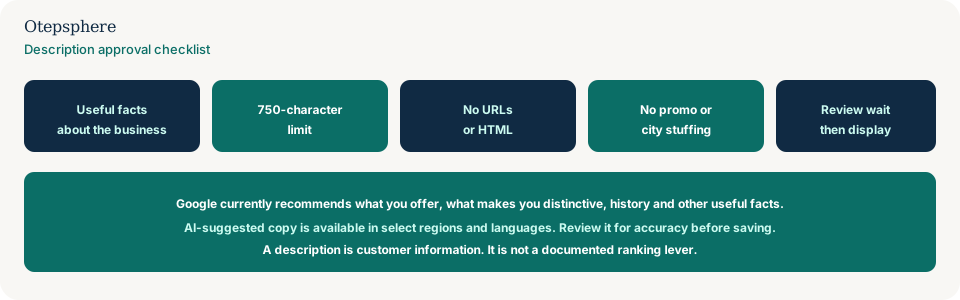
GBP Description Checklist
- Write what the business is, who it serves, and what is distinctive — in ordinary sentences.
- Stay at or under 750 characters.
- Remove URLs, HTML, prices, coupons and city-keyword lists.
- Match the website and real-world offer. Do not claim awards or years you cannot support.
- If you use Suggest description, fact-check every sentence before Save.
- Wait through the current edit-review window before concluding Google rejected the text.
- If the status is not approved, fix the policy issue rather than pasting the same draft.
What not to assume
Do not assume a keyword-rich description will rank the profile for those terms. Do not assume AI copy is approved because Google generated it. Do not assume a missing description means the whole profile is unverified.
What not to do
Practical action plan
- Read the public listing signed out. Copy what customers currently see.
- Draft a factual paragraph from the real offer, then cut it to 750 characters.
- Strip links, HTML and promotions.
- Save and record the edit status.
- If you used AI, compare every claim with the website and the rest of the profile.
When professional help makes sense
Help is useful when several locations share a stuffed template, when AI suggestions keep inventing services, or when description edits stay not approved alongside other representation issues. It cannot guarantee Google will approve a particular draft.
Sources and further reading
- Google Business Profile Help: Manage your Business Profile description
- Google Business Profile Help: Edit your Business Profile
- Google Business Profile Help: Guidelines for representing your business on Google
Business description rejected or not representing your company accurately?
Otepsphere can review your Business Profile and website messaging so the description accurately reflects the real business without relying on keyword stuffing.
Contact OtepspherePublished by Otepsphere
Published by Otepsphere, founded by Joseph Enmanuel. Learn about Otepsphere and its approach to local SEO.