What is a Business Profile attribute?
A Business Profile attribute is an extra fact about the location — such as Wi-Fi, outdoor seating, payment options or wheelchair access — that can show on Search, Maps and other Google surfaces.
Google currently says attributes help customers know details about the business and that adding certain attributes might make the business show up in searches for places with those attributes. That is a discovery statement, not a ranking guarantee. Attribute names can change over time. Source: Manage your business attributes.
Which attributes can the business edit?
You can directly edit some factual attributes from Edit profile → More, typically as Yes or No, then save.
Google’s current examples include Amenities such as Wi-Fi and Payments such as cash-only. Accessibility attributes have specific physical tests (entrance width, steps, ramps, restroom stalls, seating height, reserved parking, elevator size). Recycling drop-off types and business-identity attributes (for example women-owned or veteran-owned) are also owner-managed, with extra rules: franchises cannot be marked as a small business, and a small business is described as making less than $10 million a year. Both owners and managers can edit attributes. Sources: Manage your business attributes and Manage your Business Profile owners & managers.
Which attributes can customers influence?
Some attributes may be populated from customer input. Subjective attributes, such as whether the business is popular with locals, rely on opinions of Google users who have visited.
Google currently separates those from factual attributes you can edit, such as outdoor seating. If a “popular with” chip appears and you cannot switch it off in More, treat it as customer-sourced rather than a missing Yes control. Sources: Manage your business attributes and Edit your Business Profile.
Why can't I see a particular attribute?
You may not see an attribute because it is not offered for your category, country or location, or because Google has not made that feature available to the profile.
Google currently says some attributes can only be changed in certain locations, countries or business categories. The Business Information API also states that available attributes depend on properties of the location such as category, and that Google may add or remove attributes without an API change. A café may see outdoor seating; a solicitor’s office may not. That is not the same as choosing the wrong primary category — though the wrong category can hide a whole group of amenities. See how to choose Google Business Profile categories. Sources: Manage your business attributes and Add attributes (Business Profile APIs).
Why did an attribute appear that I did not add?
An attribute you did not add can come from customer input, from Google’s own information about the place, or from an earlier owner, manager or bulk upload.
Google currently notes that some attributes may be populated based on inputs from customers. Identity attributes can also be opted into or out of. A former manager may have marked Wi-Fi years ago. Check More, collected info where available, and any bulk spreadsheet columns before assuming Maps vandalism.
Can incorrect accessibility attributes affect customers?
Yes. Incorrect accessibility attributes can send people to a location they cannot enter or use safely.
Google currently defines a wheelchair-accessible entrance as about three feet or one metre wide with no steps, or with a permanent or at least movable ramp; revolving-door-only access should be marked No. Restroom and seating rules are similarly specific. Marking Yes when the doorway has a step and no ramp is not an SEO choice — it is a false fact customers rely on. Walk the premises against Google’s current tests before you save. Source: Manage your business attributes.
Should attributes be used for keyword optimisation?
No. Attributes should accurately describe the business.
Turning on amenities you do not offer so the listing might appear in extra filters is a representation problem. Google currently presents attributes as information for customers, with a possibility of showing in searches for those attributes. That is not a licence to keyword-stuff amenities. See Google Business Profile optimisation.
Can multi-location businesses update attributes in bulk?
Yes, in documented cases. Google currently says that if you have 10 or more locations, you can bulk upload attributes, and that third-party marketing agencies can update locations through the Business Profile APIs.
Spreadsheet attribute columns appear for attributes that apply to at least one location. Some cells show “[NOT APPLICABLE]” and should be left as they are. Hotel attributes cannot be updated through the spreadsheet; Google currently requires the API or dashboard for those. Sources: Manage your business attributes and Create a bulk upload spreadsheet.
1. Business
Which amenities can you edit as Yes or No? Owner-managed examples include many payment, Wi-Fi and outdoor-seating attributes, plus documented accessibility details.2. Customers
Could visitors have populated this attribute? Google currently says some attributes may be populated from customer input, including subjective ones such as popularity with locals.3. Availability
Does this category and country even offer the field? Some attributes exist only in certain locations, countries or business categories.4. Accuracy
Would a customer rely on this fact to visit? Incorrect wheelchair-access attributes can send people to a doorway they cannot use.5. Public profile
Does the live listing match the premises? Attributes should describe the business. They should not be used as a keyword field. Chains with 10 or more locations can bulk-upload attributes.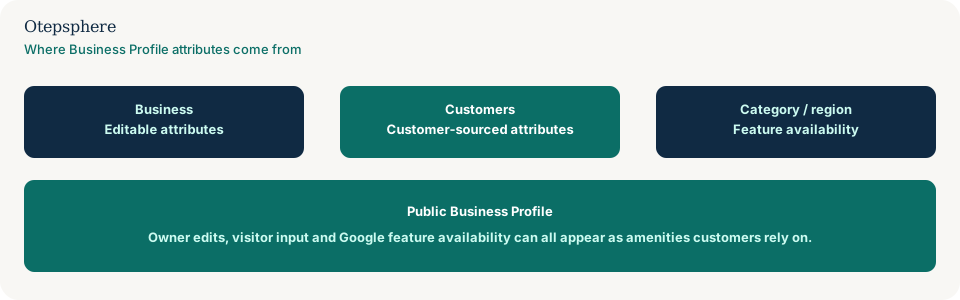
Attribute Accuracy Checklist
- Walk the location and mark only amenities that exist today.
- Apply Google’s current accessibility tests before saving wheelchair attributes.
- Separate owner-edited facts from customer-sourced or subjective chips.
- If a field is missing, check category and country before opening a support ticket.
- For chains, download current data, then bulk-update only the columns you intend to change.
- Wait the usual edit-review window (about 10 minutes, up to 30 days).
- Do not switch on attributes as keywords.
What not to assume
Do not assume every amenity is owner-editable. Do not assume a missing field is a bug. Do not assume identity attributes will appear in every market. Do not assume bulk upload will overwrite hotel attributes.
What not to do
Practical action plan
- Screenshot the public listing’s amenity chips.
- In More, correct every Yes/No you control.
- Document any chip you cannot edit and whether it looks customer-sourced.
- For multiple locations, use a controlled bulk file after a backup download.
- Re-check the public listing after review.
When professional help makes sense
Help is useful when a chain’s attributes were bulk-loaded incorrectly, when accessibility claims do not match the buildings, or when you cannot tell an uneditable chip from a category limit. It cannot guarantee Google will remove a customer-sourced attribute.
Sources and further reading
- Google Business Profile Help: Manage your business attributes
- Google Business Profile Help: Edit your Business Profile
- Google Business Profile APIs: Add attributes
Business Profile showing incorrect amenities or attributes?
Otepsphere can review the profile and business information to help identify which attributes can be corrected directly and which require another approach.
Contact OtepspherePublished by Otepsphere
Published by Otepsphere, founded by Joseph Enmanuel. Learn about Otepsphere and its approach to local SEO.