Can Google choose a canonical on another domain?
Yes, in some circumstances. Google currently describes this as uncommon.
Canonicalisation troubleshooting lists a copycat website as a rare situation where the algorithm may select a URL from an external site that is hosting your content without permission. It also lists syndicated content, misconfigured servers that return one host’s content for another host’s URL, and malicious hacking that inserts a cross-domain rel=canonical or redirect. Source: Fix canonicalization issues.
If the selected URL is on your own domain, stop here and use why Google chose a different canonical location page.
How do I confirm this?
Use Search Console URL Inspection on the official local URL and read user-declared versus Google-selected canonical.
Google’s troubleshooting steps start there: check which page Google considers canonical, then look for technical misconfigurations, then decide whether clustered pages are sufficiently different. Re-evaluation can take time; Google currently says pages might stay in a duplicate cluster for up to two weeks even after content fixes. Request indexing only for important URLs because of quotas.
Did I intentionally syndicate the content?
If you did, the partner page may be the version Google selected.
Google currently says the canonical link element is not recommended for avoiding duplication by syndication partners, because the pages are often very different, and that the most effective solution is for partners to block indexing of your content. Check the contract and the partner’s robots or noindex settings before you treat the case as theft.
Is another site copying the page without permission?
Compare publishing history, the copied HTML, and whether their page is the one Search Console selected.
Google’s copycat row says you may contact the site’s host to request removal and that you can request Google remove an infringing page by filing a request under the Digital Millennium Copyright Act. That is a documented Search option. It is not legal advice about your rights.
Did the site accidentally set a cross-domain canonical?
Check your HTML head and HTTP headers. This is a common self-inflicted cause.
A staging domain, a migrated CMS, or a plugin that still points at an old host can tell Google the other URL is preferred. Google also documents hosting misconfigurations where a server returns content from example.com for a request on other.example, which can produce unexpected cross-domain selection. View source on the live official URL. If your page already canonicalises to the external host, fix that before you accuse a copycat.
Could a hacked site inject a canonical?
Yes. Google currently recognises malicious canonical or redirect injection as a possibility.
Troubleshooting says some attacks introduce an HTTP 3xx redirect or a cross-domain rel=canonical in the HTML or HTTP header, usually pointing at malicious or spammy content, and that algorithms may then choose that URL. If you find an injected tag or redirect you did not set, treat it as a security incident: clean the host, rotate credentials, then recrawl. Do not add a second canonical on top of the injected one and hope they cancel out.
Should I simply add another canonical tag?
Diagnose first. Another tag will not fix a copycat, a syndication partner, or an injected header.
If your official page already self-canonicalises to itself and still loses, the cause is outside that tag. Google also says not to specify different canonicals with different methods. Align redirects, internal links and the sitemap to the official HTTPS URL, as you would for any preference: HTTP and HTTPS duplicate local pages.
What if the external site copied our location page?
Check publishing history, source HTML, canonicals, redirects, internal links and indexing on both URLs.
- Which page was published first, and does the copy include your unique local proof?
- Does either page point at the other with rel=canonical or a redirect?
- Are your internal links and sitemap still using the official URL?
- Does URL Inspection show the external host as Google-selected?
Strengthen the official page with genuine local information, not with a synonym rewrite. Entity clarity across the site is entity SEO for local businesses. Mentions that never link home are unlinked brand mentions. Earned links to the official URL belong in local link building, not as a substitute for cleaning an injected tag.
Do I need a copyright removal request?
Only discuss the options Google documents. This is not legal advice.
Google currently says you may contact the host and that you can file a DMCA request to ask Google to remove an infringing page from results. Whether you should file, and whether the copy infringes, is a legal question for a qualified adviser. Do not treat a DMCA form as an SEO ranking tool.
External Canonical Diagnostic Flow
Causes to separate
Copy, syndication, cross-domain tag, or hack Also check hosting that returns your HTML on someone else’s host, which Google documents as a server misconfiguration.Do not start here
Adding another canonical tag without diagnosis If your page already points at the official URL, another tag will not override a copycat or an injected header.Next
Correct signals or escalate the documented path Fix your own markup and hosting first. Copyright removal is a later, Google-documented option — not legal advice.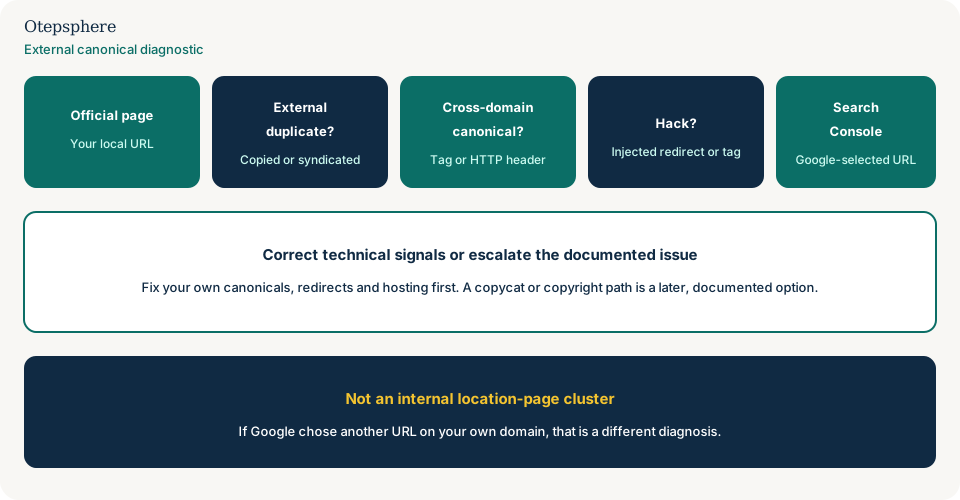
- URL Inspection shows an external Google-selected canonical.
- Your official page does not canonicalise or redirect to that host.
- Syndication, copying, hosting misconfiguration and injection have each been ruled in or out.
- Official HTTPS URL is used in internal links and the sitemap.
- Security cleanup is done if a tag or redirect was injected.
- Any host or copyright step follows documented Google paths, not guesswork.
What not to assume
- That every unwanted result is a copycat canonical.
- That a stronger tag overrides a partner you asked to republish the page.
- That this is the same problem as two of your location templates clustering.
- That a DMCA request restores rankings by a set date.
What not to do
- Do not add a second conflicting canonical “to fight” the external URL.
- Do not noindex your official location page.
- Do not copy the copycat’s domain into your sitemap.
- Do not ignore injected redirects because the visible page still looks fine.
Practical options
- Capture Search Console evidence for both URLs.
- Inspect your HTML and headers for a cross-domain canonical or redirect.
- Clean a hack or hosting misconfiguration if that is what you found.
- If you syndicated the page, ask the partner to noindex or to canonicalise back.
- If a copycat remains, use host contact and, where appropriate, the documented copyright-removal path.
- Request recrawl on the official URL after technical signals are clean.
When professional help makes sense
Help is useful when Search Console shows another hostname, the HTML looks clean, and you need to separate syndication, copying, hosting and security. Nobody can force Google to select your URL.
Sources and further reading
- Google Search Central: Fix canonicalization issues
- Google Search Central: What is canonicalization
- Google Search Central: How to specify a canonical URL
Google selecting another domain instead of your official local page?
Otepsphere can review canonical signals, duplication, redirects and indexing evidence to determine whether the issue is internal, technical or external.
Contact OtepspherePublished by Otepsphere
Published by Otepsphere, founded by Joseph Enmanuel. Learn about Otepsphere and its approach to local SEO.