Can every business add products?
No. Not every business can add products to a Business Profile.
Google currently describes Product Editor as suitable for a local store that sells physical goods, especially when there is no purchase website, the products lack barcodes, or stock data is not fresh. Dining businesses are pointed to the menu editor. Service businesses are pointed to the services editor. Experiences use ticket and activity details. If you sell time, not SKUs, a missing Products tab is expected. Sources: About product editor and Edit your Business Profile.
Product Editor vs Merchant Center
Product Editor is a Business Profile tool for submitting items one at a time, mainly without barcodes. Merchant Center is the catalog system used when products are managed as a data source, including Local Inventory for in-store stock.
In Product Editor you fill a form, attach images and publish. Items added that way appear in Business Profiles on Google Search. Merchant Center reviews products for issues, lets you hide or archive them, and is the place Google sends you when a Merchant Center account is already linked to the profile. Local Inventory can connect a point-of-sale system so in-store products show on Search and Maps. Sources: About product editor, Showcase in-store products on Google Search & Maps and Check product visibility and status in Merchant Center.
| Path | Best used when | What it is not |
|---|---|---|
| Product Editor | A local store with a small catalog and items that lack barcodes | A full inventory feed or Shopping campaign manager |
| Merchant Center | Products are managed as a data source, including linked Business Profiles | A substitute for in-store eligibility if the business is not a retailer |
| Local Inventory / POS | Barcoded in-store stock that should show as available at that location | A ranking bonus for adding extra SKUs |
Why did the Product Editor disappear?
Product Editor can disappear from the usual Edit products path when a Merchant Center account is already linked to the Business Profile.
Google currently says that if Merchant Center is linked, choosing Edit products leads to an option to manage products on Merchant Center, or to request access if you do not have it. Separately, if you sign up to add products automatically, Google currently warns that products you uploaded manually will be replaced, with manual contributions stored until more products have been added automatically. That can look like “Google deleted our boutique catalog” when the workflow changed. Sources: About product editor and Showcase in-store products.
Why did previously visible products disappear?
Previously visible products can disappear when they are hidden, archived, disapproved, replaced by an automatic source, no longer in local inventory, or removed for policy reasons.
Merchant Center currently archives hidden products after 14 days. Disapproved items stop showing until the issue is fixed. Local inventory ads and free listings need matching store codes and a product available in at least one store. Store codes are case-sensitive and must match the linked Business Profile. A change to Business Profiles or inventory data can take up to 24 hours to reflect. Diagnose in Merchant Center’s Needs attention tab before re-adding the same SKU by hand. Sources: Check product visibility and status and How to fix: Missing inventory data.
Can products without barcodes be added manually?
Yes. Google currently says that if you sell products without barcodes, you can upload images through Product Editor on Business Profile.
That path is for physical goods in a local store, not for inventing a catalog of services. Publish still has to follow Shopping ads policy. Source: About product editor.
What about products with UPC/EAN barcodes?
Products with barcodes are documented as a Local Inventory / point-of-sale path rather than a one-by-one Product Editor catalog.
Google currently tells retailers who sell products with barcodes to connect the POS system to the Local Inventory app to showcase in-store products. GTIN and barcode quality also matter in Merchant Center data specifications. A boutique that has barcodes but no POS feed may still struggle to keep a large catalog accurate by hand. Source: About product editor.
Why can Google remove submitted products?
Google can remove submitted products when they violate Shopping ads policy, fail product-data requirements, or when an account-level issue disables products across Google.
Product Editor currently states that products must adhere to the Shopping ads policy, and that violating submissions can result in the removal of all of the products you uploaded. Merchant Center documents product-level disapprovals and account suspensions that stop products showing. Fix the named issue rather than republishing the same restricted item. Sources: About product editor and Shopping ads policies.
Are products available in every country?
No. Product features are not available in every country.
Google currently describes automatic in-store product showcasing via the Local Inventory app for retail businesses in eligible countries, listing the United States, Canada, the United Kingdom and Ireland in the edit-profile article. Product Editor availability is described by business type rather than as a worldwide entitlement. Treat a missing Products control in another country as a possible eligibility limit until Google’s editor shows it. Source: Edit your Business Profile.
Does adding products guarantee local ranking improvement?
No. Adding products does not guarantee a local ranking improvement.
Products can help a shopper see what is sold at that location. Google’s local ranking guidance still describes relevance, distance and prominence. Products are not documented as a ranking switch. Do not add filler SKUs to “complete” a profile. See what Google confirms versus what SEOs observe.
Should website product information match GBP?
Yes, where the same product is represented in both places: names, prices, availability and identity should match the real offer.
Merchant Center currently treats mismatches between product data and the website as a reason products can fail. A hardware store that lists a drill in Merchant Center that the site never sold is a data-quality problem, not a Maps glitch. Align the website, the in-store facts and the Google catalog. See inconsistent business information online and Google Business Profile optimisation.
1. Retailer
Is this a local store selling physical goods? Not every business can add products. Services, menus and experiences use different editors.2. Barcode
Does the item have a barcode? Product Editor is documented for products without barcodes. Barcoded stock usually goes through Local Inventory or Merchant Center.3. Workflow
Is Merchant Center already linked? A linked Merchant Center account can replace the Product Editor screen with a request to manage products there.4. Policy
Does the item follow Shopping ads policy? Google currently says policy-violating submissions can result in removal of all products you uploaded.5. Display
Has Google accepted and refreshed the data? Adding products does not guarantee a local ranking increase. Keep website product facts consistent with the listing.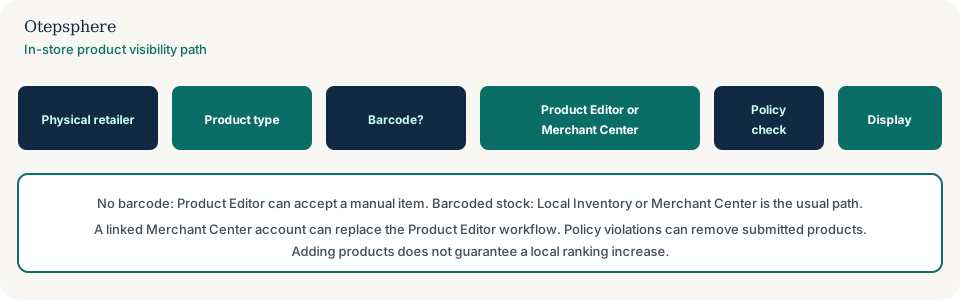
Product Visibility Checklist
- Confirm the business is a local store selling physical goods, not a service or restaurant using the wrong editor.
- Note whether Edit products opens Product Editor or Merchant Center.
- If Merchant Center is linked, request access rather than creating a second catalog.
- Use Product Editor for items without barcodes; use Local Inventory / POS for barcoded stock.
- Check Needs attention for disapprovals, missing inventory and store-code mismatches.
- Match store codes to the linked Business Profile, including case.
- Keep website titles, prices and availability consistent with the submitted product.
- Do not treat products as a ranking tactic or republish items that already failed policy.
What not to assume
Do not assume every retailer in every country gets Local Inventory. Do not assume Product Editor will survive a Merchant Center link. Do not assume a missing SKU is a suspension of the whole Business Profile. Do not assume more products produce more Map Pack rankings.
What not to do
Practical action plan
- Open the public listing and note whether products appear for customers.
- In the editor, record which product tool you actually have.
- If Merchant Center is in play, work from Needs attention and inventory data, not a new manual list.
- Correct store codes, GTINs and policy issues, then wait for Google’s documented refresh window.
- Align the website product pages with what is sold in that store.
When professional help makes sense
Help is useful when a chain mixed Product Editor items with a POS feed, when store codes do not match locations, or when Merchant Center access sits with a former agency. It cannot guarantee Google will show a product or improve local rankings.
Sources and further reading
- Google Business Profile Help: About product editor
- Google Business Profile Help: Showcase in-store products
- Google Merchant Center Help: Shopping ads policies
- Google Merchant Center Help: Product visibility and status
Products disappeared or aren't appearing on your Business Profile?
Otepsphere can review the Business Profile, product-management setup and website relationship to help identify where the product information is breaking down.
Contact OtepspherePublished by Otepsphere
Published by Otepsphere, founded by Joseph Enmanuel. Learn about Otepsphere and its approach to local SEO.